



Community Article
Community articles are authored by SitePoint Premium contributors. Content is screened before publication, and SitePoint reserves the right to moderate or remove articles that violate our guidelines. Views expressed are those of the authors and do not necessarily reflect those of SitePoint.
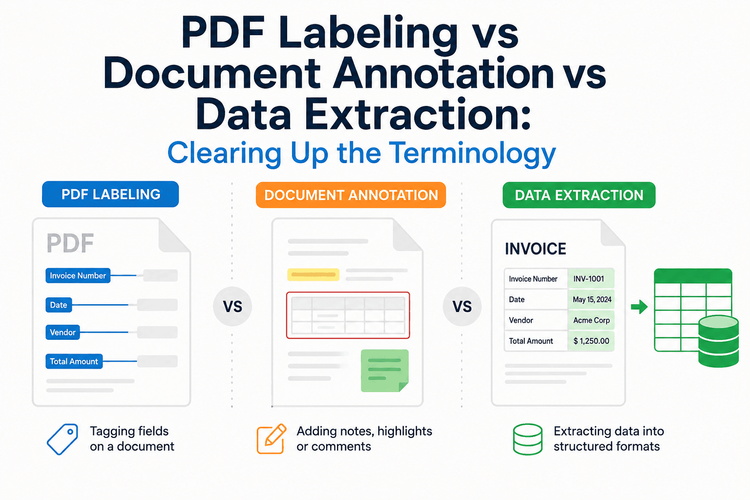
PDF Labeling vs Document Annotation vs Data Extraction: Clearing Up the Terminology
BABilal AhmadPublished inAI·
July 30, 2026
SitePoint Premium
Stay Relevant and Grow Your Career in Tech
- Premium Results
- Publish articles on SitePoint
- Daily curated jobs
- Learning Paths
- Discounts to dev tools
7 Day Free Trial. Cancel Anytime.
Anyone working on a document AI pipeline in 2026 has probably watched a meeting stall over vocabulary. One person calls it “labeling.” Another calls it “annotation.” A third insists it’s really an “extraction” problem. Vendors use all three interchangeably, research papers use them precisely but inconsistently across subfields, and job postings mix them freely.
The problem isn’t just semantic. These three terms describe genuinely different technical operations with different inputs, different outputs, and different points of failure. Confusing them leads to teams buying the wrong tools, scoping projects incorrectly, and — most costly — training models on data that doesn’t match the task they’re eventually deployed for.
This article draws the technical lines between the three, with concrete examples of what each produces, where they overlap, and how to know which one your project actually needs.
Why the Terminology Got Tangled
The confusion is partly historical. Document annotation, as a term, predates the current wave of document AI by decades — it originally described human-added metadata on scholarly texts (footnotes, marginalia, bibliographic tags). When machine learning teams began labeling documents for training data in the 2010s, they inherited the word, applying it to a very different kind of markup: bounding boxes, entity tags, and layout regions used as supervised training signal.
PDF labeling emerged later as a narrower term, mostly from the practical reality that PDFs are their own class of problem — mixed layouts, embedded images, scanned pages, form fields, and no reliable structural markup like HTML provides. Teams working specifically with PDFs needed vocabulary that reflected the format’s quirks.
Data extraction is the oldest and broadest of the three, borrowed directly from information retrieval and ETL pipelines, and applied to documents as an output-focused description: whatever the process, the goal is a structured dataset at the end.
None of these terms are wrong. They just describe different phases of, and different intents behind, working with document content.
Defining Each Term Precisely
Document Annotation
Document annotation is the process of adding structured metadata to raw document content — usually as supervised training data for a machine learning model. The input is a document (in any format), and the output is the same document plus a set of annotations that describe its content, structure, or meaning.
Concretely, annotations include:
- Bounding boxes around visual regions (headers, paragraphs, tables, figures)
- Entity tags on spans of text (person names, dates, monetary amounts)
- Classification labels on whole documents or sections (contract type, sentiment, priority)
- Relationship tags connecting entities (this signature belongs to this party, this line item belongs to this invoice)
- Reading-order markers on multi-column layouts
The defining characteristic is that annotation preserves the original document. The annotations are added to theage of a contract might look like:
{
  "document_id": "contract_2026_0042",
  "page": 3,
  "annotations": [
    {
      "type": "entity",
      "label": "party_name",
      "text": "Acme Industries, LLC",
      "bbox": [102, 218, 340, 236],
      "confidence": 0.94
    },
    {
      "type": "entity",
      "label": "effective_date",
      "text": "January 15, 2026",
      "bbox": [102, 260, 260, 278],
      "confidence": 0.98
    }
  ]
}
Annotation is what feeds supervised training. If a team says they need annotators, they almost always mean people (or systems) producing training data of this kind.
PDF Labeling
PDF labeling is a narrower subset of document annotation, specifically applied to PDF documents and typically focused on structural and layout labels rather than semantic entity tags.
Where general document annotation might tag a name as a “party_name” (a semantic label), PDF labeling more often tags a region as a “table,” “figure caption,” “footer,” or “column-1-body-text” (a structural label). The distinction matters because PDFs, unlike HTML or Markdown, carry no reliable structural markup — a heading in a PDF is just visually larger text, not a <h1> tag. PDF labeling exists to reconstruct that missing structural layer.
- Layout regions: header, body, footer, sidebar, table, figure, caption
- Reading order: which region follows which in logical reading sequence
- Table structure: row boundaries, column boundaries, header cells, merged cells
- Form fields: input regions, labels, field types
- Content hierarchy: section, subsection, paragraph, list
PDF labeling is the layer that has to exist before higher-level annotation or extraction can work well. If a labeling step incorrectly identifies a caption as body text, every downstream entity extraction inherits that error. This is why layout errors in the labeling stage tend to cascade through the rest of a document AI pipeline — an issue that has been well documented in recent document parsing research.
Because PDF labeling is such a specific technical need, a distinct category of tooling has emerged around it, separate from general-purpose annotation platforms. The shared premise across these tools is that treating PDF structure as its own labeling problem — separate from semantic annotation — produces more reliable downstream models.
Data Extraction
Data extraction is the process of pulling structured data out of a document into a separate, standalone dataset. Where annotation preserves the— a database row, a JSON record, a CSV row — that can be used independently of the original document
The input is a document; the output is structured data, typically matching a predefined schema. For an invoice, extraction output might look like:
{
  "invoice_number": "INV-2026-4471",
  "issue_date": "2026-03-14",
  "vendor": {
    "name": "Acme Industries, LLC",
    "tax_id": "12-3456789"
  },
  "line_items": [
    { "description": "Consulting services", "quantity": 40, "rate": 175.00, "total": 7000.00 },
    { "description": "Travel reimbursement", "quantity": 1, "rate": 842.50, "total": 842.50 }
  ],
  "subtotal": 7842.50,
  "tax": 627.40,
  "total": 8469.90
}
Extraction is output-first. It doesn’t care whether the underlying process used bounding boxes, layout labels, OCR, or a large language model — it cares that the resulting structured data is accurate and matches the schema.
In practice, most extraction pipelines internally perform annotation and labeling as intermediate steps. But the terminology reflects intent: an extraction project is measured by the quality of its structured output, not by the quality of the annotations that produced it.
Where They Overlap and Where They Diverge
The three terms describe operations that often occur in the same pipeline but at different levels:
| Aspect | Document Annotation | PDF Labeling | Data Extraction |
|---|---|---|---|
| Primary input | Any document | PDF specifically | Any document |
| Primary output | Original + metadata | Structural labels | Standalone structured data |
| Preserves source? | Yes | Yes | No (produces separate artifact) |
| Typical unit of work | Entity, span, or region | Layout region | Field, record |
| Measured by | Label accuracy vs ground truth | Structural accuracy | Extraction accuracy vs schema |
| Common consumer | ML training pipeline | Downstream annotation or extraction | Business systems, databases |
| Typical tooling | Annotation platforms | Specialized PDF tools | RPA, OCR + schema mapping, LLMs |
A useful way to think about it: PDF labeling produces the structure, document annotation adds meaning to that structure, and data extraction produces output usable elsewhere. In a well-designed pipeline, they run in that order.
The Same PDF, Three Different Operations
To make the distinction concrete, consider a two-page vendor invoice PDF passing through each operation.
PDF labeling would produce a set of structural labels: page 1 has a header region, a vendor information block, a “bill to” block, an invoice metadata block (invoice number, date, terms), a line-items table (with column headers and 12 rows), and a totals block. Page 2 has continuation of the line items table and a footer. The output is a description of where things are on the pages.
Document annotation would layer semantic tags on top: the header region contains a company name entity and a logo; the vendor block contains a business name, address, tax ID, and contact email; the invoice metadata block contains an invoice number, issue date, due date, and payment terms; the table contains line items with quantity, description, unit price, and line total entities. The output describes what each thing means.
Data extraction would produce the structured record shown earlier — invoice number, dates, vendor details, line items, totals — mapped to a predefined schema and ready to insert into an accounts payable database. The output is a usable data record, and the original PDF is no longer required to consume it.
The same PDF, three different operations, three different outputs, three different definitions of “done.”
Why Getting This Right Matters Technically
The terminology matters because it determines what “correct” means for a given project.
If you’re training a document layout model, you need annotation data with accurate bounding boxes and consistent structural labels. Extraction accuracy is irrelevant — the model’s output is the annotation.
If you’re building a document AI product for end users, you almost certainly need extraction output, but you may need labeling and annotation as internal steps to reach it. Measuring the wrong layer produces misleading benchmarks: an annotation model can have 95% region-labeling accuracy while producing extraction output that’s 60% accurate at the field level, because a small number of critical layout errors cascade into missing or incorrect extracted fields.
If you’re fine-tuning a language model on document data, you need annotation output structured as training pairs. Many teams accidentally use extraction output for this and end up with training data that has lost the structural context the model needs to generalize.
If you’re integrating documents into a retrieval-augmented generation pipeline, extraction into structured chunks (rather than annotation of is usually the right target — a distinction that shows up clearly in workflows like local RAG setups for private document AI, where the practical output is embeddable text chunks rather than annotated regions
Where Automated Tooling Fits Into Each Layer
All three operations have moved substantially toward automation in the last two years, but the automation profile is different for each.
Automated annotation typically means using a pre-trained model to produce a first-pass label set, which humans then review and correct. This is the dominant workflow for building high-quality training data at scale. A recent SitePoint walkthrough on building JSON training datasets from PDFs without manual annotation shows how this pattern is applied for LLM fine-tuning specifically.
Automated PDF labeling relies on layout-analysis models (LayoutLM, LayoutLMv3, DocFormer, and similar architectures) trained on labeled layout data. Automation quality here depends heavily on how similar the target documents are to the model’s training distribution.
Automated extraction commonly uses either (a) template-based extraction for highly consistent document types, (b) trained field-extraction models, or (c) large language models given the raw document (or its OCR text) and a target schema. LLMs have made significant inroads here because they handle format variability better than template-based approaches — though at the cost of higher inference expense and occasional schema-violation errors that still need validation logic.
For any of these three automation approaches, the underlying document content still has to be readable, which is where techniques from natural language processing in Python — tokenization, normalization, and cleaning — remain foundational preprocessing steps regardless of which layer you’re operating at.
A Practical Framework for Choosing the Right Term
If you’re specifying a project or evaluating vendors, ask three questions:
- What’s the output artifact? If it’s the source document plus metadata, you’re doing annotation. If it’s structural markup of a PDF specifically, you’re doing PDF labeling. If it’s a standalone structured record, you’re doing extraction.
- Who consumes the output? Training pipelines consume annotations. Downstream ML models consume labels. Business systems consume extractions.
- How is success measured? By label quality against ground truth (annotation), by structural fidelity to the source PDF (labeling), or by field-level correctness against a schema (extraction).
Getting these questions answered explicitly before scoping tools or pipelines eliminates most of the vocabulary confusion — and, more importantly, prevents building a system that solves the wrong problem accurately.
For teams working specifically at the PDF labeling layer, technical documentation on structural labeling workflows for PDF corpora covers the practical implementation details that separate this preprocessing step from downstream annotation and extraction stages.
Conclusion
PDF labeling, document annotation, and data extraction are not interchangeable synonyms for “doing something with documents.” They describe three distinct technical operations with different inputs, different outputs, and different success criteria. A robust document AI pipeline usually involves all three, arranged in that order — but treating them as one blurry activity is how teams end up with mismatched tooling, misleading metrics, and models trained on data that doesn’t match the problem being solved.
The clearer these boundaries stay in a project’s vocabulary, the easier it becomes to reason about where errors are occurring, which layer needs more accuracy, and what the next investment should improve. In a field where errors at any layer cascade into every layer after it, that clarity is not just an editorial preference — it’s a practical one.
</h1><div class=”inline-content”></div>
BA
Bilal Ahmad
