



Community Article
Community articles are authored by SitePoint Premium contributors. Content is screened before publication, and SitePoint reserves the right to moderate or remove articles that violate our guidelines. Views expressed are those of the authors and do not necessarily reflect those of SitePoint.
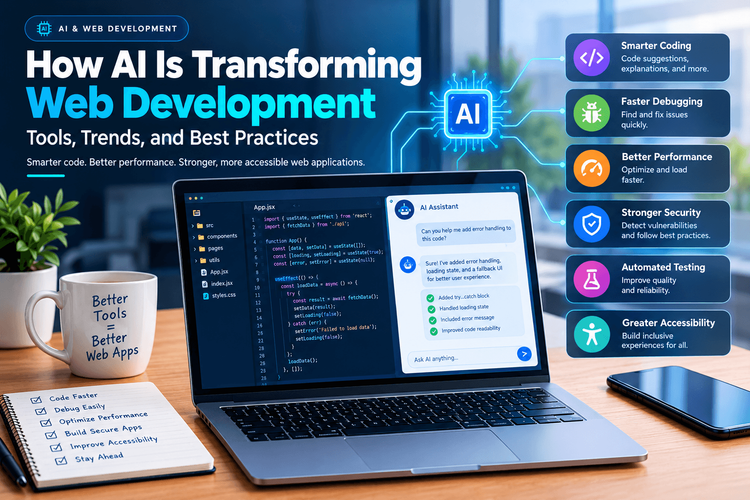
How AI Is Transforming Web Development: Tools, Trends, and Best Practices
BUBusinessnewsbreak USAPublished inWeb·App Development·
October 10, 2026
·Updated:October 10, 2026
The AI briefing for Developers
Stay up to date with AI tools, model releases, and developer workflows that matter.
Weekly. Free. One click to leave.
SitePoint Premium
Stay Relevant and Grow Your Career in Tech
- Premium Results
- Publish articles on SitePoint
- Daily curated jobs
- Learning Paths
- Discounts to dev tools
7 Day Free Trial. Cancel Anytime.
Artificial intelligence is changing the way developers build, test, and maintain modern web applications. Tasks that once required hours of manual coding can now be completed more efficiently with AI-powered tools. From generating code suggestions to identifying bugs and improving website accessibility, AI is becoming an important part of the web development process.
However, successful AI adoption involves more than simply generating code. Developers must understand how these tools work, verify their output, protect sensitive information, and ensure that applications meet real user needs.
Understanding the relationship between AI and web development can help businesses and developers make better technical decisions while building more reliable digital products.
1. AI-Powered Coding Is Changing Developer Workflows
Traditional web development involves writing code, searching documentation, debugging errors, and repeatedly testing different solutions. AI coding assistants can support these activities by suggesting code, explaining unfamiliar functions, and helping developers explore alternative implementations.
For example, a developer creating a contact form might ask an AI assistant to generate a basic HTML structure with client-side validation. Instead of writing every element manually, the developer can review the suggested implementation and adapt it to the project’s requirements.
Consider this simple JavaScript example:
functionvalidateEmail(email){const emailPattern =/^[^s@]+@[^s@]+.[^s@]+$/;return emailPattern.test(email);}const email ="developer@example.com";if(validateEmail(email)){console.log("Email format is valid.");}else{console.log("Please enter a valid email address.");}An AI coding assistant could explain how this function works, suggest test cases, or help integrate it into a form.
However, this validation checks only the email’s general format. It does not establish whether the address exists or belongs to the user. Applications must perform appropriate server-side validation as well.
The most effective approach is to treat AI-generated code as a starting point rather than a finished solution. Developers remain responsible for correctness, security, performance, and maintainability.
2. Faster Debugging and Error Detection
Debugging is one of the most time-consuming parts of software development. A small mistake in a function, API request, or component can create problems across an entire application.
AI tools can help developers understand error messages, identify suspicious code patterns, and suggest possible fixes. They can also explain stack traces in simpler language, making unfamiliar errors easier to investigate.
For example, consider the following code:
functioncalculateTotal(items){return items.reduce((total, item)=> total + item.price,0);}This function assumes that items is an array and that every item contains a usable price value. If the API returns null instead of an array, the function will fail.
A safer implementation could include explicit input checks:
functioncalculateTotal(items){if(!Array.isArray(items)){thrownewTypeError("Expected an array of items.");}return items.reduce((total, item)=>{if(typeof item.price!=="number"||!Number.isFinite(item.price)){thrownewTypeError("Each item needs a valid price.");}return total + item.price;},0);}AI can help identify these assumptions, but developers should still test edge cases and determine how errors should be handled by the surrounding application.
Automated suggestions are particularly useful when combined with unit tests, code reviews, and established debugging practices.
3. Improving Website Performance
Website performance affects usability, engagement, and the overall quality of a digital product. Slow pages can frustrate visitors, particularly when they access applications through mobile devices or unreliable network connections.
AI-assisted development tools can help identify performance bottlenecks and suggest improvements to JavaScript, CSS, database queries, and component rendering.
Potential improvements include:
Reducing unnecessary JavaScript execution.
Identifying repeated or expensive computations.
Optimizing image delivery and asset loading.
Detecting unnecessary component re-renders.
Suggesting caching strategies for suitable data.
Reviewing large dependencies that increase bundle size.
Nevertheless, AI recommendations should be supported by actual measurements. Tools such as browser developer tools, Lighthouse, and real-user monitoring can help developers understand whether a proposed change improves performance.
For instance, reducing the size of a JavaScript bundle may improve loading speed, but the result depends on network conditions, caching, device capabilities, and how the application loads its re
The best performance strategy combines automated assistance with profiling and real-world testing.
4. AI and Modern Frontend Frameworks
Frontend frameworks such as React, Vue, and Angular help developers create interactive user interfaces. AI coding assistants can support work within these frameworks by generating component structures, explaining state management, and helping developers understand unfamiliar APIs.
Imagine building a dashboard that displays customer orders. An AI assistant might suggest a reusable table component, loading indicators, and an empty state for situations in which no orders are available.
A basic React component might look like this:
functionOrderStatus({ status }){if(status ==="loading"){return<p>Loading orders...</p>;}if(status ==="error"){return<p>Unable to load orders. Please try again.</p>;}return<p>Your orders are ready to view.</p>;}This component illustrates how an interface can display different messages according to its current state.
In a production application, developers would also need to implement the underlying data-fetching logic, handle unexpected states, and provide accessible notifications where appropriate.
AI can accelerate component development, but a polished interface still requires thoughtful design, consistent behavior, accessibility testing, and a clear understanding of the framework.
5. Strengthening Web Application Security
Security is one area where developers must be especially careful when using AI-generated code.
AI assistants can help identify common vulnerabilities and explain secure coding practices. However, generated code may contain unsafe assumptions, outdated recommendations, or incomplete security controls.
Developers should pay particular attention to input validation, authentication, authorization, session management, dependency security, and the handling of sensitive information.
For example, applications should not rely exclusively on frontend checks to decide whether a user can access protected information. A user can modify browser-side code or send requests directly to an API.
Authorization must therefore be enforced on the server for every protected operation.
Developers should also avoid placing API secrets, private credentials, or sensitive customer information into AI tools unless the organization’s policies and the tool’s approved data-handling arrangements permit it.
Security reviews, automated scanning, dependency audits, and human code reviews remain essential, even when AI tools are involved in development.
6. Automated Testing and Quality Assurance
Testing helps ensure that a web application behaves as expected under different conditions. AI-assisted tools can help generate test ideas, create initial test cases, and identify missing scenarios.
For example, an AI assistant reviewing a shopping cart might recommend tests for adding products, removing items, calculating totals, handling unavailable inventory, and responding to failed payment requests.
A simple unit test could look like this:
functionadd(a, b){return a + b;}console.assert(add(2,3)===5);console.assert(add(-1,1)===0);console.assert(add(0,0)===0);These checks illustrate the basic idea of testing expected outcomes. Larger applications should use an appropriate testing framework and include assertions that produce clear, actionable failures.
AI-generated tests are not automatically comprehensive. They may repeat existing assumptions, overlook important edge cases, or verify implementation details instead of meaningful behavior.
Developers should review test coverage, confirm that assertions reflect actual requirements, and run tests within the project’s normal development and deployment workflows.
7. Making Web Development More Accessible
Accessibility ensures that websites can be used by people with different abilities, including visitors who rely on screen readers, keyboard navigation, or other assistive technologies.
AI tools can help identify missing image descriptions, suggest clearer interface wording, and review HTML structures for potential accessibility issues.
For example, a developer might ask an AI assistant to review a navigation menu for keyboard usability or identify form fields that lack meaningful labels.
However, automated tools cannot reliably identify every accessibility problem. A page can pass many automated checks and still provide a confusing experience for someone using a screen reader.
Developers should combine automated accessibility testing with manual keyboard checks, semantic HTML, appropriate focus management, and testing with assistive technologies.
Accessibility should be considered during the initial design stage rather than treated as a final checklist before launch.
8. The Importance of Human Oversight
Although AI can make development faster, it does not remove the need for technical expertise.
Generated code may compile successfully while still containing logical errors, inefficient algorithms, security vulnerabilities, or architectural decisions that create maintenance problems later.
Developers should evaluate AI-generated solutions against several important criteria:
Correctness: Does the code meet the stated requirements and handle relevant edge cases?
Security: Could the implementation expose sensitive information or allow unauthorized actions?
Performance: Does the solution use re
Maintainability: Can other developers understand, test, and extend the code?
Compliance: Does the solution respect applicable licensing requirements, privacy obligations, and organizational policies?
A disciplined review process helps teams benefit from AI while reducing the risk of introducing defects into production applications.
9. Preparing for the Future of AI-Assisted Development
AI-powered development tools will continue to evolve, creating new opportunities for automation, personalized interfaces, intelligent testing, and faster software delivery.
Developers who understand both traditional engineering principles and modern AI capabilities will be better positioned to evaluate these opportunities.
Businesses should begin by identifying repetitive tasks that can benefit from assistance, establishing clear security policies, and measuring whether AI adoption produces meaningful improvements in delivery time or software quality.
Teams should also invest in foundational skills such as JavaScript, data structures, web security, testing, accessibility, and software architecture. These skills make it easier to recognize incorrect suggestions and adapt generated code to complex requirements.
Rather than replacing sound engineering practices, AI is most valuable when it strengthens them.
Conclusion
Artificial intelligence is transforming web development by helping developers write code, investigate bugs, improve performance, generate tests, and identify potential accessibility issues.
These capabilities can reduce repetitive work and help teams explore solutions more efficiently. However, they also introduce new responsibilities related to code verification, data privacy, security, and long-term maintainability.
The most successful development teams will use AI as a practical assistant while maintaining strong engineering standards and human oversight.
Ultimately, building better web applications requires more than producing code quickly. It requires creating secure, accessible, reliable, and useful experiences for the people who depend on them.
