


Close Menu
ToolTechBlogToolTechBlog

    Subscribe to Updates

    Get the latest creative news from FooBar about art, design and business.

    What's Hot

    OpenAI announces new discoveries in mathematics, computer science and physics

    October 27, 2026

    X is nudging users to promote their posts with a pointing hand, and people are confused

    October 27, 2026

    Browser Fingerprinting Explained: How Websites Identify You and How Developers Can Reduce It

    October 27, 2026
    Facebook X (Twitter) Instagram
    ToolTechBlogToolTechBlog
    • Home
    • AI Tools
    • Web Hosting
    • Tech
    • Digital Marketing
    • Business Software
    • VPN & Cybersecurity
    ToolTechBlogToolTechBlog
    Home»Tech»How to quickly check your Samsung Galaxy’s warranty info
    Tech

    How to quickly check your Samsung Galaxy’s warranty info

    Tool Tech TeamBy Tool Tech TeamOctober 10, 2026No Comments3 Mins Read
    Facebook Twitter Pinterest Telegram LinkedIn Tumblr WhatsApp Email
    How to quickly check your Samsung Galaxy's warranty info
    Share
    Facebook Twitter LinkedIn Pinterest Telegram Email

    Find out if your Galaxy is covered by its warranty or if you should look elsewhere for service.

    If something goes wrong with your Samsung Galaxy phone or tablet, you should first check whether it’s still under warranty. On newer devices running One UI 9, Samsung made that process easier by adding a dedicated warranty menu to the Settings app. But even if you’re on older software, there are still several ways to check your coverage.

    Through Settings in One UI 9

    If your Galaxy device is running One UI 9, the process is simple: head to Settings > Warranty and care. This menu includes warranty information, diagnostics, repair options and Samsung Care+ coverage and enrollment info.

    At the top, you’ll find your device’s warranty details, including its coverage type and expiration date. If you have other Galaxy devices linked to your Samsung account, you’ll find their info there, too.

    The menu also includes built-in diagnostics for hardware like the battery, charging system, screen, camera and sensors. If it flags a problem, you can jump to repair options in the same menu. There’s even an option to ask Bixby for troubleshooting help, in case a chatbot can actually address your problem.

    Use Samsung Members on older devices
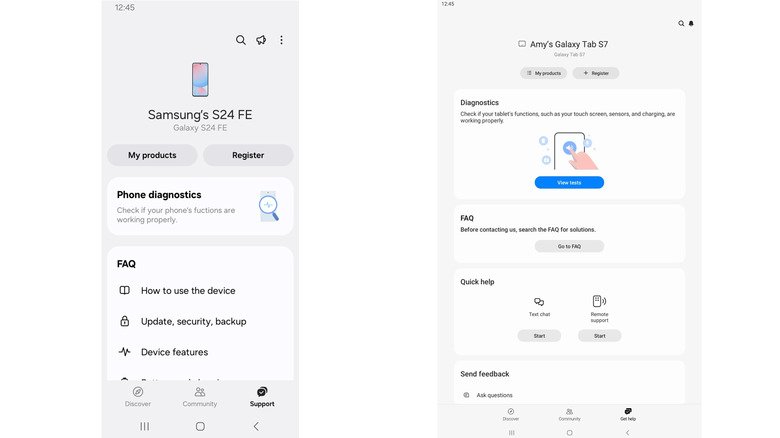
    Screenshots of a phone (left) and tablet (right) view of the Samsung Members app.

    If you aren’t yet on One UI 9 (or your device is too old to receive it), Samsung Members lets you register your device and access support. The app is usually pre-installed on Galaxy devices, but if it’s missing, you can also download it from the Galaxy Store or Google Play Store.

    To check your warranty status, open Samsung Members, sign in and tap Support in the bottom menu. (Older versions may show Get help instead.) From there, you can register your device (if it didn’t do so automatically during setup), check its status and access support tools. Depending on your device, app version and region, the app might also show product and warranty details. If not, there’s one more place to look.

    Use Samsung’s website for warranty checks

    Should all else fail, Samsung’s website is the best fallback. Open Samsung’s online devices portal and sign in to your Samsung account. If the device is already registered, you can check its warranty status under My Products. If it isn’t, you may need to enter its serial number or IMEI during registration. You can find those on your device under Settings > About phone (or About tablet).

    If Samsung shows the wrong expiration date, look for the Review Warranty (or “submit a warranty dispute”) option. With this, you can submit proof of purchase to make sure it has the right date.

    check Galaxys quickly Samsung your
    Share. Facebook Twitter Pinterest LinkedIn Tumblr Email
    Tool Tech Team
    • Website

    Related Posts

    OpenAI announces new discoveries in mathematics, computer science and physics

    October 27, 2026

    Apple adds more Siri AI tools in its 27.2 system updates, out today

    October 26, 2026

    Fitbit Air vs. Whoop: Which screenless fitness tracker is better for you?

    October 26, 2026

    The best apps for tracking your reading and discovering new books

    October 26, 2026

    What does the bell icon mean on your CarPlay screen?

    October 25, 2026

    Here’s what you need to know before buying a wireless CarPlay adapter

    October 25, 2026
    Leave A Reply Cancel Reply

    Top posts
    Tech

    OpenAI announces new discoveries in mathematics, computer science and physics

    By Tool Tech Team
    Business Software

    X is nudging users to promote their posts with a pointing hand, and people are confused

    By Tool Tech Team
    Web Hosting

    Browser Fingerprinting Explained: How Websites Identify You and How Developers Can Reduce It

    By Tool Tech Team
    Editors Picks

    OpenAI announces new discoveries in mathematics, computer science and physics

    October 27, 2026

    X is nudging users to promote their posts with a pointing hand, and people are confused

    October 27, 2026

    Browser Fingerprinting Explained: How Websites Identify You and How Developers Can Reduce It

    October 27, 2026

    How OpenAI turned its coding tools into dots, an always-on personal assistant

    October 27, 2026
    About Us

    Welcome to ToolTechBlog, your trusted source for the latest insights, reviews, and practical guides on AI tools, business software, cybersecurity, web hosting, and consumer technology.
    Our mission is simple: to help individuals, entrepreneurs, freelancers, students, and businesses discover the right digital tools to improve productivity, streamline workflows, and make informed technology decisions.

    Our Picks

    OpenAI announces new discoveries in mathematics, computer science and physics

    October 27, 2026

    X is nudging users to promote their posts with a pointing hand, and people are confused

    October 27, 2026

    Browser Fingerprinting Explained: How Websites Identify You and How Developers Can Reduce It

    October 27, 2026
    Top Reviews

    The AI Hype Index: Unsexy AI

    July 29, 2026

    What it is and How to Fix it

    July 29, 2026

    LG to Ban Residential Proxies from Smart TV Apps

    July 29, 2026

    © 2026 tooltechblog.com. All rights reserved. Designed by DD.

    • About Us
    • Contact Us
    • Terms and Conditions
    • Privacy Policy
    • Disclaimer

    Type above and press Enter to search. Press Esc to cancel.