



Community Article
Community articles are authored by SitePoint Premium contributors. Content is screened before publication, and SitePoint reserves the right to moderate or remove articles that violate our guidelines. Views expressed are those of the authors and do not necessarily reflect those of SitePoint.
What to Check Before Adding a Tripo Model to a Website
DJDiv JohnPublished inWeb·Developer Tools·
November 19, 2026
·Updated:November 20, 2026
The AI briefing for Developers
Stay up to date with AI tools, model releases, and developer workflows that matter.
Weekly. Free. One click to leave.
SitePoint Premium
Stay Relevant and Grow Your Career in Tech
- Premium Results
- Publish articles on SitePoint
- Daily curated jobs
- Learning Paths
- Discounts to dev tools
7 Day Free Trial. Cancel Anytime.
A 3D model can look convincing in a still image and still be awkward on a website. The real questions appear when someone rotates it, loads it on a typical connection, or views it on a narrow phone screen. AI generators have made the first draft of a model cheap, which shifts the work toward the part developers and designers already know: budgets, testing and fallbacks.
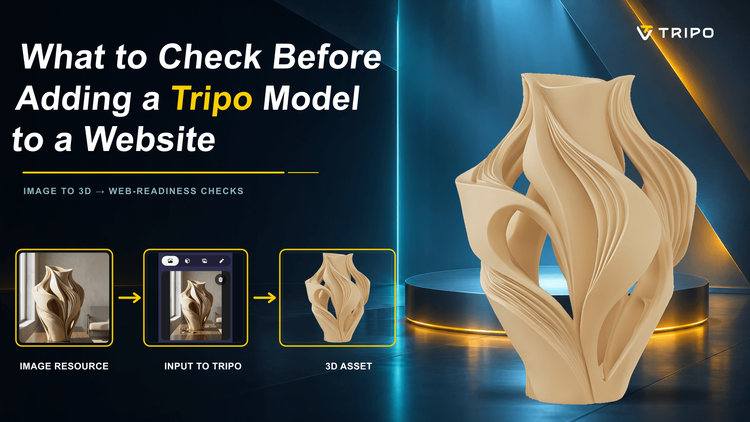
This article walks through a web-readiness review for an AI-generated model, using an openwork ceramic vessel generated from a single reference image with Tripo as the worked example. The checks apply equally to output from other generators. It includes a small Node.js script that audits a GLB file against a size budget, and the markup for a lightweight viewer with a static fallback. The model shown is one candidate, so it cannot prove browser speed, mobile behavior, hidden geometry or export compatibility. Those are checks to run on your own asset.
Key Takeaways
- Generation is the start of the work. A model that looks right from the front can still be heavy, broken at the back or hard to use on a phone.
- Set a budget first. Decide target file size, triangle count and texture size before you pick or tune an asset.
- Automate the audit. A short script can fail a build when a GLB exceeds the budget.
- Inspect hidden angles. Check the rear, underside and openings, because the source image cannot show them.
- Test the experience, not just the file. Keyboard access, touch, slow connections and a static fallback matter as much as the mesh.
The Bottleneck Has Moved
Traditional 3D work involves modeling, polygon layout, materials, scale and export. AI generation can shorten the blank-workspace stage. A beginner may discover the category through a search such as AI 3D model generator free, but an initial candidate is useful only if it survives review.
For this vessel, start with the negative space, meaning the openings between the ribs. A flattering front view can hide a blocked cavity, a thin wall, or two surfaces passing through each other. Generation moves the bottleneck from making a first shape to deciding whether that shape is usable.
What an Image-to-3D Tool Contributes, and What It Cannot Decide
Image-to-3D tools use a visual reference to create a model candidate, while text-to-3D routes start from a written prompt. Tripo offers both, and other hosted options include Meshy, Rodin by Hyper3D and 3D AI Studio, all of which list GLB among their export formats, while open-source models such as TripoSR and Stable Fast 3D let you run generation yourself. Features, pricing, licensing and output quality differ and change often, so check each vendor’s current documentation. The image route suits this example because the folds, uneven rim and openings already exist in the source.
Whichever tool you use, it can provide a candidate for inspection. It cannot decide whether the, or whether the exported asset suits a particular viewer. Those judgments belong to the person publishing the page
Put the Candidate Through Five Web-Readiness Gates
Gate 1: Define the Page Job Before the Asset
Give the object one job. In a portfolio, this vessel might show how its shell and openings relate. That is narrower than calling it printable, manufacturable or dimensionally accurate. Note what must remain recognizable, and provide a still image if the interactive view fails.
Gate 2: Audit the Reference
Use an image you own or have permission to reuse. Busy backgrounds can distract an image-based workflow, so isolate the object when possible. One photograph also leaves the back and underside unknown. Treat those areas as review risks, not as details confirmed by the source.
Gate 3: Generate and Inspect Beyond the Hero Angle
After generation, rotate beyond the familiar front. Check the rear, top, underside and sides. Trace each large opening. Look for merged ribs, intersecting surfaces or an unstable base. A wireframe view, when available, can expose crowded geometry. A single front-facing candidate cannot answer these hidden-angle questions, so check them on your own model.
Gate 4: Check the Delivery Package
Record the download size, polygon count and texture dimensions. Polygons are the small flat faces that form the shape, and web viewers draw them as triangles. This matters because generator defaults are often tuned for quality, not for the web. In the generation screenshot for this vessel, the viewer reports roughly 1.95 million faces and the settings show 4K texture quality. That is a fine starting point for inspection but a heavy asset for a phone on a mobile connection. Curved ribs may need many triangles, but the count should still fit your page budget.
glTF is the open format most web viewers expect, and GLB is its single-file form that can bundle geometry, textures and materials. The format does not guarantee good performance, so measure the package. The script below reads a GLB with the open-s, and compares them with a budget. The budget values are placeholders; set your own from your target devices
import{NodeIO}from'@gltf-transform/core';import{ statSync }from'node:fs';constBUDGET={maxBytes:3*1024*1024,maxTriangles:150_000,maxTextureSize:2048};exportasyncfunctionaudit(path, budget =BUDGET){const doc =awaitnewNodeIO().read(path);let triangles =0;for(const mesh of doc.getRoot().listMeshes()){for(const prim of mesh.listPrimitives()){const idx = prim.getIndices();const count = idx ? idx.getCount(): prim.getAttribute('POSITION').getCount();triangles += prim.getMode()===4? count /3:0;}}const textures = doc.getRoot().listTextures().map((t)=>{const[w, h]= t.getSize()??[0,0];return{name: t.getName()|| t.getURI()||'texture', w, h };});const bytes =statSync(path).size;const problems =[];if(bytes > budget.maxBytes) problems.push('file is '+(bytes /1048576).toFixed(1)+' MB');if(triangles > budget.maxTriangles) problems.push(triangles +' triangles');for(const t of textures){if(Math.max(t.w, t.h)> budget.maxTextureSize) problems.push(t.name+' is '+ t.w+'x'+ t.h);}return{ bytes, triangles, textures,ok: problems.length===0, problems };}if(process.argv[2]){const r =awaitaudit(process.argv[2]);console.log(r.ok?'PASS':'FAIL', r);process.exitCode= r.ok?0:1;}Run it with node audit.mjs model.glb after installing @gltf-transform/core. It exits with a non-zero status when the asset is over budget, so you can run it in CI. A short test builds two GLBs with known triangle counts, one small and one with 200,000 triangles, and checks that the first passes and the second fails with the right message:
import{Document,NodeIO}from'@gltf-transform/core';import{ audit }from'./audit.mjs';importassertfrom'node:assert/strict';asyncfunctionmakeGlb(path, quads){const doc =newDocument();const buf = doc.createBuffer();const pos =[], idx =[];for(let i =0; i < quads; i++){const o = i *4;pos.push(i,0,0, i +1,0,0, i +1,1,0, i,1,0);idx.push(o, o +1, o +2, o, o +2, o +3);}const position = doc.createAccessor().setType('VEC3').setArray(newFloat32Array(pos)).setBuffer(buf);const indices = doc.createAccessor().setType('SCALAR').setArray(newUint32Array(idx)).setBuffer(buf);const prim = doc.createPrimitive().setAttribute('POSITION', position).setIndices(indices);const mesh = doc.createMesh('m').addPrimitive(prim);const node = doc.createNode('n').setMesh(mesh);doc.createScene('s').addChild(node);awaitnewNodeIO().write(path, doc);}awaitmakeGlb('small.glb',100);awaitmakeGlb('big.glb',100_000);const small =awaitaudit('small.glb');assert.equal(small.triangles,200);assert.equal(small.ok,true);const big =awaitaudit('big.glb');assert.equal(big.triangles,200_000);assert.equal(big.ok,false);assert.ok(big.problems.some((p)=> p.includes('200000 triangles')));console.log('audit tests passed',{small: small.bytes,big: big.bytes});When an asset fails, glTF Transform also has a command line. gltf-transform inspect model.glb reports what is inside a file, and gltf-transform optimize input.glb output.glb --compress draco --texture-compress webp applies geometry and texture compression. Compression and mesh simplification can introduce artifacts, especially around thin ribs and openings, so reopen the result and re-check the angles from Gate 3 instead of accepting a smaller file blindly. Also check that your viewer supports the compression you choose.
Gate 5: Test the Experience, Not Just the Model
Load the asset in the intended viewer at desktop and phone widths. Check framing, touch rotation, keyboard access, scrolling and a slower connection. The Google-backed model-viewer web component is one low-code option, and libraries such as three.js give you more control at the cost of more code. The markup below shows the pieces that matter for a first release: a poster image that loads first, lazy loading so the heavy file waits until needed, a text alternative, and visible controls.
<model-viewersrc="/models/vessel.glb"poster="/img/vessel-poster.webp"alt="Openwork ceramic vessel with folded ribs and several openings"loading="lazy"reveal="interaction"camera-controlstouch-action="pan-y"style="width: 100%; height: 420px;"></model-viewer>The alt text, a poster and touch-action="pan-y" (so a vertical swipe still scrolls the page on a phone) address the common failures. Check the current model-viewer documentation for attribute names and the recommended script include, since they can change between versions. Also consider the WCAG guidance on non-text content: provide a useful description, and offer instructions plus a static image for people who cannot operate the viewer.
A single front-facing candidate is enough to discuss the method, not to certify a finished web asset. Call it a prototype until the exported file passes the checks required by its actual destination.
Where This Pattern Is Useful
The same review pattern can be adapted to an architectural ornament, exhibition object, packaging concept or game prop, but each destination adds its own geometry, scale and delivery requirements. A portfolio may accept an inferred rear surface if that limitation is clear. A sales page, printable file or measured product needs stronger references and technical validation.
Limits of This Guidance
The audit script counts triangles, texture sizes and file size only. It does not detect self-intersections, thin walls, flipped normals or licensing problems, and passing it does not make an asset good. The budget numbers are illustrative, and real limits depend on your audience’s devices and connections. Tool features and terms change, so verify them with the vendor before you rely on them, and treat any speed or quality claims on vendor pages as the vendor’s own.
Keep a Human at the Release Gate
Inspect the angle you would normally crop out. Confirm input rights, measure the download, and test touch, keyboard and a slow connection. Reread the surrounding copy, because claims of fabrication accuracy or production readiness need supporting evidence. For this vessel, “exploratory web model” is an honest label, and more demanding claims require better references and a specialist review.
Decide what visitors should learn or do before adding a 3D viewer. A modest prototype with a useful fallback can beat a dramatic asset that loads slowly or hides limitations.
Frequently Asked Questions
Do I need to code to create a model with an AI generator? No code is required to generate an initial model candidate in Tripo or similar tools. Publishing it interactively is separate work and usually involves a viewer, hosting, responsive testing and enough HTML or JavaScript knowledge to diagnose problems.
When should I use image-to-3D instead of text-to-3D? Use image-to-3D when a rights-cleared visual should guide the form, and text-to-3D when the idea begins as words. Do not treat the two routes as interchangeable evidence.
Is a generated model ready to publish as soon as it exports? No. Inspect the shape from several angles, measure the delivery package, test the intended viewer and prepare a fallback. Higher-stakes uses may also need specialist geometry, scale, material and rights review.
How can a beginner keep web 3D manageable? Give one object one clear job. Set a file-size target, test desktop and phone widths, keep interaction simple, and retain a still image for readers who cannot load or operate the viewer.
