


Close Menu
ToolTechBlogToolTechBlog

    Subscribe to Updates

    Get the latest creative news from FooBar about art, design and business.

    What's Hot

    An honest comparison for recruiting teams

    September 12, 2026

    OpenAI’s Sam Altman says it would be ‘ill-advised’ to go public in 2026

    September 12, 2026

    Is a 256GB SSD better than a 1TB hard drive? It depends how you’re using it

    September 12, 2026
    Facebook X (Twitter) Instagram
    ToolTechBlogToolTechBlog
    • Home
    • AI Tools
    • Web Hosting
    • Tech
    • Digital Marketing
    • Business Software
    • VPN & Cybersecurity
    ToolTechBlogToolTechBlog
    Home»Tech»What Is USB Tethering And How Do You Enable It For Mobile Hotspot?
    Tech

    What Is USB Tethering And How Do You Enable It For Mobile Hotspot?

    Tool Tech TeamBy Tool Tech TeamAugust 2, 2026No Comments3 Mins Read
    Facebook Twitter Pinterest Telegram LinkedIn Tumblr WhatsApp Email
    What Is USB Tethering And How Do You Enable It For Mobile Hotspot?
    Share
    Facebook Twitter LinkedIn Pinterest Telegram Email

    There are times when a physical connection works better. Here’s how to set it up.

    When you think of using a smartphone as a mobile hotspot, the wireless version is probably what comes to mind. But there’s also USB tethering, which lets you share your phone’s cellular connection with a computer over a cable. Here’s how it works, what it’s good for and how to set it up.

    Why USB tethering?

    For most people, a wireless hotspot is still the easiest way to get a laptop online when you’re away from regular Wi-Fi. It’s more flexible, supporting multiple simultaneous connections. And unlike the USB kind, you’re free to move your phone away from the computer.

    But there are some cases where USB tethering could make sense. A wired connection can be more stable, which is handy for crowded places like convention centers or airports. It also means you aren’t broadcasting a visible network in public. As a bonus, your phone might charge while it’s connected.

    How to set up USB tethering

    Screenshot by Will Shanklin (Samsung)

    Before we dive in, note that there’s one big catch: Android phones can’t tether Otherwise, USB tethering works with other phone-to-computer setups, including Android to Windows and iPhone to Mac or Windows

    If you’re tethering from an iPhone to Windows, you may need to install the Apple Devices app or iTunes for Windows from the Microsoft Store.

    1. Connect your phone to a Windows PC using a USB cable.
    2. On your phone, navigate to Settings > Network & internet > Hotspot & tethering. (On some devices, it’s under Settings > Connections > Hotspot & tethering.) You can also swipe down to open Quick Settings, then press and hold Hotspot to jump to the tethering menu.
    3. Toggle on USB tethering. If the option is grayed out, make sure you’re using a data-capable USB cable and not a charge-only one.
    1. Plug your iPhone into a computer using a USB cable.
    2. You may see authentication prompts. If your iPhone asks whether to trust the computer, tap Trust and enter your passcode. If you’re connecting to a Mac and see an “Allow accessory to connect” prompt on your computer, click Allow.
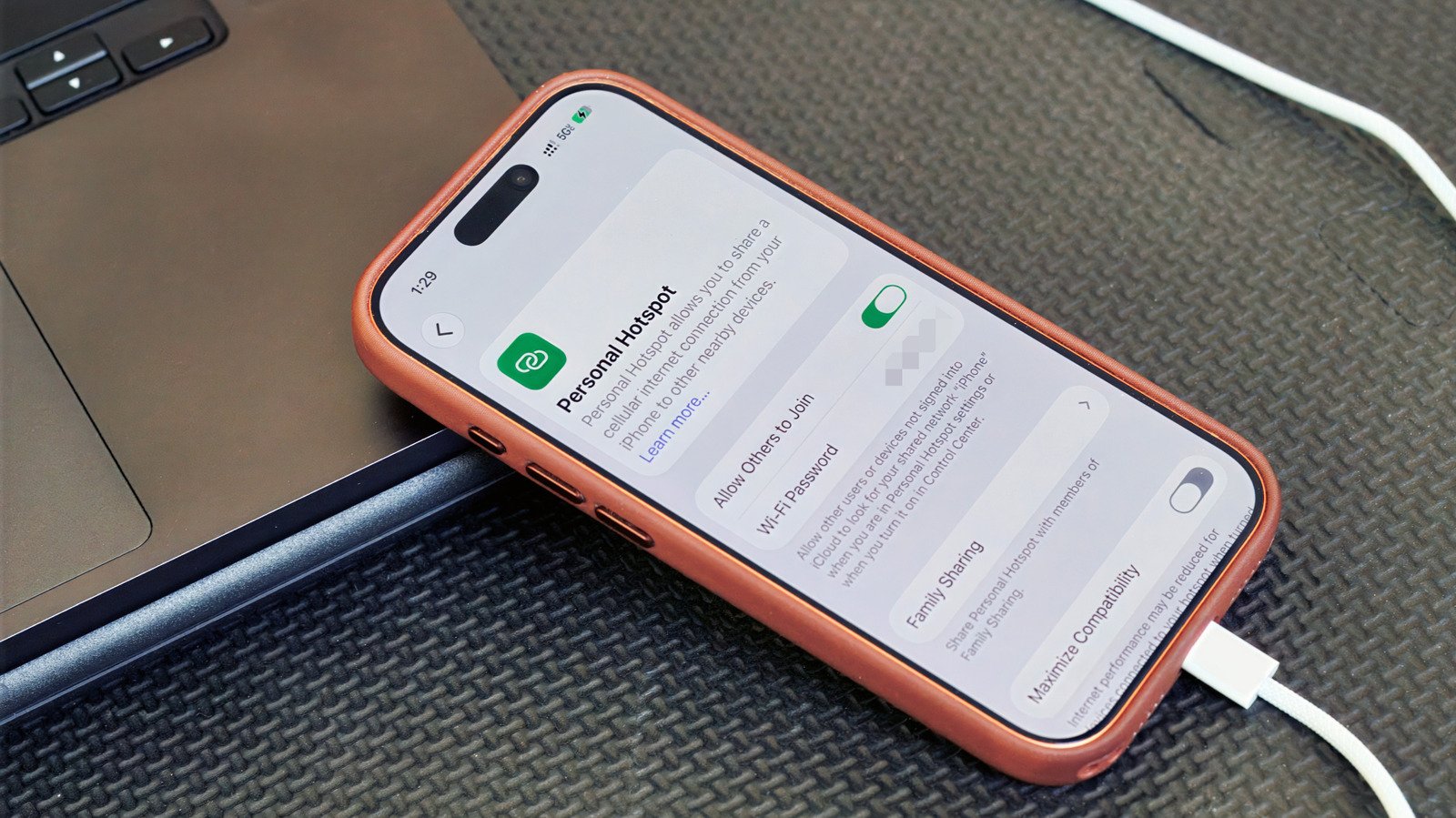
    3. On your iPhone, go to Settings > Personal Hotspot. (If you’ve never used a hotspot before, you may need to start under Settings > Cellular > Set up Personal Hotspot.)
    4. Turn on Allow Others to Join.

    A few things to keep in mind

    USB tethering usually makes more sense for one device than as a full hotspot replacement. So, for example, if you’re trying to get both your laptop and tablet online at the same time, a Wi-Fi hotspot is the solution.

    Keep in mind that laptops can burn through data with background tasks like updates and cloud syncing. Your carrier may also limit hotspot use, charge extra for it, count it against a separate data allowance or not support it at all. So it’s worth checking your plan before tethering over USB or Wi-Fi.

    And while a wired connection can be more stable than a wireless hotspot, it’s still relying on your phone’s cellular signal. Spotty service will still mean spotty internet, no matter how you connect.

    Enable Hotspot Mobile Tethering What
    Share. Facebook Twitter Pinterest LinkedIn Tumblr Email
    Tool Tech Team
    • Website

    Related Posts

    Is a 256GB SSD better than a 1TB hard drive? It depends how you’re using it

    September 12, 2026

    Moss developer Polyarc has closed

    September 12, 2026

    Bose QuietComfort Headphones (2nd gen) review: Upgraded in all the right places

    September 11, 2026

    iPhone 18 Pro Max vs Samsung Galaxy S26 Ultra: How these XL phones compete

    September 11, 2026

    Insta360 Luna Pro review: Your Instagram Reels are about to get an upgrade

    September 10, 2026

    What OpenAI’s latest controversy tells us about the future of math

    September 10, 2026
    Leave A Reply Cancel Reply

    Top posts
    Web Hosting

    An honest comparison for recruiting teams

    By Tool Tech Team
    AI Tools

    OpenAI’s Sam Altman says it would be ‘ill-advised’ to go public in 2026

    By Tool Tech Team
    Tech

    Is a 256GB SSD better than a 1TB hard drive? It depends how you’re using it

    By Tool Tech Team
    Editors Picks

    An honest comparison for recruiting teams

    September 12, 2026

    OpenAI’s Sam Altman says it would be ‘ill-advised’ to go public in 2026

    September 12, 2026

    Is a 256GB SSD better than a 1TB hard drive? It depends how you’re using it

    September 12, 2026

    Y Combinator’s Garry Tan wants US open-weight AI labs to ‘distill’ frontier models, too

    September 12, 2026
    About Us

    Welcome to ToolTechBlog, your trusted source for the latest insights, reviews, and practical guides on AI tools, business software, cybersecurity, web hosting, and consumer technology.
    Our mission is simple: to help individuals, entrepreneurs, freelancers, students, and businesses discover the right digital tools to improve productivity, streamline workflows, and make informed technology decisions.

    Our Picks

    An honest comparison for recruiting teams

    September 12, 2026

    OpenAI’s Sam Altman says it would be ‘ill-advised’ to go public in 2026

    September 12, 2026

    Is a 256GB SSD better than a 1TB hard drive? It depends how you’re using it

    September 12, 2026
    Top Reviews

    The AI Hype Index: Unsexy AI

    July 29, 2026

    What it is and How to Fix it

    July 29, 2026

    LG to Ban Residential Proxies from Smart TV Apps

    July 29, 2026

    © 2026 tooltechblog.com. All rights reserved. Designed by DD.

    • About Us
    • Contact Us
    • Terms and Conditions
    • Privacy Policy
    • Disclaimer

    Type above and press Enter to search. Press Esc to cancel.