



Close Menu
ToolTechBlogToolTechBlog

    Subscribe to Updates

    Get the latest creative news from FooBar about art, design and business.

    What's Hot

    OpenAI announces new discoveries in mathematics, computer science and physics

    October 27, 2026

    X is nudging users to promote their posts with a pointing hand, and people are confused

    October 27, 2026

    Browser Fingerprinting Explained: How Websites Identify You and How Developers Can Reduce It

    October 27, 2026
    Facebook X (Twitter) Instagram
    ToolTechBlogToolTechBlog
    • Home
    • AI Tools
    • Web Hosting
    • Tech
    • Digital Marketing
    • Business Software
    • VPN & Cybersecurity
    ToolTechBlogToolTechBlog
    Home»Tech»What is the difference between a dead pixel and a stuck pixel?
    Tech

    What is the difference between a dead pixel and a stuck pixel?

    Tool Tech TeamBy Tool Tech TeamSeptember 13, 2026No Comments3 Mins Read
    Facebook Twitter Pinterest Telegram LinkedIn Tumblr WhatsApp Email
    What is the difference between a dead pixel and a stuck pixel?
    Share
    Facebook Twitter LinkedIn Pinterest Telegram Email

    Look closely and you can tell them apart.

    Many electronics users have felt the wave of panic that comes with trying to wipe away a mark on their screen, only to realize it’s actually an issue with the screen itself. Sometimes, this can be caused by factors likeever, it’s a pixel problem, which can be much more dread-inducing due to varying levels of repairability

    Even the best monitors aren’t safe from a potential pixel issue, of which there are two main types: stuck pixels and dead pixels. Both are dots — or, even worse, clusters of dots — that no screen user wants to see. However, though both screen annoyances look a lot alike shape-wise, there are some distinct differences between them, namely in their exact appearance and if they can be fixed.

    Spotting the difference

    One of the biggest differences between a stuck and dead pixel is the presence of light. A stuck pixel is permanently on, displaying a constant blue, red, green or bright point, while a dead pixel is, as the name suggests, no longer functioning and is always black. This visual difference can help you determine which particular problem you’re facing.

    The other main defining factor between the two is how fixable they are. A stuck pixel has a myriad of troubleshooting routes that can be taken, and can often be returned to normal. A dead pixel, on the other hand, cannot be salvaged. If you’ve got a dead pixel, you’ll unfortunately either have to get a replacement or learn to tolerate it. On the bright side, it’s a generally less obtrusive visual issue than something like screen burn-in.

    How to test for dead and stuck pixels
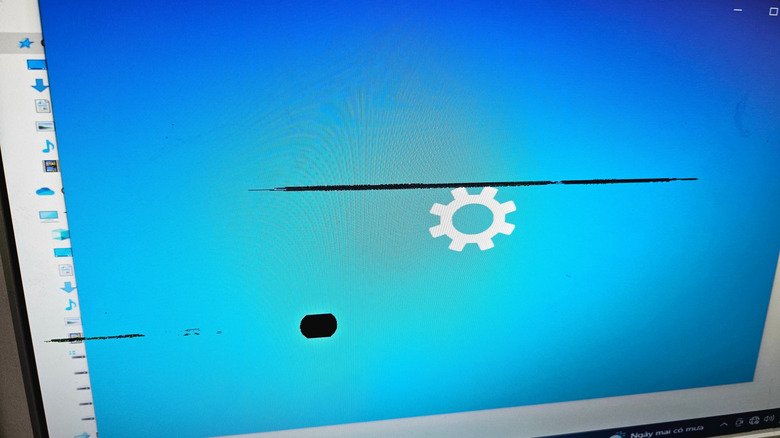
    A computer screen with many clusters of dead pixels

    Stuck and dead pixels are so small it can sometimes be tricky to identify if they’re even the issue at hand, and, if they are, which instance in particular you’re dealing with. First, it’s best to rule out all other display issues that could be going on. Clean your display thoroughly, see if the problem persists across different applications and, if you can, try both a new cable and input device.

    Once you’ve ruled out other problems, conduct a final test designed to concretely pinpoint the issue. There are several sites and apps that can be used to sniff out pixel problems, like Dead Pixel Buddy, and even some that purport the potential to solve the issue as well, like JScreenFix or Dead Pixels Test and Fix. It should be noted that stuck pixels can sometimes be harder to diagnose, as those with power or heat problems as the underlying cause may only appear intermittently. If that’s the case, try to pull up one of these tests as soon as you notice the issue’s returned.

    between dead difference Pixel What
    Share. Facebook Twitter Pinterest LinkedIn Tumblr Email
    Tool Tech Team
    • Website

    Related Posts

    OpenAI announces new discoveries in mathematics, computer science and physics

    October 27, 2026

    Apple adds more Siri AI tools in its 27.2 system updates, out today

    October 26, 2026

    Fitbit Air vs. Whoop: Which screenless fitness tracker is better for you?

    October 26, 2026

    What does the bell icon mean on your CarPlay screen?

    October 25, 2026

    Here’s what you need to know before buying a wireless CarPlay adapter

    October 25, 2026

    Google is quietly linking your phone number to other Android accounts

    October 24, 2026
    Leave A Reply Cancel Reply

    Top posts
    Tech

    OpenAI announces new discoveries in mathematics, computer science and physics

    By Tool Tech Team
    Business Software

    X is nudging users to promote their posts with a pointing hand, and people are confused

    By Tool Tech Team
    Web Hosting

    Browser Fingerprinting Explained: How Websites Identify You and How Developers Can Reduce It

    By Tool Tech Team
    Editors Picks

    OpenAI announces new discoveries in mathematics, computer science and physics

    October 27, 2026

    X is nudging users to promote their posts with a pointing hand, and people are confused

    October 27, 2026

    Browser Fingerprinting Explained: How Websites Identify You and How Developers Can Reduce It

    October 27, 2026

    How OpenAI turned its coding tools into dots, an always-on personal assistant

    October 27, 2026
    About Us

    Welcome to ToolTechBlog, your trusted source for the latest insights, reviews, and practical guides on AI tools, business software, cybersecurity, web hosting, and consumer technology.
    Our mission is simple: to help individuals, entrepreneurs, freelancers, students, and businesses discover the right digital tools to improve productivity, streamline workflows, and make informed technology decisions.

    Our Picks

    OpenAI announces new discoveries in mathematics, computer science and physics

    October 27, 2026

    X is nudging users to promote their posts with a pointing hand, and people are confused

    October 27, 2026

    Browser Fingerprinting Explained: How Websites Identify You and How Developers Can Reduce It

    October 27, 2026
    Top Reviews

    The AI Hype Index: Unsexy AI

    July 29, 2026

    What it is and How to Fix it

    July 29, 2026

    LG to Ban Residential Proxies from Smart TV Apps

    July 29, 2026

    © 2026 tooltechblog.com. All rights reserved. Designed by DD.

    • About Us
    • Contact Us
    • Terms and Conditions
    • Privacy Policy
    • Disclaimer

    Type above and press Enter to search. Press Esc to cancel.