



ZDNET’s key takeaways
- After a year in the works, the latest Mint is a complete refresh.
- It includes an improved Nemo file manager and a new system monitor app.
- It will also come with many updated programs, such as the GIMP image editor.
Linux Mint, my favorite Linux desktop distribution, is ready for a fresh start.
Its lead developer, Clement “Clem” Lefebvre, announced earlier this year that the team behind it was considering slowing Mint’s release cadence because the old twice-a-year release cycle was time-consuming and constrained their ability to make major changes. So it is that the next release, Linux Mint 27, will appear in your Christmas stocking.
Also: 5 premium Linux distros absolutely worth paying for in 2026
The developers officially changed the designation on Oct. 13th whenMint changed both its release cadence and its numbering. Clem’s happy about the change: it “was a tough decision to make, but we’re really starting to see it pay off. We’re taking on projects and implementing changes which would previously have been considered too large or ambitious.”
Why Mint 27 rather than Mint 24?
Earlier development snapshots had been labeled Mint 23 “Alfa.”That title was explicitly a placeholder while the team decided its release strategy. Its final name is Adrien. Moving ahead, release numbers will be based on the upcoming year. Clem said, “We’ll no longer use point releases, so the release after that will be 28. You’ll upgrade from 27 to 28 to 29, and so on.” Instead of girls’ names, Mint will use boys’ names for distro titles.
The biggest changes
On Halloween, Clem announced the top changes in Mint 27. It starts with Mint bringing hibernation back into its supported desktop configuration through a dedicated Sleep Modes page in its System Administration tool. The page is intended to make enabling and configuring hibernation easier, including addressing its swap-space requirements.
It may not sound like much, but Clem explained it’s actually rather a big deal. “When you close the lid of your laptop, it goes into a sleep mode called “Suspend”. This mode is very useful… but it has a major limitation: It uses power.” People often forget it’s not really off and that your laptop will eventually run out of power. When that happens, “the outcome is worse than a normal shutdown. The session is gone, and the battery is empty.”
Also: Linux Mint vs. RefreshOS: I compared the two best distros for new users
That’s where “Hibernation comes into play. It saves the session to disk and completely shuts down the computer. No power is used. When you reopen the lid, the session is as it was, and so is the battery.”
Superlight: System monitoring and storage analysis
Another new feature is Superlight. This fresh system-monitoring application replaces the older GNOME System Monitor. It comes with CPU, RAM, swap, GPU, network, disk I/O, temperature, and fan-speed graphs. It also includes per-application and per-process reow history
Its storage analysis is particularly interesting: it can break down disk usage into files and folders, Steam games, and Flatpak applications. That brings several common troubleshooting tasks — “What’s using the CPU?” and “Where did my disk space go?” — into one interface. I’ve been checking it out on a Mint virtual machine (VM), and I like it already.
Cinnamon’s Nemo file manager gains a preview pane
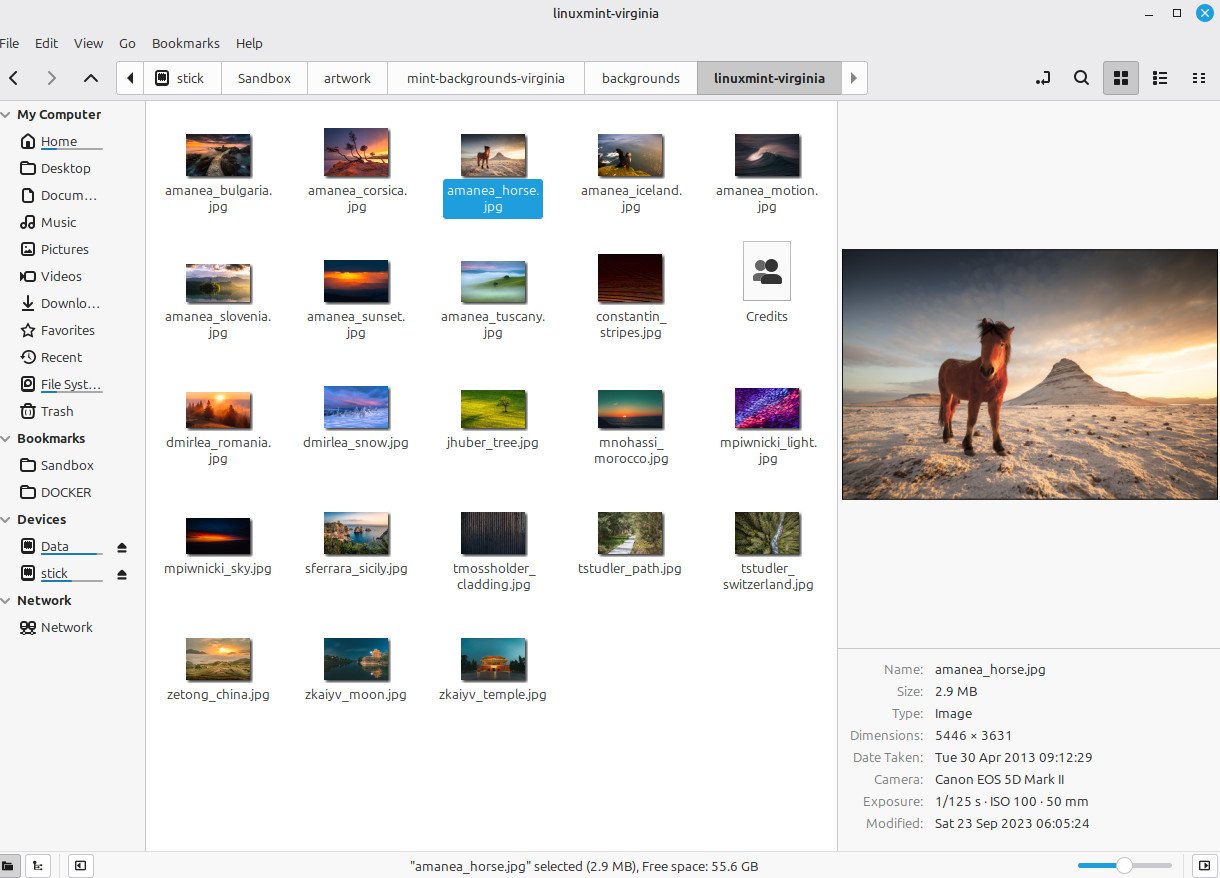
The Nemo file manager is getting a media preview pane, toggled with F7 or a status-bar button. It supports pictures, audio, and video, and displays associated information — for photographs, that can include the capture date and camera model. I like this feature a lot. I’ve always done a lot of work from file managers going all the way back to the classic Norton Commander and its Linux successor, Midnight Commander.
Velocitty: a new terminal with practical session management
I’ve said it before, I’ll say it again. You don’t need to ever touch a Linux shelll Linux user and you like using the terminal, Velocitty, Mint’s new terminal application, looks interesting. Its announced features include:
- A graphical tab overview and configurable color palettes.
- Tabs that can be reordered, moved between windows, or detached.
- Configurable shells and startup commands.
- Named, color-coded custom tabs with preset commands and optional automatic opening.
- Context-sensitive tab colors: red for elevated privileges, blue for remote sessions, and a lighter shade for running processes.
The point is to make recurring projects and SSH sessions easier to find and reopen. If you like other terminal programs, my latest fave is the Rust-based WexTerm; you don’t have to use Velocitty.
Unfold: a simpler archive manager
Unfold is a new archive manager for viewing, creating, and extracting archives. It uses 7-Zip and 7zip-RAR and supports the encryption formats those backends handle, including password-protected archives. Its design goal is simplicity rather than a sprawling feature set.
Under the hood: Ubuntu base, installer, and Wayland
The new Mint uses Ubuntu 26.04 LTS as its foundation. Mint is also moving from Ubiquity to the Linux Mint Debian Edition live installer for installing the operating system. This fresh installer comes with support for OEM bulk-produced installations, installation on both BIOS and EFI PCs, support for Secure Boot, and LVM/LUKS configurations.
Also: Linux Mint vs. Zorin OS: I’ve tried both Windows alternatives, and here’s my winner
For the Linux kernel, Mint 27 will use version 7.0. Which one exactly? Good question. We’ll see closer to Christmas.
Wayland compatibility remains the goal, but X11 isn’t disappearing. As Clem said in June, “In an ideal scenario, we manage to make Wayland work just as well as X11.” But they’re not there yet.
What makes this release different?
The central change is a cleanup of existing code. Mint’s longer cycle gives developers room to overhaul several parts of the desktop together, rather than squeezing individual improvements into six-month windows. As Clem put it in the September newsletter, “I don’t think I’ve ever seen so many changes and new features implemented for a single release.”
What that means for you and me will be better laptop power management, more capable built-in utilities, and a more complete collection of everyday desktop applications. For example, I expect the updated Mint will ship with GIMP 3.2.2 as its default photo editor, instead of Mint 22.3’s years-old GIMP 2.10.
