



Community Article
Community articles are authored by SitePoint Premium contributors. Content is screened before publication, and SitePoint reserves the right to moderate or remove articles that violate our guidelines. Views expressed are those of the authors and do not necessarily reflect those of SitePoint.
Modern CSS Grid: Build Responsive Layouts With Less Complexity
BUBusinessnewsbreak USAPublished inWeb·CSS·
October 16, 2026
·Updated:October 17, 2026
The AI briefing for Developers
Stay up to date with AI tools, model releases, and developer workflows that matter.
Weekly. Free. One click to leave.
SitePoint Premium
Stay Relevant and Grow Your Career in Tech
- Premium Results
- Publish articles on SitePoint
- Daily curated jobs
- Learning Paths
- Discounts to dev tools
7 Day Free Trial. Cancel Anytime.
Creating responsive website layouts is a fundamental part of modern front-end development. Developers need interfaces that work across mobile phones, tablets, laptops, and large desktop displays without requiring separate markup for every screen size.
CSS Grid provides a powerful way to organize content into rows and columns. Unlike older layout techniques that often require additional wrappers or complicated positioning, Grid allows developers to define two-dimensional layouts directly in CSS.
When combined with flexible sizing functions, intrinsic layout techniques, and a small number of carefully chosen media queries, CSS Grid can make responsive interfaces easier to build and maintain.
This article explores practical CSS Grid techniques for creating flexible layouts, avoiding common mistakes, and writing cleaner responsive stylesheets.
1. Understand the Grid Container and Its Items
CSS Grid begins by defining a grid container. Its direct children become grid items, which can be positioned within the resulting layout.
Consider a simple content layout:
<divclass="card-grid"><articleclass="card"><h2>Frontend Development</h2><p>Explore modern techniques for building user interfaces.</p></article><articleclass="card"><h2>Web Performance</h2><p>Learn how to make applications more responsive.</p></article><articleclass="card"><h2>Accessible Design</h2><p>Create interfaces that work for more people.</p></article></div>The layout can be defined with a few CSS declarations:
.card-grid{display: grid;grid-template-columns:repeat(3,1fr);gap:1.5rem;}.card{padding:1.5rem;border:1px solid #dce2ea;border-radius:0.75rem;}The display: grid declaration establishes the grid formatting context. The grid-template-columns property creates three equal-width columns, while gap controls the spacing between grid items.
This works well when the available space can accommodate three columns. On a narrow screen, however, the columns may become too small. Responsive sizing can solve this without requiring a separate rule for every device.
2. Create Flexible Columns With minmax()
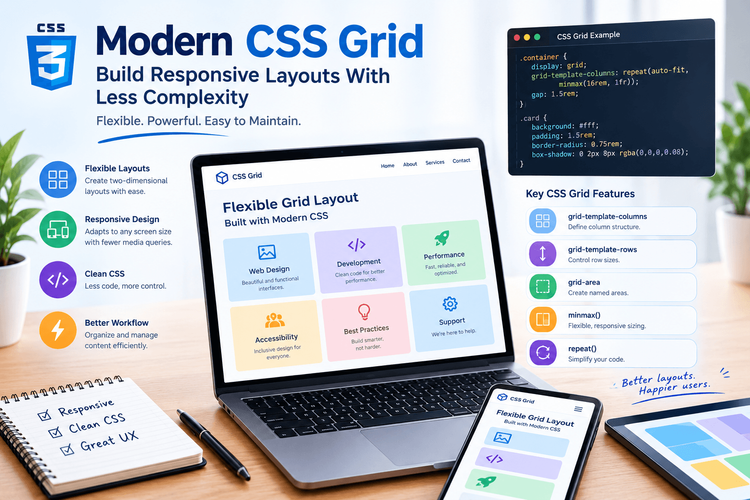
One useful CSS Grid technique is combining repeat(), auto-fit, and minmax().
.card-grid{display: grid;grid-template-columns:repeat(auto-fit,minmax(min(100%,16rem),1fr));gap:1.5rem;}This declaration allows the browser to create as many columns as comfortably fit within the available space.
The expression has three important parts:
repeat()repeats the column definition.auto-fitfits available tracks into the grid and collapses empty repeated tracks when appropriate.minmax()establishes a flexible range for each column.
The nested min(100%, 16rem) also helps prevent the minimum column size from exceeding the container’s available width on narrow screens.
As the container grows, more columns can fit. As it shrinks, items naturally move onto additional rows.
This technique is especially useful for product listings, article cards, image galleries, and re
It does not eliminate the need for testing. Content length, available space, and the desired visual hierarchy may still require additional layout rules.
3. Understand the Difference Between auto-fit and auto-fill
The auto-fit and auto-fill keywords look similar, but they handle empty repeated grid tracks differently.
With auto-fill, the browser preserves the space for tracks that can fit within the grid, even when there are not enough items to occupy them.
With auto-fit, empty repeated tracks collapse after placement, allowing occupied tracks to expand into the available space.
.gallery{display: grid;grid-template-columns:repeat(auto-fit,minmax(14rem,1fr));gap:1rem;}This can be a good choice for a gallery where a small number of images should expand to fill the available row.
If the design needs to preserve the expected track arrangement even when some positions are empty, auto-fill may be more appropriate.
Neither option is universally better. The choice depends on whether the layout should expand existing items or preserve space for potential additional items.
4. Use Grid Areas for Clear Page Structure
CSS Grid is also useful for larger page layouts that contain a header, navigation, main content, a sidebar, and a footer.
Grid template areas allow developers to describe this arrangement using named regions.
<divclass="page-layout"><headerclass="site-header">Header</header><navclass="site-nav">Navigation</nav><mainclass="main-content">Main content</main><asideclass="sidebar">Related links</aside><footerclass="site-footer">Footer</footer></div>The corresponding CSS might look like this:
.page-layout{display: grid;grid-template-columns:minmax(0,2fr)minmax(14rem,1fr);grid-template-areas:"header header""nav nav""main sidebar""footer footer";gap:1.25rem;}.site-header{grid-area: header;}.site-nav{grid-area: nav;}.main-content{grid-area: main;}.sidebar{grid-area: sidebar;}.site-footer{grid-area: footer;}The named areas make the intended layout easier to understand than a collection of unexplained numeric positions.
The minmax(0, 2fr) declaration also helps the main column shrink below its intrinsic content size when necessary, rather than allowing long content to force the entire layout wider.
On smaller screens, the areas can be rearranged:
@media(max-width:48rem){.page-layout{grid-template-columns:minmax(0,1fr);grid-template-areas:"header""nav""main""sidebar""footer";}}The same HTML now supports a single-column layout on narrow screens.
5. Prevent Content From Breaking the Grid
One common CSS Grid problem occurs when content forces a column to become wider than expected.
Grid items can have automatic minimum sizes influenced by their content. Long URLs, unbroken strings, wide images, and large code examples may therefore cause overflow.
A practical solution is to allow grid items to shrink:
.content-grid{display: grid;grid-template-columns:minmax(0,2fr)minmax(0,1fr);gap:1.5rem;}.content-grid> *{min-width:0;}.content-grid img{display: block;max-width:100%;height: auto;}.content-grid pre{max-width:100%;overflow-x: auto;}The zero minimum in minmax(0, ...) gives the tracks more flexibility, while min-width: 0 helps individual grid items shrink when their content would otherwise create an unwanted minimum width.
For code blocks, horizontal scrolling may be preferable to forcing long lines to wrap and changing their formatting.
These techniques address common overflow problems, but the best solution depends on the type of content and how users are expected to interact with it.
6. Combine Grid With Intrinsic Sizing
Responsive layouts do not always need explicit breakpoints. CSS Grid can often determine a suitable arrangement from the available space and the intrinsic dimensions of its content.
.feature-layout{display: grid;grid-template-columns:repeat(auto-fit,minmax(min(100%,20rem),1fr));gap:2rem;align-items: start;}This creates flexible columns with a preferred minimum size of approximately 20rem, unless the container is narrower.
For a card collection, this may be enough to provide a responsive layout without a collection of device-specific media queries.
However, some designs require more deliberate changes. A navigation bar might need to become a menu button, or a sidebar may need to move below the primary content. These are behavioral or structural decisions that intrinsic sizing alone cannot make.
A useful approach is to let Grid handle flexible dimensions and use media queries when the design genuinely needs a different arrangement.
7. Avoid Using Grid for Every Layout Problem
CSS Grid is powerful, but it is not always the simplest tool for the job.
Flexbox is often a better fit for a one-dimensional layout, such as aligning a group of buttons in a row or arranging an icon beside a label.
.button-group{display: flex;flex-wrap: wrap;align-items: center;gap:0.75rem;}Grid is generally useful when relationships between rows and columns matter, while Flexbox is particularly effective when content flows primarily along one axis.
Both systems can work together. A page can use Grid for its overall structure and Flexbox for individual components.
The best layout method is the one that expresses the design clearly without introducing unnecessary rules.
8. Test Layouts With Real Content
A grid that works with three short placeholder headings may behave differently when real content is introduced.
Before shipping a responsive layout, developers should test:
Narrow and wide viewport sizes.
Long headings and translated text.
Images with different aspect ratios.
Large text settings and browser zoom.
Empty or partially populated card collections.
Long URLs and code samples.
Intermediate widths where columns begin to feel cramped.
Browser developer tools make it easy to inspect grid tracks and experiment with container dimensions.
It is also useful to test the actual content rather than relying exclusively on idealized examples. Realistic content exposes sizing problems that placeholder text often hides.
Conclusion
CSS Grid provides a flexible foundation for responsive web layouts. Features such as minmax(), auto-fit, named grid areas, and intrinsic sizing allow developers to create adaptable interfaces with relatively little CSS.
The most effective layouts combine these features thoughtfully. Let Grid manage two-dimensional structure, use Flexbox for simpler one-dimensional arrangements, and introduce media queries when the design requires a meaningful change.
