




You’ve spent hours learning the most effective SEO tactics, but they won’t be useful if you can’t measure them.
Measuring SEO return on investment (ROI) involves two factors: KPIs (key performance indicators) and the cost of your current SEO campaigns. Tracking these key metrics monthly enables you to tweak and optimize your strategy, as well as make educated business decisions.
To get the most bang for your buck (or time), <a href="https://moz.com/beginners-guide-to-google-analytics” rel=”nofollow noopener” target=”_blank”>consider using Google Analytics (GA) to calculate your ROI. With GA, you can pinpoint where your audience is coming from, set goals to stay on track, and incorporate the most attractive keywords to rank better in search engines.
Ways to calculate your SEO ROI using Google Analytics
#1 Page value
Page value is an important aspect to consider when talking about ROI.
Think about it like money. In the US, paper money has been dated back to the late 1600s as a way of symbolizing the value of something. Instead of bartering, citizens began attaching a value to a 10 dollar bill or a 100 dollar bill to obtain an item they needed that was worth the equivalent value.
Page value assigns an average monetary value to all pages viewed in a session where a transaction took place. Specifically for e-commerce sites, it helps assign a value to non-transactional pages such as articles and landing pages. This is useful to understand because although a blog didn’t necessarily produce revenue, that doesn’t mean it didn’t contribute to a customer’s buying decision in the future.
With lead generation pages, a value can be assigned to a goal like the contact form submission, so you can more accurately measure whether or not you’re on track.
Below is a visual that depicts how page value is calculated according to Google:
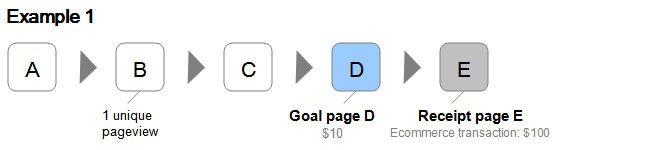
In the first example, Page B is visited once by a user before continuing to the Goal page D (which was assigned a value of $10) and Receipt page E (which generated $100). That means a single pageview of Page B generated $110, which gives us its Page Value.
In equation form, this is how it looks:
Page Value for Page B =
E-commerce Revenue ($100) + Total Goal Value ($10)
Number of Unique Pageviews for Page B (1)
= $110
But not all pageviews lead to a conversion. That’s why it’s important to keep track of data and recalculate your Page Value as more information comes in. Let’s see how this works with the second example.

Here we see two sessions but only one converted to an e-commerce transaction (session 1). So even if we have two unique pageviews for Page B, the e-commerce revenue stays the same. We can then recalculate our Page B’s Page Value using this new information.
Page Value for Page B =
e-commerce revenue ($100) + Total Goal Value ($10 x 2 sessions)
Number of Unique Pageviews for Page B (2)
= $60
With more sessions and more data, you’ll get a better idea of which pages contribute most to your site’s revenue.
#2 E-commerce settings
If you’re not managing an e-commerce business, skip this section. For those of you who do, there’s a more advanced feature on Google Analytics that can prove extremely useful. By turning on the e-commerce settings, you can track sales amounts, the number of orders, billing locations, and even the average order value. In this way, you can equate website usage to sales information and better understand which landing pages or campaigns are performing the best.
How to turn on e-commerce settings
In your Google Analytics left sidebar panel, click on ADMIN > under the VIEW panel (rightmost panel), click on “E-commerce Settings” > Enable E-Commerce > Enable Enhanced E-commerce Reporting.
To finalize this go over to where it says, “Checkout Labeling” underneath the Enhanced E-commerce settings, and under “funnel steps” type in:
Below is a picture to better explain these steps:

If you have Shopify or Woocommerce, make sure to set up tracking over there, too, so that Google Analytics can communicate and relay this crucial information to you.
Once you have the E-commerce tracking setup, you’ll have access to the following data:
An overview of your revenue, E-commerce conversion rate, transactions, average order value, and other metrics
Shopping and checkout behavior
These give you a better understanding of how your customers are interacting with your site and which products are selling the most. In terms of calculating SEO ROI, knowing the steps that your customers take and the pages they view before making a purchase helps you analyze the value of individual pages and also the effectiveness of your overall SEO content strategy.
#3 Sales Performance
Again, this is for e-commerce only. The sales performance feature shows sales from alld identify its revenue
How to view your sales performance
In your Google Analytics’ left panel, click on “Conversions” > “E-commerce” > “Sales Performance”.
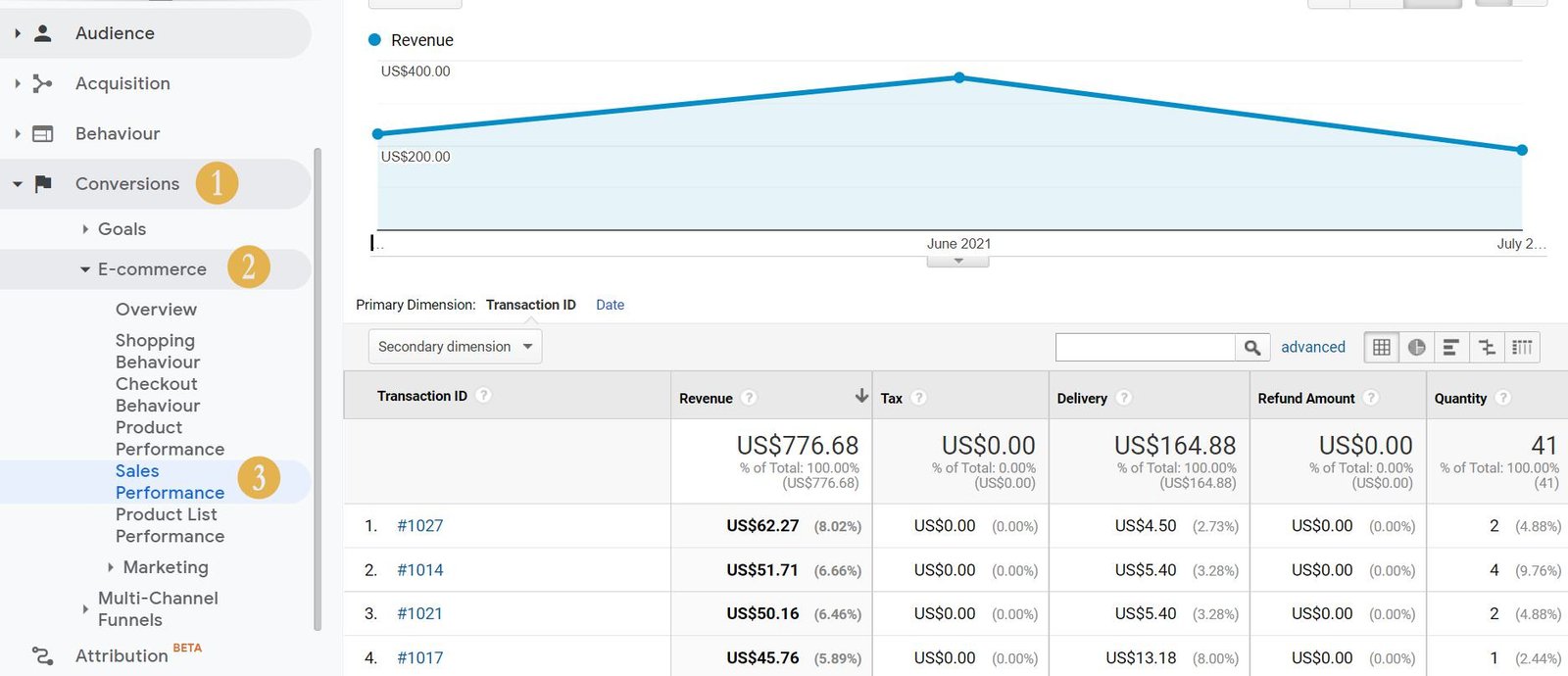
This gives you an overview of your revenue and a breakdown of each transaction. Tracking this through time and seeing how it trends guides your content strategy.
What is the average transaction amount and what does it tell you about your customers? Does tweaking your copy to promote up-sells or cross-sells have an impact on your per-transaction revenue?
Another set of data that helps you calculate your SEO ROI and optimize your content strategy is your customers’ shopping behavior.
How to see your customers’ shopping behavior in-depth
Click over to “Conversions” > “E-Commerce” > “Shopping Behavior”

At a glance, you can see how effective your purchase funnel is – how many sessions continue from one step to the next? How many people went to your page and didn’t purchase, or added to the cart but didn’t follow through with payment?
This helps you identify areas that need more SEO attention. This also helps you draw projections on how much your revenue can increase by optimizing your copy and implementing SEO to boost organic traffic, which helps you get a better idea of your SEO ROI.
For instance, if there’s a high percentage of users visiting your page but not going through the buying cycle, maybe you need to tweak your copy to include searchable keywords or copy that resonates better with your audience.
Additionally, it’s worth remembering that while this does show organic sales, you can’t identify the keyword that led to that sale, but organic traffic can be an indicator of holistic marketing efforts working. For example, PR may increase brand searches on Google.
Quick tip: you can get an idea of which keywords bring in the most traffic to your website with Google Search Console and then follow the navigation history from Google Analytics in order to connect specific keywords with sales.
Overall, to truly measure the ROI of your SEO you need to discover which keywords are working for your business, because although people may be interested in your business due to some amazing PR exposure, they might not actually be interested in your services. To really hit this one home, select keywords that have purchase intent. That way you can attract more qualified leads to your site.
#4 Engagement Events
If you’re not working on an e-commerce site (hint, hint, my fellow B2B marketers), here’s where you’ll want to pay attention. Both e-commerce and lead generation sites can make use of engagement events.
Align with your sales team to assign a value to a goal based on average order value, the average number of sign-ups, and conversion rate. Although useful for e-commerce, these analytics are likely to be most beneficial for lead generation sites who have longer sales cycles and transactions that occur off-site or after multiple sessions (for example, B2B SaaS or a marketing agency).
Examples of engagement events include:
How to view your campaign engagement data
Click on “Behavior” > “Events” > “Top Events”
Below is an image so you can follow along:

This type of tracking gives greater insight into how people are interacting with parts of your website, and how engaged they are at different parts of the journey. Use it to set goals for your lead generation and investigate whether or not your SEO efforts are paying off.
Let’s say you find that your website gets a ton of traffic to your services page, and a high percentage of those visitors download a case study. This means they’re interested in what you have to offer and would like to see more case studies from you.
Use ROI calculations to make better strategic decisions for your business
Ultimately, when using Google Analytics for SEO, you should work to align business goals with specific measurable metrics so that you can create a long-term plan for sustainable growth. It’s no secret SEO is a powerful tool for your business, but putting it into an actionable and personalized plan to get the train continuously going uphill is what counts.
The author’s views are entirely their own (excluding the unlikely event of hypnosis) and may not always reflect the views of Moz.
