



Test README with Users and Docker: Two-Layer Verification

SitePoint TeamPublished inDesign & UX·DevOps·
October 11, 2026
The AI briefing for Developers
Stay up to date with AI tools, model releases, and developer workflows that matter.
Weekly. Free. One click to leave.
SitePoint Premium
Stay Relevant and Grow Your Career in Tech
- Premium Results
- Publish articles on SitePoint
- Daily curated jobs
- Learning Paths
- Discounts to dev tools
7 Day Free Trial. Cancel Anytime.
How to Test Your README with Docker and Real Users
- Extract all fenced code blocks from your README into a runnable shell script using the command extraction tool.
- Build a Dockerfile that replays each extracted command as a sequential
RUNinstruction in a clean container. - Run the Docker build with
--no-cacheand capture output to identify the exact failing step. - Fix all mechanical failures—missing dependencies, broken paths, deprecated flags—and rebuild until the image passes.
- Recruit 2–3 participants from your target audience who have never seen the project before.
- Conduct think-aloud sessions where participants narrate their thought process while following the README without help.
- Audit session notes and Docker logs against the setup gap checklist to categorize blockers, confusion points, and minor friction.
- Iterate by applying fixes, re-running the Docker build to prevent regressions, and conducting follow-up sessions if needed.
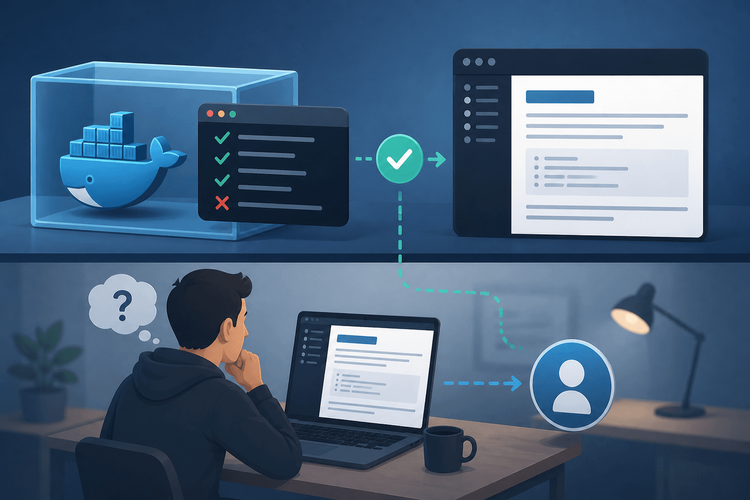
Effective README testing requires two complementary layers: automated mechanical verification using Docker, and human cognitive verification through think-aloud observation. This tutorial walks through building both: a reusable Dockerfile template, a command extraction script, a think-aloud session script, a structured note-taking template, and a setup gap checklist.
Table of Contents
Your README Is Probably Broken
Every developer has experienced it: cloning a promising repository, opening the README, following the setup instructions with care, and hitting a wall at step three. A missing dependency. An undocumented environment variable. A command that clearly works on the maintainer’s machine but nowhere else. Hours evaporate. Interest dies. The contributor moves on.
This pattern persists because of a well-documented cognitive bias called the “curse of knowledge.” Once someone understands their own project deeply, they lose the ability to see their documentation through a beginner’s eyes. Implicit assumptions become invisible. Steps get skipped not out of laziness, but because the author genuinely cannot perceive them as necessary.
Terence Eden demonstrated this vividly. For his ActivityBot project, he paid volunteers 25 euros each for an hour of their time, asked them to follow the README while speaking aloud, and learned about wrong links, confusing section order, and terms he had never thought to explain. He updated the README after each session and re-tested with the next person. He does not claim the result is perfect, only that it is demonstrably easier to follow. His write-up on shkspr.mobi details the specific failures that surfaced.
Why README Testing Needs Two Layers
Layer 1: Mechanical Errors (What Docker Catches)
Automated testing in a clean container exposes a specific category of failures in setup documentation:
- The README omits dependencies or packages from its prerequisites.
- Commands require a specific shell, operating system, or pre-installed tool the README never names.
- Setup steps reference files, scripts, or external URLs that do not resolve. Hardcoded paths like
/Users/maintainer/projects/...fall into this category too. - Flag syntax or CLI arguments target a deprecated or mismatched version of the tool.
- The author’s machine supplies environment variables or config files the README never mentions.
These are mechanical errors. They have nothing to do with how well-written the prose is. They are binary: the command either succeeds or it does not.
Layer 2: Cognitive Errors (What Users Catch)
Human testers reveal an entirely different failure mode, one no automated system can detect:
- Steps assume implicit knowledge, such as “set up your database” without specifying which database engine, version, or configuration.
- Ambiguous instructions where two reasonable interpretations exist, leading half of users down the wrong path.
- Missing context about why a step is needed, causing users to skip it or apply it incorrectly.
- The README introduces a prerequisite after the step that needs it.
- Unstated restart requirements, such as “restart your terminal” or “log out and back in,” that the author does reflexively but never writes down.
Why One Layer Alone Is Not Enough
Docker proves commands run. It cannot prove a human understands them. Users reveal comprehension gaps, but they cannot systematically test every OS and environment permutation.
| Detection Capability | Docker (Layer 1) | Human Tester (Layer 2) |
|---|---|---|
| Missing dependency | Yes | Sometimes |
| Deprecated CLI flag | Yes | No |
| Ambiguous instruction | No | Yes |
| Ordering problem | Partially | Yes |
| Implicit knowledge gap | No | Yes |
| Cross-platform issues | Yes (multi-image) | Limited to tester’s OS |
| Broken file reference | Yes | Sometimes |
Neither layer is sufficient alone. Together, they cover the vast majority of README failures.
Layer 1: Automate README Verification with Docker
Prerequisites
Before starting, confirm the following:
- Run
docker --versionand confirm you have Docker Engine 23.0+, which you need for--progress=plainand BuildKit defaults. - Run
bash --versionand confirm you have a recent Bash. The scripts below usePIPESTATUSand[[ ]]regex matching, and I tested them with Bash 5.1. On macOS, which ships an older Bash, install a newer version via Homebrew if a script misbehaves. - Network access is required during the Docker build for
apt-get update, runtime installation, and dependency fetching. - Docker permissions:
docker buildanddocker runrequire root access or membership in thedockergroup. Verify by runningdocker infowithoutsudo.
The Principle: A Clean Room for Your Instructions
A fresh Docker container approximates a new user’s machine more closely than any other practical option. Nothing is pre-installed beyond the base image. There is no hidden configuration, no accumulated state, no shell aliases, no globally installed packages from three projects ago. If the README commands succeed in a bare container, the mechanical instructions are sound. If they fail, the README has a gap that needs documenting.
Extract Commands from Your README
The first step is pulling the executable commands out of the README’s fenced code blocks. You can do this manually for small documents, but a script makes the process repeatable and less error-prone.
The following shell script uses bash’s built-in while read loop and regex matching to extract all fenced code blocks from a Markdown file and write them to a runnable shell script:
#!/usr/bin/env bashset-euo pipefailINPUT_FILE="${1:?Usage: $0 <README.md>}"if[!-f"$INPUT_FILE"];thenecho"Error: File '$INPUT_FILE' not found.">&2exit1fiprintf'#!/usr/bin/env bash'printf'set -euo pipefail'STEP=0IN_BLOCK=falsewhileIFS=read-r line;doif[["$line"=~ ^```(bash|sh|shell)$ ]]&&["$IN_BLOCK"=false];thenIN_BLOCK=trueSTEP=$((STEP + 1))printf'# ========== README Step %s =========='"$STEP"continuefiif[["$line"=~ ^```$ ]]&&["$IN_BLOCK"=true];thenIN_BLOCK=falseprintf'echo "Step %s completed successfully."'"$STEP"continuefiif["$IN_BLOCK"=true];thenprintf'%s'"$line"fidone<"$INPUT_FILE"if["$IN_BLOCK"=true];thenprintf'echo "Step %s completed successfully."'"$STEP"printf'# WARNING: README fence block was not closed.'>&2fiRunning ./extract-commands.sh README.md > setup-steps.sh against a README produces a numbered, traceable script where each step maps back to a specific code block. When a step fails, the step number immediately identifies which README section is broken.
Build the Dockerfile Template
With the extracted commands in hand, the next step is a Dockerfile that executes them inside a clean environment:
FROM ubuntu:24.04ARG DEBIAN_FRONTEND=noninteractiveWORKDIR /workspaceCOPY . .RUN apt-get update && apt-get install -y curl git build-essential && rm -rf /var/lib/apt/lists/*RUN curl -fsSL https://deb.nodesource.com/setup_22.x -o /tmp/nodesource_setup.sh && echo "VERIFY CHECKSUM HERE BEFORE PROCEEDING IN PRODUCTION" >&2 && bash /tmp/nodesource_setup.sh && apt-get install -y nodejs && rm /tmp/nodesource_setup.shRUN npm installRUN npm run buildHEALTHCHECK--interval=5s--timeout=3s--start-period=10s--retries=3CMD curl -f http://localhost:3000/health || exit 1CMD ["npm", "start"]Each RUN instruction maps directly to a README step. When Docker encounters a failing step, the build halts at that exact instruction, providing both the step number and the error output. The comments let you trace a Docker build failure back to the corresponding README section.
The base image choice matters. Using ubuntu:24.04 tests a broad set of assumptions for users starting from a minimal Linux environment. Using node:22-bookworm or python:3.12-slim tests whether the README correctly assumes a runtime is already installed. Running against both catches different categories of omissions.
Run and Interpret Results
#!/usr/bin/env bashset-uo pipefailIMAGE_NAME="${IMAGE_NAME:-readme-test}"DOCKERFILE="readme-test.Dockerfile"LOG_FILE="readme-test-output.log"CONTAINER_ID=""trap'[[ -n "${CONTAINER_ID:-}" ]] && docker rm --force "$CONTAINER_ID" > /dev/null 2>&1 || true' EXITecho"Building README test image..."docker build -f"$DOCKERFILE"-t"$IMAGE_NAME"--no-cache --progress=plain .2>&1|tee"$LOG_FILE"BUILD_EXIT_CODE=${PIPESTATUS[0]}if["$BUILD_EXIT_CODE"-ne0];thenecho""echo"README VERIFICATION FAILED."echo"Check $LOG_FILE for the failing step."echo"Search for 'README Step' to identify which instruction broke."exit1fiecho""echo"Build succeeded. Running smoke test..."CONTAINER_ID=$(docker run -d--name readme-smoke-test "$IMAGE_NAME")||{echo"ERROR: Failed to start container.">&2exit1}HEALTH="starting"foriin{1..12};doHEALTH=$(docker inspect --format='{{if .State.Health}}{{.State.Health.Status}}{{else}}no-healthcheck{{end}}'"$CONTAINER_ID"2>/dev/null)||HEALTH="inspect-error"["$HEALTH"="healthy"]&&break["$HEALTH"="no-healthcheck"]&&break["$HEALTH"="unhealthy"]&&breaksleep5donedocker stop "$CONTAINER_ID"> /dev/null 2>&1||trueif["$HEALTH"="healthy"];thenecho"README VERIFICATION PASSED. All steps succeeded and app starts."elif["$HEALTH"="no-healthcheck"];thenecho"Build passed. No health check defined — verify startup manually."elseecho"README VERIFICATION FAILED. App built but did not start healthy."echo"Health status: $HEALTH"exit1fiCommon failure patterns to watch for: a missing apt-get install for a system library, a Node or Python version mismatch between what the README states and what the base image provides, and hardcoded paths like /Users/maintainer/projects/... that exist only on the author’s machine.
You can also run this test in a CI pipeline. For example, a GitHub Actions workflow can trigger on any pull request that modifies README.md using on: pull_request: paths: ['README.md'] with a job that calls ./test-readme.sh.
Limitations of Automated Testing
Docker-based testing cannot verify GUI setup steps, browser-based configuration flows, or instructions that require external service credentials (“create an API key at…”). It also cannot assess whether a human would understand the purpose of a step, correctly interpret ambiguous wording, or follow steps in the intended order when the ordering is not strictly enforced. These limitations are exactly why Layer 2 exists.
Layer 2: Observe Real Users with Think-Aloud Testing
What Think-Aloud Testing Is (and Is Not)
In a think-aloud protocol, the participant narrates their thought process continuously while following the README. The observer watches, listens, and takes notes. This is not a support session. The observer does not help, correct, or explain. Every urge to say “oh, you just need to…” is a signal that the documentation has failed.
Eden paid his participants for their time. Payment also makes it clear that finding problems is the job, which can help if you suspect a volunteer doing you a favor would push through ambiguity quietly. Volunteers can still work well, as Eden notes, so do not let budget stop you from running sessions.
Who to Recruit and How Many
The ideal participant is someone in the project’s target audience who has not seen the project before. A frontend developer testing a frontend library’s README. A DevOps engineer testing a deployment tool’s setup guide. Domain familiarity without project familiarity is the target profile.
Nielsen’s usability research suggests five participants surface roughly 85% of interface usability issues. Treat this as a practical guideline for README testing rather than a precise threshold. For README testing, 2 to 3 sessions typically surface all blocker-level issues and most confusion-level issues without significant time investment. Participants can be colleagues from a different team, community members, paid testers through platforms like Upwork or UserTesting, or developer friends working in a different stack.
The Session Script
# Think-Aloud README Testing: Session Script## Before the Session- [ ] Ensure participant has a machine with their normal development setup- [ ] Confirm participant has NOT seen this project or README before- [ ] Set up screen recording (with participant consent)- [ ] Open the note-taking template## Introduction (Read Aloud to Participant)"Thank you for helping with this. I'm testing the documentation for aproject, not testing you. There are no wrong answers or wrong actions.Your goal is to get this project running on your machine by followingonly the README. Please say everything you're thinking out loud asyou go: what you're reading, what you expect to happen, what confusesyou, what you're about to try, and why.I won't be able to help or answer questions during the session. If youget stuck, do whatever you would normally do: search online, readerror messages, try alternatives. Just keep narrating your thinking.We'll stop after 45 minutes or when you've completed the setup,whichever comes first."## Observer Rules- Do NOT help, correct, hint, or explain. At all.- Do NOT react visibly to mistakes or confusion (no sighing, wincing, nodding).- Note exact timestamps when the participant hesitates, re-reads, or expresses confusion.- Record exact quotes when possible. Paraphrasing loses critical nuance.## Wrap-Up Questions (Ask After the Session)1. "Where did you feel most stuck or uncertain?"2. "Was there anything you almost skipped? Why?"3. "What would you have Googled if I weren't watching?"4. "Were there terms or tools mentioned that you didn't recognize?"5. "If you had to describe the setup process to a colleague, what wouldyou warn them about?"The Note-Taking Template
# README Think-Aloud Session Notes**Date:****Participant ID:** (e.g., P1, P2 — do not use real names in shared notes)**Participant Background:****OS / Environment:****Session Duration:**|-----------|----------------------|-------------------------------------|------------|----------||0:00|Title / Intro||||||||||||||||## Issue Type Key-**Missing prerequisite** — A tool, package, or config not mentioned in README-**Unclear language** — Wording that caused hesitation or misinterpretation-**Wrong assumption** — README assumes knowledge/setup the user lacks-**Broken link** — URL or file reference that does not resolve-**Ordering problem** — Step requires something introduced later-**Missing verification** — User unsure if step succeeded## Severity Key-**Blocker** — User cannot proceed without external help-**Confusion** — User pauses, re-reads, or takes wrong path but recovers-**Minor friction** — User notices oddity but proceeds without delayAnalyze Results and Fix Your README
The Setup Gap Checklist
After completing both layers, the following checklist provides a systematic audit framework:
# README Setup Gap Checklist## Dependencies- [ ] All required tools listed with exact names (not just "a database")- [ ] All required runtime versions specified (e.g., Node 20.x, Python 3.12+)- [ ] System-level packages documented (e.g., build-essential, libssl-dev)- [ ] Package manager assumed is stated explicitly (npm, yarn, pnpm)## Links and References- [ ] Every URL tested and resolving- [ ] Every file path reference verified against current repo structure- [ ] External service signup links included where API keys are needed## Commands- [ ] Flag syntax correct for the documented tool version- [ ] No aliases assumed (e.g., `python` vs `python3`)- [ ] No shell-specific syntax without stating which shell## Environment- [ ] Target operating system(s) stated- [ ] Shell assumptions stated (bash, zsh, PowerShell)- [ ] Environment variables listed with example values- [ ] Config files documented with expected location and format## State and Sequencing- [ ] Terminal restart requirements documented- [ ] Logout/login requirements documented- [ ] Each step's prerequisites appear before the step itself- [ ] No circular dependencies between steps## Comprehension- [ ] Every acronym spelled out on first use or linked- [ ] Every tool name includes a one-line description or link- [ ] Purpose of each step explained (not just the "what" but the "why")## Verification- [ ] Each major step includes a way to confirm it worked- [ ] Expected output shown for commands that produce output- [ ] Final "you're done" state clearly describedPrioritize and Iterate
Fix blockers first. These are steps where Docker fails or participants cannot proceed without external help. Address confusion points second, focusing on steps where users hesitated, re-read multiple times, or misinterpreted the instruction. Minor friction items can be batched into a subsequent pass.
After applying fixes, re-run the Docker build to confirm nothing regressed. A fix for a cognitive gap (adding explanatory text) should not break the mechanical verification. If reements. Eden’s iterative approach showed that each round of testing and revision reduced the number of stuck-points per session, resulting in a README that new users could follow to completion unassisted
Putting It All Together: A Repeatable Workflow
The two-layer verification process breaks into two phases.
Phase 1: Automated verification. Write or update the README. Extract commands using the extraction script, then run them in a Docker container. Fix all mechanical failures and re-run the build until it passes cleanly.
Phase 2: Human verification. Conduct 2 to 3 think-aloud sessions with participants who match the target audience. Apply the setup gap checklist against findings from both layers, then fix cognitive failures: unclear language, missing context, ordering problems. Re-run the Docker build to confirm your documentation changes did not break anything mechanical.
Repeat the full cycle on major project changes, dependency upgrades, or significant feature additions. For continuous protection, a GitHub Actions workflow can trigger the Docker-based README test on any pull request modifying README.md using on: pull_request: paths: ['README.md'] with a job that calls ./test-readme.sh.
Two Layers, One Reliable README
The curse of knowledge is not a character flaw. It is a cognitive inevitability that affects every author of every piece of technical documentation. Testing is the only antidote. A Docker container catches what the author forgot to write down. A real user catches what the author forgot to explain. These are fundamentally different failure modes, and addressing only one leaves the other entirely undetected.
Start with whichever layer is easier. Even one layer is vastly better than none. But the combination of both, applied iteratively, transforms a README from a best-guess narrative into verified, tested documentation: one where users complete setup without external help.
Save the five files from this tutorial (the Dockerfile, extraction script, session script, note-taking template, and setup gap checklist) into a readme-testing/ directory in your project and adapt them from there.
Sharing our passion for building incredible internet things.
