



Community Article
Community articles are authored by SitePoint Premium contributors. Content is screened before publication, and SitePoint reserves the right to moderate or remove articles that violate our guidelines. Views expressed are those of the authors and do not necessarily reflect those of SitePoint.
Build Live Video Chat With WebRTC: From First Call to Production Debugging
VPVasyl PopovychPublished inWeb·
November 16, 2026
·Updated:November 16, 2026
The AI briefing for Developers
Stay up to date with AI tools, model releases, and developer workflows that matter.
Weekly. Free. One click to leave.
SitePoint Premium
Stay Relevant and Grow Your Career in Tech
- Premium Results
- Publish articles on SitePoint
- Daily curated jobs
- Learning Paths
- Discounts to dev tools
7 Day Free Trial. Cancel Anytime.
Adding real-time video to a web app used to mean plugins, proprietary SDKs and a lot of money. Today every modern browser ships with WebRTC, a set of APIs that lets two browsers exchange audio, video and data directly. The catch is that WebRTC gives you building blocks, not a finished feature. This guide walks through those blocks in the order you actually need them, with the exact API calls you need, and then covers the production issues that tutorials usually skip.
How a WebRTC call fits together
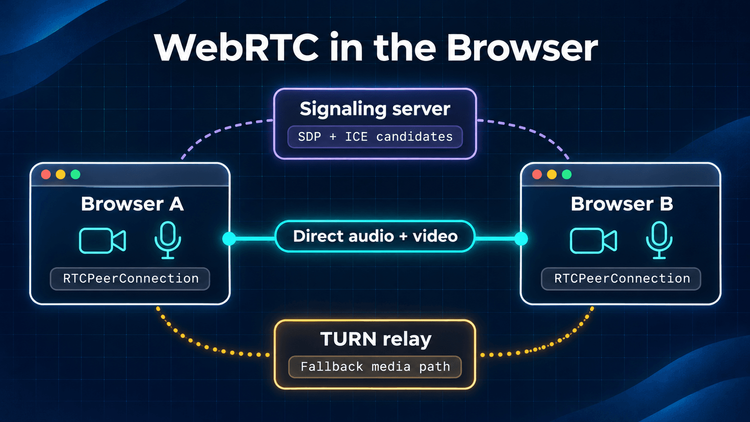
A browser-to-browser call has four moving parts:
- Media capture with getUserMedia(), which asks for camera and microphone access.
- A peer connection (RTCPeerConnection) that negotiates codecs, encrypts traffic and sends the streams.
- Signalling, a channel you build yourself (usually WebSockets) so the two peers can exchange session descriptions and network candidates before they can talk directly.
- STUN and TURN servers, which help peers discover their public addresses and relay traffic when a direct path is impossible.
- WebRTC deliberately does not define signalling. That is the part you own, and it is where most bugs live.
Step 1: Capture the camera and microphone
Start with the local preview. Browsers only allow camera access on HTTPS or localhost, so serve your page accordingly.
1. Request a stream with navigator.mediaDevices.getUserMedia(), passing video constraints (an ideal width of 1280 and height of 720 is a sensible default) and audio constraints with echoCancellation and noiseSuppression enabled.
2. Assign the returned MediaStream to the srcObject property of your local video element.
3. Keep a reference to the stream, because you will add its tracks to the peer connection later.
Set the muted and playsinline attributes on the local video element. Without muted users hear themselves, and without playsinline iOS Safari opens the video full screen.
Step 2: A minimal signalling server
The peers need a way to find each other. A tiny Node.js server using the ws package is enough for development. Its whole job is to relay messages between the peers in a room:
1. Create a WebSocket server (for example with the ws package) listening on its own port.
2. Keep a map of room names to the set of sockets in each room.
3. When a client sends a join message, store the room name on the socket and add it to that room’s set.
4. For every other message type, forward the raw message to the other sockets in the same room, and never echo it back to the sender.
5. On disconnect, remove the socket from its room so stale peers do not receive messages.
In production you would add authentication, limit room size to two for one-to-one calls, and validate message types, but the shape stays the same.
Step 3: Create the peer connection
Both sides create an RTCPeerConnection, add their local tracks and listen for the remote ones:
1. Create a new RTCPeerConnection with an iceServers list that contains at least one STUN server.
2. Loop over the local stream’s tracks and call addTrack() for each one.
3. In the ontrack handler, attach the first remote stream to your remote video element.
4. In the onicecandidate handler, send every new candidate to the other peer through your signalling channel as a candidate message.
Step 4: The offer/answer exchange
One peer creates an offer, the other answers, and both apply each other’s descriptions. Candidates arrive asynchronously in the background.
1. The caller runs createOffer(), applies it with setLocalDescription() and sends the description as an offer message.
2. The callee applies the offer with setRemoteDescription(), runs createAnswer(), applies it locally and sends it back as an answer.
3. The caller applies the answer with setRemoteDescription().
4. Both sides pass every incoming candidate message to addIceCandidate().
If both peers might start a call at the same time, look up the “perfect negotiation” pattern on MDN. It assigns one side as polite and resolves offer collisions cleanly instead of leaving both peers stuck.
Step 5: Add TURN before you ship
On a home network, STUN alone often works. On corporate Wi-Fi, mobile carriers and symmetric NATs it frequently does not, and the call silently fails to connect. A TURN server relays media when a direct path is impossible. The open-
In practice, your iceServers list should contain your own STUN URL plus a TURN URL with a username and credential, so the browser can fall back to the relay automatically when direct connectivity fails.
Generate short-lived TURN credentials on your backend rather than hard-coding them, and budget for bandwidth: relayed calls pass every frame through your server.
Production lessons that tutorials skip
Handle permissions and device changes
Users deny camera access, unplug headsets and switch from Wi-Fi to 4G mid-call. Catch NotAllowedError and show a clear explanation, listen for devicechange events, and use RTCRtpSender.replaceTrack() to swap cameras without renegotiating the whole call.
Watch connection state
Listen to pc.onconnectionstatechange. When the state becomes disconnected, wait a few seconds before giving up, because it often recovers. On failed, call pc.restartIce() to try new network paths.
Adapt quality to the network
Use RTCRtpSender.setParameters() to cap the bitrate on weak connections, and read pc.getStats() to monitor packet loss and round-trip time. Showing a small “poor connection” indicator does more for perceived quality than any codec tweak.
Know when peer-to-peer stops scaling
Mesh calls, where every participant connects to every other, work for two or three people. Beyond that, upload bandwidth explodes. Group calls need a Selective Forwarding Unit (SFU) such as mediasoup, LiveKit or Janus, which receives each stream once and forwards it to the others.
Learn from a real production call
Tutorials end at a working demo, but the fastest way to understand what production WebRTC looks like is to watch a real call from the inside. Chrome ships an internal diagnostics page that shows every peer connection the browser opens, and it works on any site that uses WebRTC.
1. Open chrome://webrtc-internals in one tab and keep it open.
2. In another tab, start a call on your own demo and find its RTCPeerConnection entry.
3. Expand that entry and look at the ICE candidate pairs: you will see whether the call went direct (host or srflx) or through a TURN relay (relay).
4. Open the stats graphs for the outbound video stream and watch the bitrate, frame rate and resolution adapt when you throttle the network in DevTools.
5. Check the negotiated codec and how quickly the connection recovers when you switch Wi-Fi off and back on.
Once you can read your own call, repeat the exercise on a production service. Any browser-based product works, whether a meeting tool or a live video chat that pairs two visitors, because webrtc-internals shows the same data for every site. Expect differences from your demo: more candidate pairs, a relay candidate in the list and a bitrate that adapts faster. Seeing them makes the earlier sections concrete, from why TURN matters to how bandwidth estimation reacts to packet loss.
Quick reference: connection states
| connectionState | What it means | What your app should do |
| new / connecting | ICE and DTLS are still negotiating | Show a “connecting” indicator; start a timeout of 10–15 seconds |
| connected | Media is flowing | Hide the indicator; start polling getStats() |
| disconnected | Temporary loss of connectivity | Wait a few seconds; it often recovers on its own |
| failed | No working candidate pair | Call restartIce(); if that fails, offer to reconnect |
| closed | The connection was closed locally | Release tracks and clean up UI state |
Where to go from here
The one-to-one call above is the core of many products, from telehealth consultations and tutoring to customer support. The engineering challenges grow with the use case: random matching needs queueing and presence on the signalling server, public platforms need moderation and reporting, and global audiences need TURN servers in several regions.
Start with the minimal version, get it working across Chrome, Firefox and Safari on both desktop and mobile, and add TURN before real users arrive. Once the call is reliable, every other feature becomes a much easier problem.
