


Close Menu
ToolTechBlogToolTechBlog

    Subscribe to Updates

    Get the latest creative news from FooBar about art, design and business.

    What's Hot

    How Focus mode has changed in iOS 27

    September 19, 2026

    India forces caller-ID apps to feed spam reports to telcos

    September 19, 2026

    Enforcing Agent Architectural Contracts

    September 19, 2026
    Facebook X (Twitter) Instagram
    ToolTechBlogToolTechBlog
    • Home
    • AI Tools
    • Web Hosting
    • Tech
    • Digital Marketing
    • Business Software
    • VPN & Cybersecurity
    ToolTechBlogToolTechBlog
    Home»Tech»How Focus mode has changed in iOS 27
    Tech

    How Focus mode has changed in iOS 27

    Tool Tech TeamBy Tool Tech TeamSeptember 19, 2026No Comments3 Mins Read
    Facebook Twitter Pinterest Telegram LinkedIn Tumblr WhatsApp Email
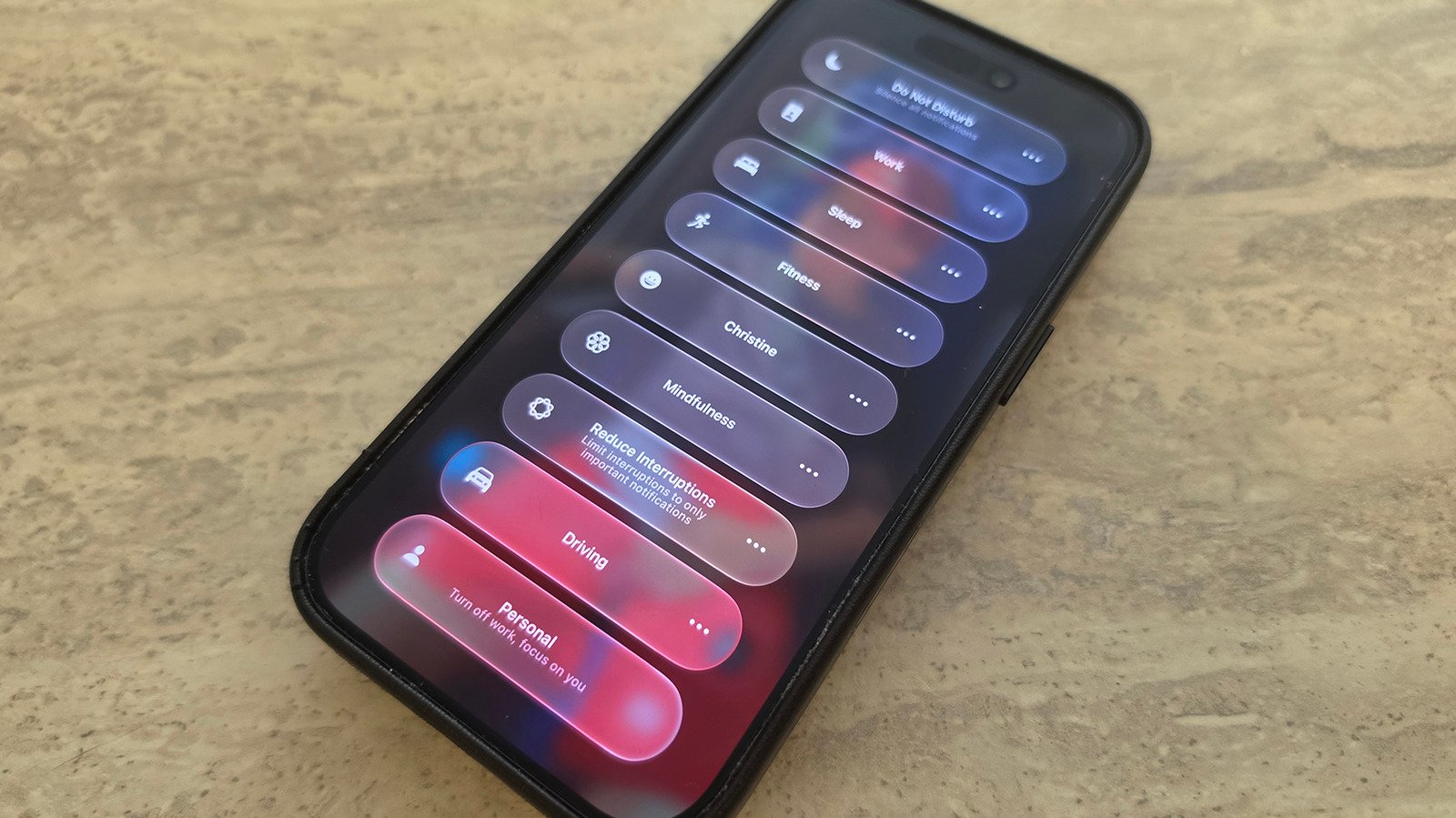
    How Focus mode has changed in iOS 27
    Share
    Facebook Twitter LinkedIn Pinterest Telegram Email

    Focus isn’t the biggest feature to change with iOS 27, but it has some cool enhancements worth knowing.

    One of the best tools your iPhone offers to help you avoid distractions is Focus, which lets you control which alerts arrive at what times. It includes default modes like Work, Personal, Sleep and more, as well as the ability to create your own. For example, you might want to silence social media notifications while still getting pings for incoming messages from family members.

    To select a Focus mode, swipe down from the top-right of the screen to open Control Center, then tap the Focus panel and select the desired mode from there. To configure your Focus modes, go to Settings, scroll down to Focus, then select any option (or create your own) to tweak what’s permitted and what’s silenced. 

    While Focus has been around for several years, some of iOS 27’s improvements include tweaks to the feature. If you haven’t updated yet, this is another great reason to do so.

    Notable changes to Focus mode
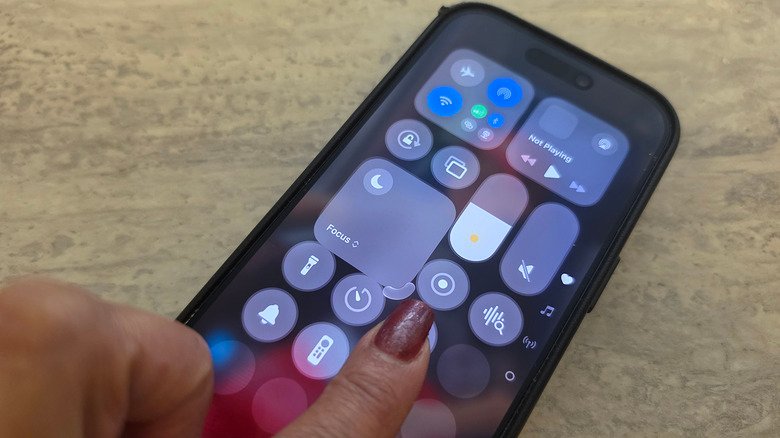
    A finger dragging on the Focus mode icon in Control Center on iPhone to make it bigger.

    Christine Persaud for Engadget

    You can now change how the Focus entry appears in Control Center. With Control Center opened, long-press on any empty part of the screen until edit mode activates. Drag the bottom-right corner of the Focus icon to resize it as desired. While this was limited to a 2×1 space in iOS 26 and earlier, you can now make it a small 1×1 circle to save room or as large as 2×2 for quicker selections.

    iOS 27 also brings improvements to Focus mode tracking that allow you to build better Shortcuts around them. As explained by Derek Seaman, Shortcut actions can check your specific phone state based on the Focus mode that’s currently active. For example, I created a Shortcut, using natural language commands, that asks my phone to play a podcast when it’s in Driving focus mode. You can now select Sleep Focus mode for an automation trigger, too.

    Finally, “Otherwise if” logic statements are now supported with Shortcuts and Focus mode triggers. So, you might have a Shortcut trigger a specific action automatically if Sleep Focus is turned on, but if Driving is on instead, another action will trigger. Your device is able to track when you switch to each mode and run the action accordingly. This allows for more granular control of automated actions so they relate back to the Focus mode your phone is in, not just a single trigger.

    Focus mode can simplify automations
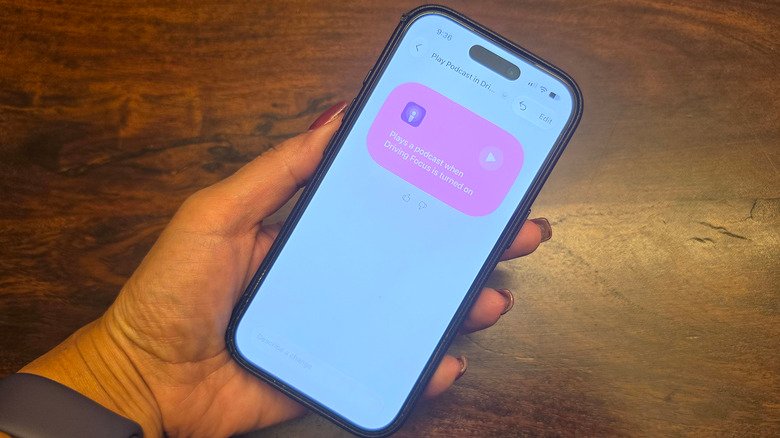
    A hand holding an iPhone, showing Driving focus mode with an automation.

    There are vast improvements to Siri AI with iOS 27. You can use natural language commands to have Siri create a Shortcut that includes Focus mode status integrated to it, now improved with iOS 27.

    I have a custom Focus Mode called Christine where I silence notifications from Facebook, Instagram, Phone and Messenger but still permit notifications from Slack and my Ring video doorbell. You can also choose specific people to allow notifications from, like your boss or spouse, so you don’t miss a crucial message.

    I also set a Shortcut to open my workout app automatically whenever I switch to Fitness mode. These aren’t massive changes, but can make your days run more smoothly thanks to actions being easier to trigger. It’s worth getting more familiar with Focus mode and using it alongside Shortcuts to create your own phone automations. Focus Mode is one of Apple’s best productivity tools, and you’re missing out if you’re not using it.

    Changed Focus mode
    Share. Facebook Twitter Pinterest LinkedIn Tumblr Email
    Tool Tech Team
    • Website

    Related Posts

    The Street Fighter movie popcorn bucket is gloriously goofy

    September 18, 2026

    eGPUs do work, but they come with some notable limitations

    September 18, 2026

    Europe’s EU Kids Act would ban social media access for children under 13

    September 17, 2026

    Microsoft AI CEO says AI threats are real, and Anthropic is making it worse

    September 17, 2026

    Snap Specs hands on: Standalone AR glasses are here

    September 17, 2026

    Threads leans even further into podcasts with transcripts, analytics and more

    September 16, 2026
    Leave A Reply Cancel Reply

    Top posts
    Tech

    How Focus mode has changed in iOS 27

    By Tool Tech Team
    Business Software

    India forces caller-ID apps to feed spam reports to telcos

    By Tool Tech Team
    Web Hosting

    Enforcing Agent Architectural Contracts

    By Tool Tech Team
    Editors Picks

    How Focus mode has changed in iOS 27

    September 19, 2026

    India forces caller-ID apps to feed spam reports to telcos

    September 19, 2026

    Enforcing Agent Architectural Contracts

    September 19, 2026

    Anthropic’s first embedded evaluator is … Accenture?

    September 18, 2026
    About Us

    Welcome to ToolTechBlog, your trusted source for the latest insights, reviews, and practical guides on AI tools, business software, cybersecurity, web hosting, and consumer technology.
    Our mission is simple: to help individuals, entrepreneurs, freelancers, students, and businesses discover the right digital tools to improve productivity, streamline workflows, and make informed technology decisions.

    Our Picks

    How Focus mode has changed in iOS 27

    September 19, 2026

    India forces caller-ID apps to feed spam reports to telcos

    September 19, 2026

    Enforcing Agent Architectural Contracts

    September 19, 2026
    Top Reviews

    The AI Hype Index: Unsexy AI

    July 29, 2026

    What it is and How to Fix it

    July 29, 2026

    LG to Ban Residential Proxies from Smart TV Apps

    July 29, 2026

    © 2026 tooltechblog.com. All rights reserved. Designed by DD.

    • About Us
    • Contact Us
    • Terms and Conditions
    • Privacy Policy
    • Disclaimer

    Type above and press Enter to search. Press Esc to cancel.