





SitePoint SponsorsPublished inAI·APIs·Developer Tools·
September 12, 2026
The AI briefing for Developers
Stay up to date with AI tools, model releases, and developer workflows that matter.
Weekly. Free. One click to leave.
SitePoint Premium
Stay Relevant and Grow Your Career in Tech
- Premium Results
- Publish articles on SitePoint
- Daily curated jobs
- Learning Paths
- Discounts to dev tools
7 Day Free Trial. Cancel Anytime.
This article is sponsored by SerpApi. The techniques below work with any search provider; SerpApi is used for the runnable examples.
If you ask a large language model what happened this morning, it will tell you it doesn’t know, or invent something plausible. That is not a bug you can prompt your way out of. The problem is that a model’s knowledge is frozen at its training cutoff, with no built-in connection to the live web. If you’re building anything that needs current data, like a research assistant, a support bot, or a market-monitoring agent, you have to bring the web to the model yourself.
The technique is simpler than it looks. The catch is that fetching the data is only half the job. The other half is getting it into the model cheaply, because raw search results burn through your context window and your budget. This guide covers both halves along with the code.
Where model knowledge runs out
Two limitations are at play, and it’s worth separating them because people constantly confuse them.
The first is the knowledge cutoff. Training data is collected up to a point in time, then baked into the model’s weights. Anything after that date, whether a product launch, a price change, or yesterday’s match result, simply isn’t in there.
The second is the lack of a live index. Even within its training window, a model doesn’t “look things up.” It generates a statistically likely continuation of your prompt based on patterns it has learned, with no database query under the hood. When a model appears to know a fact, it’s recalling a compressed impression of it, not retrieving a record. That’s exactly why models hallucinate specifics like dates, figures, and citations.
Prices are where this gets obvious. Ask a model something like “What’s the cheapest flight from London to Lisbon next Friday, and what are hotel rates near the center that weekend?” and the reply will land in one of three shapes.
- It refuses.“I don’t have access to real-time flight or hotel pricing. I’d recommend checking Skyscanner or Booking.com.” Honest and useless to your users.
- It hedges.“Flights typically range from £40 to £120, and mid-range hotels in central Lisbon usually run €90 to €150 a night.” Wide enough to be safe, specific enough to sound helpful, and not an answer to the question asked.
- It commits.“TAP Air Portugal, £58 departing Gatwick 07:15”, with a named hotel and nightly rate to match. It looks exactly like a real result, but it’s a reconstruction of fares absorbed during training, and none of it may survive contact with a booking site.
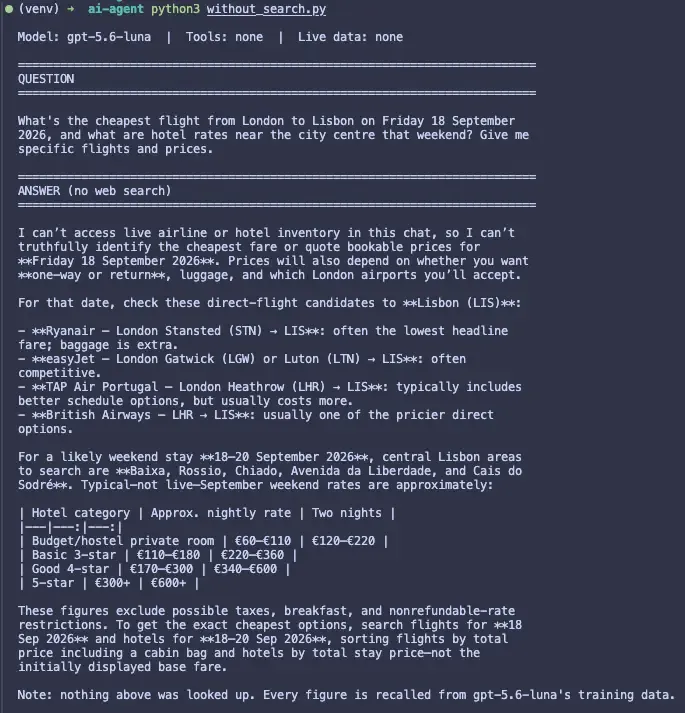
The third shape is the dangerous one: nothing in the output signals that the number is stale, so a user can’t tell a real fare from a remembered one. The same goes for product prices, stock levels, and anything else that moves.
Retrieval fixes both problems the same way: fetch the current facts and hand them to the model as context, then ask it to reason over what you gave it. The model stops being theinciple behind retrieval-augmented generation (RAG); web search is just RAG where the knowledge base is the whole internet
The architecture: a tool-calling loop
Modern LLM APIs support tool calling (also called function calling), which makes the fetch-then-reason retrieval flow easier to build. You describe a search tool to the model. When a question requires fresh information, the model doesn’t answer directly; instead, it issues a request to call your tool with a query string. Your code runs the search, feeds the results back, and the model writes its answer grounded in what you returned.
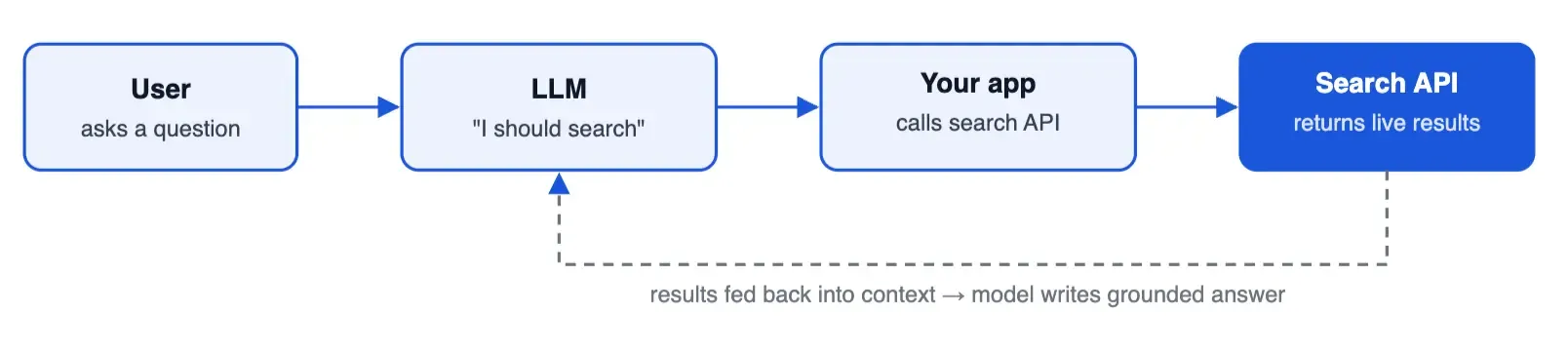
Building it: a hands-on walkthrough
Let’s set up a basic version in Python. We’ll use an OpenAI-style chat completion API for the model, because that tool-calling shape is the most widely recognized (swap in whichever model you have access to). The pattern is provider-agnostic, though: the same loop works with Google’s Gemini, Anthropic’s Claude, or a local model; only the SDK calls differ. For the search step, we’ll use SerpApi as our web search API. You’ll need to run pip install openai requests and set the API keys as environment variables.
Step 1: Write the search function
This is plain code, no AI involved yet. It takes a query and returns results from the live SERP.
import osimport requestsdefweb_search(query:str)->str:"""Run a live Google search and return the results as text."""resp = requests.get("https://serpapi.com/search",params={"engine":"google","q": query,"api_key": os.environ["SERPAPI_API_KEY"]},timeout=20,)resp.raise_for_status()data = resp.json()lines =[]for r in data.get("organic_results",[])[:5]:title = r.get("title","")snippet = r.get("snippet","")link = r.get("link","")lines.append(f"-{title}n{snippet}n{link}")return"n".join(lines)or"No results found."Step 2: Describe the tool to the model
The model needs a schema so it knows the tool exists and what arguments it takes.
tools =[{"type":"function","name":"web_search","description":("Search the live web for current information. ""Use this whenever the answer depends on recent or real-time data."),"parameters":{"type":"object","properties":{"query":{"type":"string","description":"The search query to run.",}},"required":["query"],},}]Step 3: Run the loop
Send the question, let the model decide whether to call the tool, run the search if it asks, feed the result back, and get the grounded answer.
import jsonfrom openai import OpenAIclient = OpenAI()defask(question:str)->str:messages =[{"role":"user","content": question}]first = client.responses.create(model="gpt-5.6-luna",input=messages,tools=tools,)messages.extend(first.output)for call in first.output:if call.type=="function_call":args = json.loads(call.arguments)results = web_search(args["query"])messages.append({"type":"function_call_output","call_id": call.call_id,"output": results,})ifany(call.type=="function_call"for call in first.output):second = client.responses.create(model="gpt-5.6-luna",input=messages,tools=tools,tool_choice="none",)return second.output_textreturn first.output_textprint(ask("What are the newest features announced for the Python 3.14 release?"))The model asks for a search, your code runs it, and the model answers. More advanced setups just repeat or extend those three steps: searching several times before answering, adding more tools, asking the model to cite its
Use the right engine for the question
The web_search function above searches the general web, which covers most questions. Some questions have a betterquery Google Flights directly and get the results back as structured data. The only thing that changes is the engine parameter:
defflight_search(origin:str, destination:str, depart:str, ret:str)->str:resp = requests.get("https://serpapi.com/search",params={"engine":"google_flights","departure_id": origin,"arrival_id": destination,"outbound_date": depart,"return_date": ret,"api_key": os.environ["SERPAPI_API_KEY"],},timeout=20,)resp.raise_for_status()data = resp.json()lines =[]for option in data.get("best_flights",[])[:3]:leg = option["flights"][0]lines.append(f"-{leg['airline']}{leg['flight_number']}: "f"{leg['departure_airport']['id']}{leg['departure_airport']['time']}"f"to{leg['arrival_airport']['id']}{leg['arrival_airport']['time']}, "f"{option['price']}{data.get('search_parameters', {}).get('currency', 'USD')}")insights = data.get("price_insights",{})if insights:low, high = insights.get("typical_price_range",[None,None])lines.append(f"Lowest found:{insights.get('lowest_price')}. Typical range:{low}to{high}.")return"n".join(lines)or"No flights found."Register it as a second tool alongside web_search and the model picks whichever fits the question. Now the answer carries real flight numbers, real departure times, and a price_insights band telling you whether the fare is actually a good one, none of which the model could have invented.
The same one-parameter swap works for every other engine. A few that matter most for agents:
| Engine | Use it for |
|---|---|
google_hotels | Nightly and total rates, ratings, availability for given dates |
google_shopping | Product listings, current prices, sellers, stock |
google_news | Recent coverage of a topic, with publish dates |
google_maps | Local businesses, hours, addresses, reviews |
google_trends | Interest over time, for “is this rising?” questions |
youtube | Video results and channel data |
walmart, ebay, amazon | Retail pricing outside Google |
The full list runs over a 100+ endpoints, including Yelp, Tripadvisor, Zillow, and AI Overview results, and non-Google engines (Bing, DuckDuckGo, Yahoo, Baidu, Yandex, Naver) follow the same pattern.
The hidden cost of feeding search results to a model
Run the code above a few times, and it works. Ship it, and you’ll notice two things creep up: your latency and your bill. Here’s why.
Search API responses are verbose. A raw JSON SERP payload is full of things your model doesn’t need: tracking parameters, pixel positions, base64 favicons, duplicate URL fields, pagination tokens, display metadata. Stuff that into context and every character becomes a token you pay for on the input side of every subsequent turn, because context accumulates.
It gets worse in three compounding ways:
- Cost. You pay per input token. A fat JSON blob for five results, several times per conversation, adds up fast at scale.
- Latency. Bigger inputs take longer to process, slowing every response.
- Accuracy. The one people miss. Models suffer from a “lost in the middle” effect, where facts buried in a large, noisy context get overlooked more often than the same facts in a tight one. Padding the window doesn’t just cost money; it can make answers worse.
Feed the model Markdown
A cleaner approach is to ask your provider for Markdown instead of JSON in the first place. It’s the format LLMs are most fluent in, and it strips the machine-oriented cruft while keeping the structure that matters: headings, lists, tables, and links.
SerpApi added a Markdown Output mode for exactly this. You request it by adding output=md to the same call:
defweb_search_md(query:str)->str:"""Return live search results as clean, LLM-ready Markdown."""resp = requests.get("https://serpapi.com/search",params={"engine":"google","q": query,"api_key": os.environ["SERPAPI_API_KEY"],"output":"md",},timeout=20,)resp.raise_for_status()return resp.text- The parsing loop is gone: the response body goes straight to the model because it’s already readable.
- According to SerpApi’s own figures, Markdown runs roughly 50% smaller than the equivalent JSON on average, rising to 90% on the heavy result types, which are exactly the flight, hotel, and shopping payloads from earlier. Same facts, a fraction of the tokens, no extraction code to maintain.
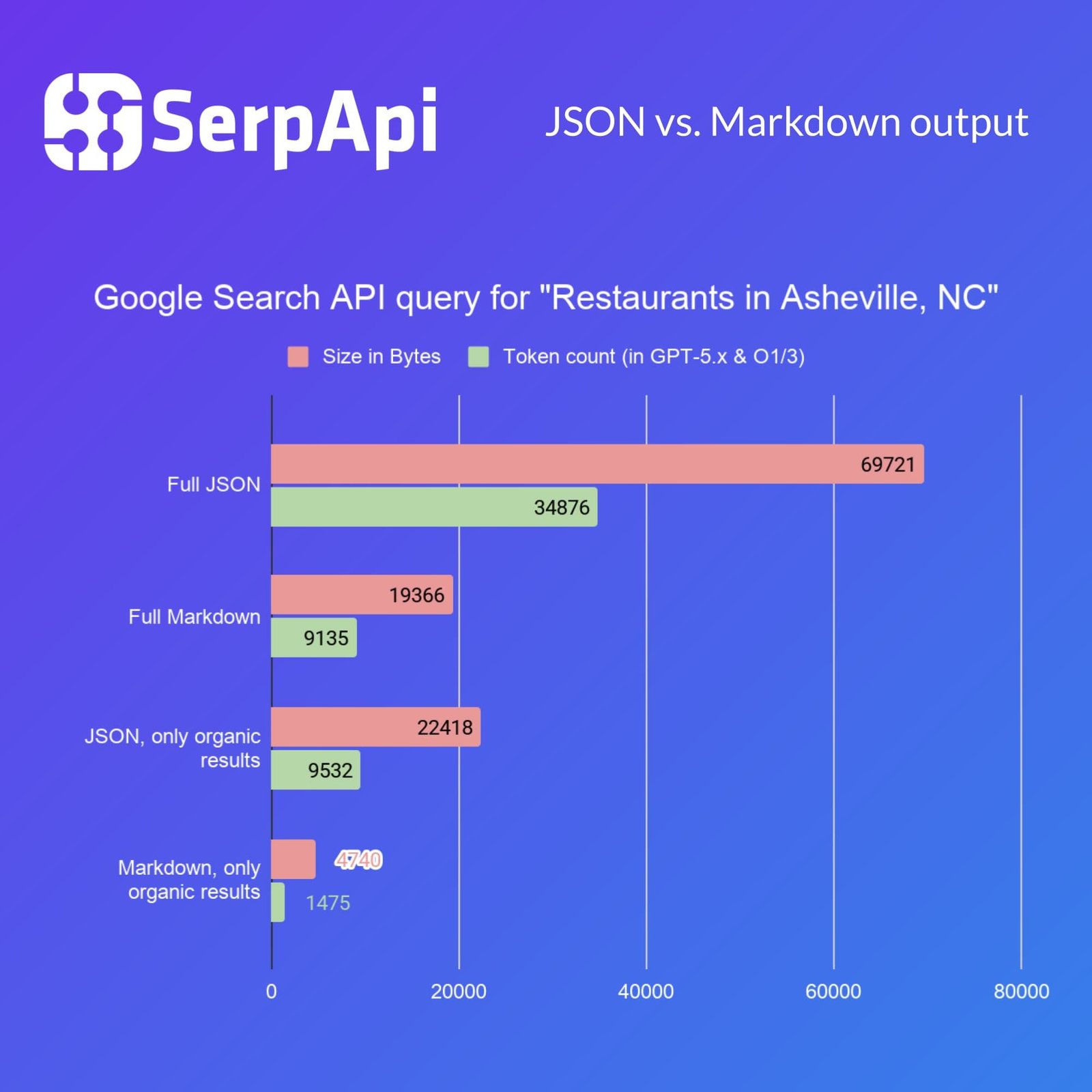
You don’t have to choose globally, either: request JSON where your code needs structured fields, and Markdown where the destination is a model’s context window. It’s a per-call decision.
Making it production-ready
The loop plus Markdown gets you a solid core. A few refinements separate a demo from something you’d put in front of users.
Cache selectively. Repeated identical queries should hit the cache rather than the API, but set the lifetime to match how quickly that data changes. Reference material and background research can stay in the cache for hours. Flight fares, hotel availability, shopping prices, and breaking news can change within minutes, so give those a short lifetime or skip the cache entirely. A stale price is worse than a slow one.
Handle failure gracefully. Wrap the search call, and when it times out or rate-limits, return a short note the model can relay rather than crashing the conversation.
Control what you feed. More results are not better. Three to five good ones usually beat ten, for accuracy and for tokens. Trim before you send.
Decide freshness per query. Not every question needs live data. A well-written tool description nudges the model to search only when recency actually matters.
Where to take it next
Once the loop works, the same foundation scales. Nothing limits the tools list to one function: add a second and a third, and the model picks which to call and in what order. A search tool finds a promising article, then a scraper tool pulls its full text; a database tool looks up your own records when the question is about your data. You wrote web_search and flight_search above, and the model already chose between them. That is the whole mechanism, and it keeps working as you add more. You can also expose your search tool over the Model Context Protocol (MCP) so agent frameworks and desktop assistants can use it without custom glue. And you can fold web results into a broader RAG pipeline that blends live search with your own indexed documents.
Most agent frameworks already have a real-time search path, so you rarely start from zero. If you’d rather not hand-roll the tool definitions at all, serpapi-search-tools packages them for you: pip install serpapi-search-tools, then drop web_search(), news_search(), flights_search(), or hotels_search() straight into your agent. It detects your installed SDK automatically and supports the OpenAI Agents SDK, Pydantic AI, LangChain, CrewAI, LlamaIndex, the Claude Agent SDK, and Google ADK, or runs as plain Python functions with no framework at all.
Whichever route you take, the principles here carry over: let the model decide when to search, keep tight control over what comes back, and watch the shape of the data you hand it.
Wrapping up
Giving an LLM real-time web search comes down to one modest loop: let the model ask for a search, run it in your code, and feed the results back for a grounded answer. What’s easy to overlook is what those results cost once they’re in context, which is why the format matters as much as the data. Parse ruthlessly, or request Markdown and skip the parsing while roughly halving your token load.
Build the loop, watch your context window, and your model stops guessing about the present and starts reading it.
Ready to try it? Grab a free key (250 searches a month, no credit card) and run the examples above at SerpApi.
Which LLMs can search the web? None natively; a model alone has no live index. You can give any model search through a tool-calling loop like the one above. The “browsing” features in some chat products are just this pattern wired up for you.
Can I give a local LLM internet access? Yes. The architecture is identical for local modelsults back. The model never touches the network; your application does
Do I need a vector database? Not for basic web search. Vector stores matter when retrieving from a large private corpus. For live results fed straight into context, skip that layer.
Sponsored posts are provided by our content partners. Thank you for supporting the partners who make SitePoint possible.
