




SitePoint SponsorsPublished inSoftware Development·DevOps·Business·
July 31, 2026
SitePoint Premium
Stay Relevant and Grow Your Career in Tech
- Premium Results
- Publish articles on SitePoint
- Daily curated jobs
- Learning Paths
- Discounts to dev tools
7 Day Free Trial. Cancel Anytime.
Most ERP buying guides stop at feature checklists. This one goes down to the schema, the application server layer and the five-year cost of every customization you make.
Choosing an ERP is one of the highest-stakes technical decisions an organization makes, and the numbers prove how often it goes wrong. A large share of ERP projects fail to meet their original objectives, and cost overruns averaging well over 100 percent are common. The root cause is rarely the software itself. It is the gap between a rigid, pre-built product and the way a business actually operates, a gap teams try to close with customization that quietly becomes the most expensive and fragile part of the whole system.
This guide compares a custom ERP with an off-the-shelf ERP the way an engineer would: by the data model, the integration surface, the performance characteristics and, crucially, the infrastructure you have to run and keep alive. Whether you deploy on a managed platform or a bare VPS behind NGINX, the hosting model shapes cost, control and risk as much as any feature list.
An ERP built from scratch shifts from luxury to fit-for-purpose, giving you a system shaped around your processes and an infrastructure footprint you control end to end.
Key Takeaways
- Off-the-shelf ERP is faster to start but pushes your processes to fit the vendor’s schema, and heavy customization breaks on every upgrade.
- A custom ERP makes the data model, APIs and performance tuning yours to control, which matters most for non-standard or fast-changing operations.
- The real comparison is total cost of ownership over five years, not the sticker price or the first invoice.
- A custom ERP is a standard web application — Laravel/PHP-FPM, Django/ASGI or ASP.NET Core/Kestrel on PostgreSQL or MySQL, with Redis and Docker — which means you can self-host it on a VPS you control, with the reverse proxy of your choice.
- Build when your workflow is a competitive advantage; buy when your processes are genuinely commodity.
Table of Contents
- What Custom and Off-the-Shelf ERP Really Mean
- Why So Many ERP Projects Fail: The Customization Trap
- The 7 Technical Trade-offs That Actually Matter
- Custom vs Off-the-Shelf: Side-by-Side
- Infrastructure: How a Custom ERP Is Actually Deployed
- When to Build vs When to Buy
- 8 Best Practices for a Custom ERP Build
- FAQs
- Summary
What Custom and Off-the-Shelf ERP Really Mean
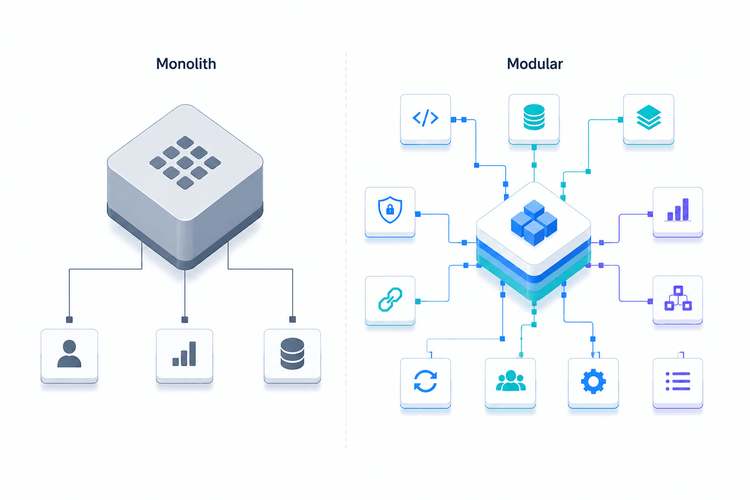
An off-the-shelf ERP is a packaged product (SAP Business One, Microsoft Dynamics, NetSuite, Odoo Community and similar) built to serve thousands of companies from one shared data model. You configure it, you bolt on modules, and where it does not fit you write customizations that live alongside vendor code.
A custom ERP is an application built from the ground up around one organization’s processes. There is no vendor schema to conform to: the entities, the state machines, the business rules and the reports are modeled to match how the company already works. Technically it is a normal web application, which is exactly why it is so much more controllable than a packaged suite.
That distinction is not ideological. It determines who owns the schema, who controls performance, where the data lives and what an upgrade costs you three years from now.
Why So Many ERP Projects Fail: The Customization Trap
Packaged ERP demos cleanly because the demo runs the vendor’s happy path. Real operations are messier, so teams customize. The trap is that every customization layered onto a packaged ERP becomes technical debt the vendor does not maintain. When the vendor ships a major version, each customization has to be re-tested and frequently rewritten, because the upgrade moved the ground beneath it.
This is the mechanism behind the failure and overrun statistics. The license was the cheap part. The expensive part is the specialist work to keep a heavily customized instance upgradable, plus the per-seat fees that scale with headcount whether or not the seats are heavily used. A custom ERP does not remove complexity, but it relocates it into a codebase you own and can refactor on your own schedule, instead of a black box you rent.
The 7 Technical Trade-offs That Actually Matter
1. Data model and schema ownership
With a packaged ERP you inherit a generic schema and adapt your processes to it, which means workarounds, unused tables and custom fields stapled onto entities that were never meant to carry them. A custom ERP lets you model the domain directly. A hot path such as orders filtered by tenant and status can be indexed precisely, because you own the table:
CREATEINDEX CONCURRENTLY idx_orders_tenant_statusON orders (tenant_id,status)WHEREstatusIN('open','processing');EXPLAINANALYZESELECT*FROM ordersWHERE tenant_id =42ANDstatus='open';That kind of targeted, partial index is tridor product
2. Customization vs configuration limits
Off-the-shelf customization lives within the vendor’s extension points. Step outside them and you are in unsupported territory. In a custom ERP the customization is the application, so a new approval rule or a new state in a workflow is a normal code change with normal tests behind it, not a fight with a framework.
3. Integration surface and APIs
ERPs do not live alone. They talk to e-commerce, EDI partners, payment processors, shipping and BI. Packaged systems expose connectors that are often metered, version-locked or paywalled. A custom build exposes exactly the APIs you need, on your terms, and can offload slow integrations to a queue rather than blocking a user request:
php artisan queue:work redis --queue=invoicing,edi,default --tries=3--timeout=300 --max-jobs=10004. Performance and scaling
In a packaged ERP, performance is largely the vendor’s domain. You can add hardware, but you rarely control the queries. In a custom ERP you tune the whole stack. The following example shows a PHP/Laravel-based ERP sizing its FPM worker pool to the real per-request memory cost of report-heavy pages — the same principle applies in Django or ASP.NET Core :
pm=dynamicpm.max_children=24 ; ~= usable RAM / avg worker RSSpm.start_servers=6pm.min_spare_servers=4pm.max_spare_servers=10pm.max_requests=500 ; recycle workers to curb memory growthrequest_terminate_timeout=120sLong-running financial reports are the classic cause of gateway timeouts, so application server and reverse proxy timeouts must be set deliberately rather than left at the default — this class of misconfiguration is behind most 502 and 504 errors regardless of the stack.
5. Infrastructure and hosting control
This is where the two models diverge most. A packaged SaaS ERP runs where the vendor says it runs. A custom ERP is a standard web app, deployable on any VPS or control panel (such as CloudPanel), with a reverse proxy fronting the application tier. The dominant open-source choice is NGINX (paired naturally with Laravel/PHP-FPM); Django-based ERPs typically run behind Gunicorn over an ASGI server such as Uvicorn; and ASP.NET Core uses its built-in Kestrel server, itself often fronted by NGINX or IIS in production. The NGINX example below illustrates the pattern for a PHP stack with a real-time Node.js side-car:
upstream erp_app{server unix:/run/php/php8.3-fpm-erp.sock;}server{listen443 ssl http2;server_name erp.yourcompany.com;root /home/erp/htdocs/public;client_max_body_size64M;location /{try_files$uri$uri/ /index.php?$query_string;}location ~ .php${fastcgi_pass erp_app;fastcgi_read_timeout120s;include fastcgi_params;fastcgi_param SCRIPT_FILENAME $document_root$fastcgi_script_name;}location /ws/{proxy_pass http://127.0.0.1:6001;proxy_http_version 1.1;proxy_set_header Upgrade $http_upgrade;proxy_set_header Connection "upgrade";}}6. Data ownership, security and compliance
When the database is yours, data residency, retention, encryption and audit logging are decisions you make, not constraints you accept. For organizations with regulatory or sovereignty requirements, hosting the ERP in a chosen region on infrastructure you control is often the deciding factor on its own.
7. Total cost of ownership and the upgrade path
Off-the-shelf wins the first year on raw cost and time to value. Custom usually wins the five-year view, because it removes per-seat licensing and the recurring customization-rework tax. The honest way to compare is to model both over a realistic horizon, including license growth, integration fees, customization maintenance and the internal hours each option consumes.
Custom vs Off-the-Shelf: Side-by-Side
The trade-offs above, condensed into the dimensions that decide most ERP projects:
| Dimension | Off-the-shelf ERP | Custom ERP |
|---|---|---|
| Data model | Vendor schema; you bend your processes to fit it | Schema you own, normalized to your actual workflows |
| Customization | Configuration plus plugins; custom code breaks at upgrade | Native and unlimited; the codebase is the customization |
| Integrations | Pre-built connectors, often metered or paywalled | First-class APIs to the exact systems you run |
| Performance tuning | Black box; little control over queries or indexes | Full control of queries, indexes, caching and workers |
| Hosting and infra | Vendor cloud or rigid on-prem appliance | Self-host anywhere: VPS, NGINX, Docker, your region |
| Data ownership | Vendor-controlled store, residency constraints | Your database, your backups, your compliance posture |
| Cost shape | Low entry, recurring per-seat licensing | Higher upfront build, no per-seat tax afterward |
| Upgrade path | Forced version bumps; re-test every customization | You decide when and what changes |
Infrastructure: How a Custom ERP Is Actually Deployed
A custom ERP is not exotic infrastructure. Three common, boring, reliable shapes exist: a Laravel/PHP-FPM application behind NGINX; a Django application served by Gunicorn and an ASGI layer (Uvicorn or Daphne) for async workloads; or an ASP.NET Core application running on Kestrel, optionally behind a reverse proxy for TLS termination. All three sit on PostgreSQL or MySQL, use Redis for cache, sessions and queues, and are packaged with Docker for reproducible environments. The whole stack fits comfortably on a single well-sized VPS to start, and splits across nodes as load grows. The Docker Compose skeleton below applies equally to any of them — only the app image changes:
services:app:build: .depends_on:[db, cache]db:image: postgres:16volumes:["pgdata:/var/lib/postgresql/data"]cache:image: redis:7volumes:pgdata:Because every layer is standard, the operational playbook is standard too: health checks and a process manager to auto-restart workers, indexed queries and a cache to keep response times flat, off-peak backups of a database you fully control, and centralized logging so a slow report is diagnosed in minutes. None of this is available to you in the same way inside a closed packaged suite.
The practical takeaway for a technical team is that a custom ERP does not lock you into a vendor’s cloud. It runs on the same application stack you already operate for everything else — whether that is NGINX/PHP-FPM, Gunicorn/Django, or Kestrel/ASP.NET Core.
When to Build vs When to Buy
The decision is not about prestige, it is about where your complexity lives. Buy when your processes are genuinely commodity and the packaged best-practice flow is good enough, when you need to be live in weeks rather than months, or when you lack any appetite to own software long term. In those cases the licensing tax is worth paying.
Build when your workflow is a competitive advantage, when you are already drowning in spreadsheets and workarounds because no product fits, when integrations and data ownership are first-order requirements, or when per-seat licensing has started to scale faster than the value you get from it. In those cases a custom ERP built from the ground up around your workflows stops being the expensive option and becomes the one that actually fits, with an infrastructure footprint your team can run and tune like any other application in your stack.
8 Best Practices for a Custom ERP Build
- Start with a process and data audit, not a feature list. Model the entities and state machines before writing code.
- Design the API surface first so integrations and a future mobile or partner client are not bolted on later.
- Index for the read paths that matter and review slow query logs from day one, not after the first outage.
- Push anything slow (invoicing, PDFs, EDI, syncs) onto a Redis queue so user requests stay fast.
- Containerize with Docker so staging matches production and onboarding a new developer takes minutes.
- Set reverse proxy and application server timeouts and worker/thread pool sizes deliberately, sized to your heaviest reports (NGINX + PHP-FPM pool, Gunicorn worker count, or Kestrel thread limits depending on your stack).
- Automate backups of your database and test the restore, since owning the data means owning recovery.
- Instrument everything with centralized logging and error tracking so regressions surface before users report them.
Is a custom ERP more expensive than off-the-shelf?
Usually higher upfront and lower over time. Off-the-shelf wins year one on license cost and speed. A custom ERP removes per-seat licensing and the recurring cost of re-doing customizations at every upgrade, so it tends to win the five-year total cost of ownership for organizations with non-standard processes or growing headcount.
Can I self-host a custom ERP on a VPS?
Yes. A custom ERP is a standard web application — PHP/Laravel behind NGINX, Django behind Gunicorn/Uvicorn, or ASP.NET Core on Kestrel — on PostgreSQL or MySQL with Redis. It runs on any VPS or a control panel such as CloudPanel, which gives you full control over region, performance and data ownership regardless of the framework you choose.
How do I avoid the customization trap with a packaged ERP?
Keep customizations inside the vendor’s supported extension points, document every change, and budget for re-testing each one at every major upgrade. When the list of unsupported customizations grows large, that is the signal that a custom build may now be cheaper to maintain than the packaged one.
What technology stack is typically used to build a custom ERP?
Three common, reliable shapes cover most custom ERP builds. In the PHP/open-source world: Laravel with PHP-FPM, served behind NGINX. In the Python/open-source world: Django with Gunicorn and an ASGI server (Uvicorn or Daphne) for async and WebSocket workloads. In the Microsoft/closed-source world: ASP.NET Core with its built-in Kestrel server, optionally fronted by NGINX or IIS. All three use PostgreSQL or MySQL for data, Redis for cache and queues, and Docker for reproducible environments. Stack choice comes down to team expertise and ecosystem fit, not infrastructure philosophy.
How long does it take to build a custom ERP?
It depends on scope, but a focused first module that replaces the most painful spreadsheet or workaround can ship in a few months, with the system growing iteratively from there. Building module by module keeps risk low and delivers value before the whole suite is finished.
Summary
The custom ERP vs off-the-shelf question is really a question about control. Packaged ERP is faster and cheaper to start, but you adopt the vendor’s schema, performance ceiling and upgrade calendar, and you pay for customization twice: once to build it and again to keep it alive. A custom ERP front-loads cost and effort, then hands you the schema, the APIs, the performance levers and the hosting model.
For commodity processes, buy. For workflows that are part of how you win, a purpose-built ERP on a stack you control — whether that is PHP/Laravel, Django/Python or ASP.NET Core — is the more durable engineering decision. Model the five-year cost honestly, look hard at where your real complexity lives, and let that, not the demo, make the call.
Sponsored posts are provided by our content partners. Thank you for supporting the partners who make SitePoint possible.
