


Close Menu
ToolTechBlogToolTechBlog

    Subscribe to Updates

    Get the latest creative news from FooBar about art, design and business.

    What's Hot

    This built-in windows tool can tell if your DirectX has a problem

    November 21, 2026

    Signal restricts mobile screenshots as it confronts ‘existential threat’ of AI surveillance

    November 21, 2026

    What to Check Before Adding a Tripo Model to a Website

    November 21, 2026
    Facebook X (Twitter) Instagram
    ToolTechBlogToolTechBlog
    • Home
    • AI Tools
    • Web Hosting
    • Tech
    • Digital Marketing
    • Business Software
    • VPN & Cybersecurity
    ToolTechBlogToolTechBlog
    Home»Tech»The built-in iPhone app for creativity you may be ignoring (but shouldn’t)
    Tech

    The built-in iPhone app for creativity you may be ignoring (but shouldn’t)

    Tool Tech TeamBy Tool Tech TeamNovember 7, 2026No Comments4 Mins Read
    Facebook Twitter Pinterest Telegram LinkedIn Tumblr WhatsApp Email
    The built-in iPhone app for creativity you may be ignoring (but shouldn't)
    Share
    Facebook Twitter LinkedIn Pinterest Telegram Email

    Apple‘s free digital whiteboard lets you organize messy ideas, sketch plans and work with others without another subscription.

    Your iPhone is great for capturing screenshots you’ll likely never revisit. So organizing all that mess into something coherent might be just what you need. Apple’s Freeform app has been available on iPhones since 2022, giving you room to spread out ideas instead of adding them to another list.

    It’s a digital whiteboard with an infinite canvas, so you can organize photos, sketches, links, and PDFs in any way you want. From there, you can connect them and change your mind without having to rewrite everything. The Freeform app is good for visual plans that are easier to show than explain, and others can participate too.

    Now, Freeform isn’t some miracle app that can organize your life, but it could be just the thing that makes your next messy project less of a headache. Best of all, the app is free.

    What you can do with Freeform’s infinite canvas on iPhone

    An iPhone Duo displays a Freeform board with an Apple Pencil beside it.

    When you open a new Freeform board, you’re presented with a blank canvas that expands as you add to it. You can use your finger to scribble on the board, add a photo or sticky note, and drag items around until they begin to make sense. It also lets you draw arrows between related items, zoom out to see the bigger picture or zoom in to work on smaller details. An Apple Pencil isn’t required, either, although iPhone Duo owners running iOS 27.2 or later can use the Apple Pencil (USB-C) to sketch directly in Freeform.

    It also allows for videos, PDFs, website links, and text boxes. Photos app and Safari can also send images and links directly to a board from the Share menu, without copying and pasting.

    You could storyboard a video by laying out reference images and notes for each shot, then shuffle the scenes around as your ideas evolve. Or sketch out a DIY project on the canvas, where drawings and measurements are right where you need them. But things like your grocery list, for instance, probably don’t need an infinite whiteboard.

    Since its introduction with iOS 16.2, Freeform has gained Dark Mode and folders in iOS 27. On compatible iPhones, Image Playground can also create illustrations for boards, but Freeform itself doesn’t require Apple Intelligence.

    Freeform sharing is simple, until Android joins the conversation
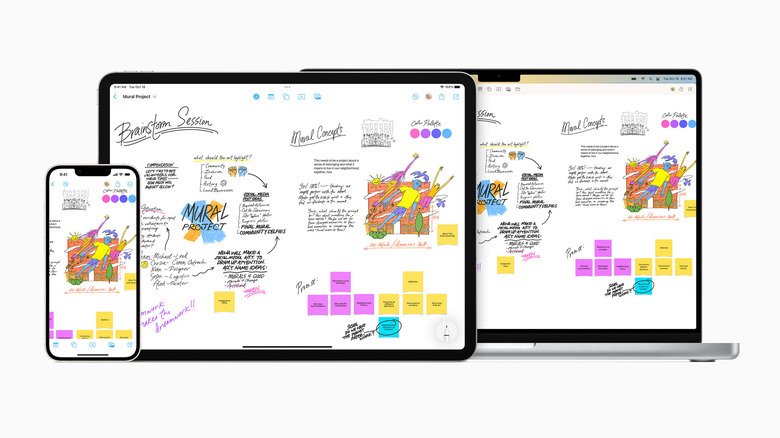
    An iPhone, iPad, and Mac display a Freeform board.

    You can also invite others to a Freeform board and see their changes in real time. That means a group can plan a vacation or collaborate on a project without having to search through message threads. Boards are syncedoard, you’ll be glad to have the larger screen on an iPad or Mac

    There is one tiny hiccup, though. Everyone on the board needs a compatible Apple device, an Apple Account with two-factor authentication, and Freeform turned on in iCloud. There’s no Android app or browser-based editor, so a cross-platform whiteboard like Miro would be more appropriate for mixed-device groups. Alternatively, if someone just needs to view the final product, the board can be exported as a PDF.

    There are downsides to the expanding canvas, as well. Bigger boards can be hard to maneuver, particularly on the smaller screen of an iPhone, but maybe this is a problem for the iPhone Duo to solve.

    Board creation and sharing are still free. You don’t need Apple’s optional Creator Studio subscription, which costs $12.99 per month in the U.S., to do basic brainstorming, but it does provide access to premium assets, plus advanced AI image-generation tools on compatible iPhones. If you previously deleted Freeform thinking it was some Samsung-like bloatware, you can reinstall it from the App Store.

    builtin creativity ignoring iPhone shouldnt
    Share. Facebook Twitter Pinterest LinkedIn Tumblr Email
    Tool Tech Team
    • Website

    Related Posts

    This built-in windows tool can tell if your DirectX has a problem

    November 21, 2026

    Why you shouldn’t depend on GTA 6 to auto-save

    November 21, 2026

    The Internet Archive’s workers are unionizing

    November 20, 2026

    OpenAI is testing Dots personal agents on its $20 per month Plus tier

    November 20, 2026

    Meta Quest adds 3D movie purchases and rentals to its TV app

    November 19, 2026

    Elon Musk accuses Ukraine of being ‘untruthful’ about Starshield disruptions

    November 19, 2026
    Leave A Reply Cancel Reply

    Top posts
    Tech

    This built-in windows tool can tell if your DirectX has a problem

    By Tool Tech Team
    Business Software

    Signal restricts mobile screenshots as it confronts ‘existential threat’ of AI surveillance

    By Tool Tech Team
    Web Hosting

    What to Check Before Adding a Tripo Model to a Website

    By Tool Tech Team
    Editors Picks

    This built-in windows tool can tell if your DirectX has a problem

    November 21, 2026

    Signal restricts mobile screenshots as it confronts ‘existential threat’ of AI surveillance

    November 21, 2026

    What to Check Before Adding a Tripo Model to a Website

    November 21, 2026

    Trump says reported FBI database hack is ‘not good’

    November 21, 2026
    About Us

    Welcome to ToolTechBlog, your trusted source for the latest insights, reviews, and practical guides on AI tools, business software, cybersecurity, web hosting, and consumer technology.
    Our mission is simple: to help individuals, entrepreneurs, freelancers, students, and businesses discover the right digital tools to improve productivity, streamline workflows, and make informed technology decisions.

    Our Picks

    This built-in windows tool can tell if your DirectX has a problem

    November 21, 2026

    Signal restricts mobile screenshots as it confronts ‘existential threat’ of AI surveillance

    November 21, 2026

    What to Check Before Adding a Tripo Model to a Website

    November 21, 2026
    Top Reviews

    The AI Hype Index: Unsexy AI

    July 29, 2026

    What it is and How to Fix it

    July 29, 2026

    LG to Ban Residential Proxies from Smart TV Apps

    July 29, 2026

    © 2026 tooltechblog.com. All rights reserved. Designed by DD.

    • About Us
    • Contact Us
    • Terms and Conditions
    • Privacy Policy
    • Disclaimer

    Type above and press Enter to search. Press Esc to cancel.