



Eliminating AI Code Hallucinations with TypeScript Compiler Diagnostics and TDD Loops

SitePoint TeamPublished inAI·Programming·JavaScript·
September 20, 2026
The AI briefing for Developers
Stay up to date with AI tools, model releases, and developer workflows that matter.
Weekly. Free. One click to leave.
SitePoint Premium
Stay Relevant and Grow Your Career in Tech
- Premium Results
- Publish articles on SitePoint
- Daily curated jobs
- Learning Paths
- Discounts to dev tools
7 Day Free Trial. Cancel Anytime.
AI coding agents generating TypeScript frequently hallucinate code that looks correct but fails to compile. Compiler diagnostics combined with test-failure traces, structured as machine-readable JSON, create a verifiable feedback loop that forces an AI agent to self-correct against the real type system rather than its probabilistic memory of it.
How to Build a TypeScript Diagnostic Feedback Loop for AI Coding Agents
- Extract compiler diagnostics programmatically using
typescript.createPrograminstead of parsing CLI output. - Enrich each diagnostic with enclosing symbol context via ts-morph AST traversal.
- Validate every error payload against a Zod schema to guarantee consistent structure.
- Run tests programmatically with Vitest’s
createVitestAPI to capture structured failure data. - Merge diagnostics and test failures into a single JSON feedback payload with token estimates.
- Detect thrashing by hashing diagnostic and failure identifiers across iterations.
- Feed the structured payload back into the agent’s context window with file-scoped fix constraints.
- Repeat until zero compiler errors and all tests pass, or the iteration ceiling is reached.
Table of Contents
Why AI Coding Agents Keep Hallucinating TypeScript
AI coding agents generating TypeScript frequently produce code that looks correct but fails to compile. These failures take specific, predictable forms: fabricated method signatures that do not exist on a given type, phantom generic parameters applied to interfaces that accept none, invented overloads for standard library functions, and calls to third-party package APIs that were never published. When Claude, GPT-4, or Copilot agents work inside TypeScript projects, they draw on probabilistic training data rather than the actual type system. The result: incorrect return types, non-existent utility type combinations, and method calls against outdated or imaginary package surfaces.
Compiler diagnostics combined with test-failure traces, structured as machine-readable JSON, create a verifiable feedback loop that forces an AI agent to self-correct against the real type system rather than its probabilistic memory of it.
This approach is deterministic. It does not rely on the agent “understanding” TypeScript. It relies on the TypeScript compiler and a test runner serving as an oracle.
The implementation uses TypeScript 5.4.x Compiler API, Vitest 2.1.x programmatic API, Zod 3.x for schema validation, ts-morph 21.x for AST enrichment, and Node.js v22+ (required for native fetch support and stable ESM loader behavior used by Vitest). Add "engines": { "node": ">=22" } to your package.json to enforce the Node version requirement, and verify with node --version. The compiler extracts diagnostics into JSON frames, Vitest captures test failures as structured objects, and Zod validates every payload before it reaches the agent’s context window — replacing noisy terminal output with line-and-column-indexed diagnostic objects (~42 tokens per error) that an agent can act on.
The Problem with Raw Terminal Output as LLM Context
Token Bloat and Signal Loss
Most developers feeding compilation errors back into an LLM prompt simply capture the output of tsc --noEmit and paste it in. That terminal dump includes ANSI escape codes, repeated absolute file paths on every diagnostic line, and boilerplate like “Found 12 errors in 4 files.” across multiple summary lines. A 12-error compilation run can consume 1,200 or more tokens of prompt context. The same set of errors, restructured as a JSON array of diagnostic frames with only the relevant fields, uses approximately 480 tokens. That is a 60% reduction in context window consumption for identical information density.
Consider the contrast between raw output and structured output for the same set of errors:
// Raw tsc terminal output (abbreviated)src/services/UserService.ts:42:11 - error TS2339: Property 'fetchProfile' does not exist on type 'ApiClient'.42 client.fetchProfile(userId);~~~~~~~~~~~~src/types/ApiClient.ts:8:38 get(url: string): Promise<Response>;~~~The expected type comes from this interface declaration.Found 12 errors in 4 files.[{"diagnosticCode":2339,"severity":"error","filePath":"src/services/UserService.ts","line":42,"column":11,"messageChain":["Property 'fetchProfile' does not exist on type 'ApiClient'."],"codeSnippet":"client.fetchProfile(userId);","enclosingSymbol":"UserService.handleRequest"}]The structured payload eliminates noise while preserving every actionable detail: the diagnostic code, exact file location, the message chain, a code snippet, and the enclosing symbol where the error lives.
Why Agents Misinterpret Unstructured Errors
LLMs struggle with multi-line diagnostic chains. The TypeScript compiler frequently emits related-information spans such as “The expected type comes from property ‘x’ which is declared here in…” that span multiple lines with indentation and file references. Without line numbers explicitly tied to code snippets in a parseable structure, agents may patch the wrong location. Worse, they fabricate fixes for errors that do not actually exist in the source, confusing a related-info span for a separate error. Structured JSON with a messageChain array and explicit positional data eliminates this ambiguity entirely.
Architecture of the Diagnostic Feedback Loop
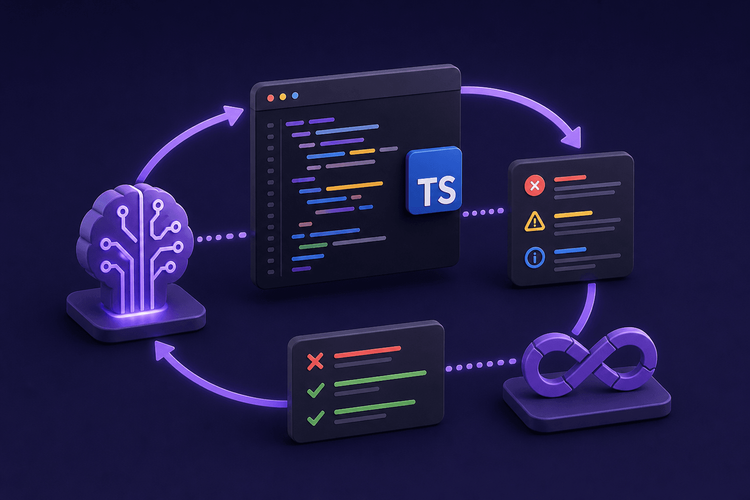
The feedback loop follows a cyclic three-phase sequence: Compile, Test, Report. The agent generates or modifies TypeScript source files. The harness then extracts diagnostics via the TypeScript Compiler API. If compilation passes, Vitest runs programmatically against the test suite. The results from both phases merge into a single JSON payload, and the harness feeds that payload back into the agent’s prompt. The loop repeats until the exit condition is met: zero compiler diagnostics AND all tests green.
Key Design Decisions
Parsing TAP or JUnit XML introduces an intermediate serialization layer that loses structured data. The harness uses Vitest’s Node programmatic API instead, gaining direct access to task-level results — assertion diffs, duration, and hierarchical suite/test names — without format conversion. The createVitest function lets the harness control the entire test lifecycle in-process.
Using typescript.createProgram directly instead of shelling out to the tsc CLI provides typed diagnostic objects in memory. There is no need to parse terminal strings, strip ANSI codes, or handle locale-dependent error formatting. The program instance exposes getSemanticDiagnostics(), getSyntacticDiagnostics(), and getDeclarationDiagnostics() as structured arrays. Note that getDeclarationDiagnostics() requires the declaration (or composite) compiler option to be enabled in tsconfig.json; calling it on a project without these options will throw. The harness guards against this by checking the compiler options before invoking it.
Zod schemas validate every error payload before it enters the agent’s context window. This serves two purposes: it guarantees the agent always receives a consistent shape (preventing malformed frames from confusing it), and it makes the contract self-documenting for anyone extending the harness.
Extracting Structured Diagnostics with the TypeScript Compiler API
Setting Up typescript.createProgram
The diagnostic extraction function loads the project’s tsconfig.json, parses it into compiler options, creates a program instance, and collects all diagnostics into typed objects with line-and-column-level location data.
import*as ts from"typescript";import*as path from"path";import{ readFileSync }from"fs";exportinterfaceRawDiagnostic{file:string;line:number;column:number;code:number;category: ts.DiagnosticCategory;messageText:string;codeSnippet:string;}functionsafeGetDeclarationDiagnostics(program: ts.Program):readonly ts.Diagnostic[]{const opts = program.getCompilerOptions();if(!opts.declaration &&!opts.composite){return[];}return program.getDeclarationDiagnostics();}exportfunctiongetDiagnostics(projectPath:string): RawDiagnostic[]{const configPath = ts.findConfigFile(projectPath,ts.sys.fileExists,"tsconfig.json");if(!configPath)thrownewError("tsconfig.json not found");let configFileContent:string;try{configFileContent =readFileSync(configPath,"utf-8");}catch(err:unknown){const message = err instanceofError? err.message :String(err);thrownewError(`Failed to read tsconfig at${configPath}:${message}`);}const configFile = ts.readConfigFile(configPath,()=> configFileContent);const parsed = ts.parseJsonConfigFileContent(configFile.config,ts.sys,path.dirname(configPath));const program = ts.createProgram(parsed.fileNames, parsed.options);const allDiagnostics =[...program.getSyntacticDiagnostics(),...program.getSemanticDiagnostics(),...safeGetDeclarationDiagnostics(program),];return allDiagnostics.filter((d)=> d.file !==undefined).map((d)=>{const sourceFile = d.file!;const{ line, character }= ts.getLineAndCharacterOfPosition(sourceFile,d.start!);const sourceText = sourceFile.getFullText();const lines = sourceText.split("");const snippetStart = Math.max(0, line -1);const snippetEnd = Math.min(lines.length, line +2);const codeSnippet = lines.slice(snippetStart, snippetEnd).join("");return{file: sourceFile.fileName,line: line +1,column: character +1,code: d.code,category: d.category,messageText: ts.flattenDiagnosticMessageText(d.messageText, ""),codeSnippet,};});}The ts.flattenDiagnosticMessageText call handles TypeScript’s DiagnosticMessageChain structure, which nests related information as a linked list. Flattening it produces a single string with newline-separated messages. The three-line snippet window (one line above, the error line, one line below) gives the agent just enough spatial context without bloating the payload.
Enriching Diagnostics with ts-morph
Raw diagnostics tell the agent where an error is, but not what semantic context surrounds it. ts-morph’s higher-level AST access can resolve the enclosing function or class name for each diagnostic position, which gives the agent information like “this error is inside UserService.fetchProfile.”
import{ Project, SyntaxKind, Node }from"ts-morph";import{ RawDiagnostic }from"./getDiagnostics";constCALLABLE_KINDS=[SyntaxKind.FunctionDeclaration,SyntaxKind.FunctionExpression,SyntaxKind.ArrowFunction,SyntaxKind.MethodDeclaration,SyntaxKind.Constructor,SyntaxKind.GetAccessor,SyntaxKind.SetAccessor,]asconst;functiongetEnclosingSymbol(node: Node |undefined):string{if(!node)return"<module>";for(const kind ofCALLABLE_KINDS){const ancestor = node.getFirstAncestorByKind(kind);if(ancestor){const cls = ancestor.getFirstAncestorByKind(SyntaxKind.ClassDeclaration);const fnName ="getName"in ancestor &&typeof ancestor.getName ==="function"?(ancestor.getName()??"<anonymous>"):"<anonymous>";return cls?.getName()?`${cls.getName()}.${fnName}`: fnName;}}return"<module>";}exportfunctionenrichWithEnclosingSymbol(projectPath:string,diagnostics: RawDiagnostic[]):(RawDiagnostic &{ enclosingSymbol:string})[]{const project =newProject({tsConfigFilePath:`${projectPath}/tsconfig.json`,});return diagnostics.map((d)=>{const sourceFile = project.getSourceFile(d.file);let enclosingSymbol ="<module>";if(sourceFile){const fullText = sourceFile.getFullText();const textLines = fullText.split("");let pos =0;for(let i =0; i < d.line -1&& i < textLines.length; i++){pos += textLines[i].length +1;}pos += d.column -1;const node = sourceFile.getDescendantAtPos(pos);enclosingSymbol =getEnclosingSymbol(node);}return{...d, enclosingSymbol };});}Defining the Error Frame Schema with Zod
The DiagnosticFrame Zod schema validates every error object before it enters the agent’s context window. If the diagnostic extraction logic changes or produces an unexpected shape, Zod catches it at the boundary.
import{ z }from"zod";exportconst DiagnosticFrame = z.object({diagnosticCode: z.number(),severity: z.enum(["error","warning","suggestion"]),filePath: z.string(),line: z.number().int().positive(),column: z.number().int().positive(),messageChain: z.array(z.string()).min(1),codeSnippet: z.string(),enclosingSymbol: z.string(),});exporttypeDiagnosticFrame= z.infer<typeof DiagnosticFrame>;The messageChain field is an array rather than a single string. Each element is a newline-separated segment of the flattened diagnostic message; the original chain hierarchy is not preserved.
Capturing Test Failures with Vitest’s Programmatic Runner
Running Vitest from Node without the CLI
This article targets Vitest 2.1.x. Run npm install vitest@2.1 to match. The createVitest API is unstable across minor versions; verify against the Vitest programmatic API docs for your version.
Vitest exposes createVitest for in-process test execution. The harness creates a Vitest instance, runs the suite, iterates over task results, and extracts structured failure data.
import{ createVitest,typeTask}from"vitest/node";exportinterfaceTestResultFrame{testName:string;suiteName:string;status:"pass"|"fail"|"skip";errorMessage:string|null;diffSnippet:string|null;duration:number;}functionflattenTasks(tasks: Task[]): Task[]{const result: Task[]=[];for(const task of tasks){if(task.type ==="suite"&& task.tasks?.length){result.push(...flattenTasks(task.tasks));}else{result.push(task);}}return result;}exportasyncfunctionrunTests(testGlob:string):Promise<TestResultFrame[]>{const vitest =awaitcreateVitest("test",{include:[testGlob],watch:false,reporters:[],silent:true,});try{await vitest.start();await vitest.close();const results: TestResultFrame[]=[];for(const file of vitest.state.getFiles()){const suiteName = file.name;for(const t offlattenTasks(file.tasks ??[])){const errorMessage = t.result?.errors?.[0]?.message ??null;let diffSnippet = t.result?.errors?.[0]?.diff ??null;if(diffSnippet && diffSnippet.length >500){diffSnippet = diffSnippet.slice(0,500)+ "...[truncated]";}results.push({testName: t.name,suiteName,status:t.result?.state ==="pass"?"pass": t.result?.state ==="fail"?"fail":"skip",errorMessage,diffSnippet,duration: t.result?.duration ??0,});}}return results;}catch(err){await vitest.close().catch(()=>{});throw err;}}Normalizing Failure Traces
The harness strips internal Vitest and Node.js stack frames (anything referencing node_modules/vitest, node:internal, or similar paths) so the agent sees only user-land frames. It truncates assertion diffs to a configurable maximum length (defaulting to 500 characters) to prevent a single large object comparison from consuming the entire context window. This truncation is visible in the output as a ... [truncated] marker, signaling to the agent that the full diff was larger.
Building the Agent TDD Loop Harness (agent-tsc-loop.ts)
The Orchestration Script
The harness ties the diagnostic extraction and test runner together into a single loop with a configurable iteration ceiling.
import*as ts from"typescript";import*as path from"path";import{ getDiagnostics }from"./getDiagnostics";import{ enrichWithEnclosingSymbol }from"./enrichDiagnostics";import{ runTests, TestResultFrame }from"./runTests";import{ DiagnosticFrame }from"./schemas";import{ createHash }from"crypto";interfaceFeedbackPayload{iteration:number;diagnostics: DiagnosticFrame[];testFailures: TestResultFrame[];summary:{totalErrors:number;totalFailures:number;tokenEstimate:number;};}functiongetFlag(args:string[], flag:string):string|undefined{const idx = args.indexOf(flag);return idx !==-1&& idx +1< args.length ? args[idx +1]:undefined;}functionestimateTokens(payload: object):number{return Math.ceil(JSON.stringify(payload).length /3.5);}functionthrashKey(diagnostics: DiagnosticFrame[],testFailures: TestResultFrame[]):string{const diagKeys = diagnostics.map((d)=>`${d.filePath}:${d.line}:${d.diagnosticCode}`).sort();const failKeys = testFailures.map((t)=>`${t.suiteName}::${t.testName}`).sort();returncreateHash("sha256").update(JSON.stringify({ diagKeys, failKeys })).digest("hex");}const args = process.argv.slice(2);const projectPath =getFlag(args,"--project")??".";const testGlob =getFlag(args,"--test-glob")??"src/**/*.test.ts";const rawMax =parseInt(getFlag(args,"--max-iterations")??"5",10);if(isNaN(rawMax)|| rawMax <1){console.error("--max-iterations must be a positive integer");process.exit(1);}const maxIterations = rawMax;const outFormat =getFlag(args,"--out-format")??"json";const resolvedProject = path.resolve(projectPath);if(!resolvedProject.startsWith(process.cwd())){console.error("--project must be within the current working directory");process.exit(1);}asyncfunctionmain(){const seenHashes =newSet<string>();for(let i =1; i <= maxIterations; i++){const rawDiags =getDiagnostics(resolvedProject);const enriched =enrichWithEnclosingSymbol(resolvedProject, rawDiags);const diagnostics: DiagnosticFrame[]= enriched.map((d)=>DiagnosticFrame.parse({diagnosticCode: d.code,severity:d.category === ts.DiagnosticCategory.Error?"error": d.category === ts.DiagnosticCategory.Warning?"warning":"suggestion",filePath: d.file,line: d.line,column: d.column,messageChain: d.messageText.split(""),codeSnippet: d.codeSnippet,enclosingSymbol: d.enclosingSymbol,}));let testFailures: TestResultFrame[]=[];if(diagnostics.length ===0){const allResults =awaitrunTests(testGlob);testFailures = allResults.filter((t)=> t.status ==="fail");}const payload: FeedbackPayload ={iteration: i,diagnostics,testFailures,summary:{totalErrors: diagnostics.length,totalFailures: testFailures.length,tokenEstimate:estimateTokens({ diagnostics, testFailures }),},};const payloadHash =thrashKey(diagnostics, testFailures);if(seenHashes.has(payloadHash)){console.error(`Thrashing detected at iteration${i}. Aborting.`);process.exitCode =2;return;}seenHashes.add(payloadHash);const output =outFormat ==="markdown"?`## Iteration${i}```json${JSON.stringify(payload,null,2)}````:JSON.stringify(payload,null,2);process.stdout.write(output + "");if(diagnostics.length ===0&& testFailures.length ===0){process.exitCode =0;return;}}process.exitCode =1;}main();Configuring the Loop
The harness accepts four CLI flags: --project (path to the TypeScript project root, defaults to .), --test-glob (Vitest include pattern, defaults to src/**/*.test.ts), --max-iterations (ceiling before forced abort, defaults to 5), and --out-format (either json or markdown). The process.exitCode signals results to CI systems: 0 for success, 1 for exhausted iterations, 2 for thrashing detection. The --project path is validated to ensure it resolves within the current working directory, preventing path traversal if the harness is exposed as a tool endpoint.
Token Budget Estimation
The heuristic Math.ceil(JSON.stringify(payload).length / 3.5) provides a rough approximation of GPT-family tokenization. One token averages roughly 3.5 characters of JSON text; use tiktoken for precise counts. This is not exact, but it is directionally useful for monitoring cost across iterations. Note that String.length counts UTF-16 code units rather than bytes, and the 3.5 chars/token ratio is a rough heuristic — non-ASCII content (e.g., error messages with Unicode characters) will skew the estimate. For production use, consider integrating tiktoken for accurate token counting. The estimate is included in the summary.tokenEstimate field of each payload, enabling teams to track how context window consumption trends over successive correction passes.
{"iteration":2,"diagnostics":[{"diagnosticCode":2339,"severity":"error","filePath":"src/services/UserService.ts","line":42,"column":11,"messageChain":["Property 'fetchProfile' does not exist on type 'ApiClient'."],"codeSnippet":" client.fetchProfile(userId);","enclosingSymbol":"UserService.handleRequest"}],"testFailures":[{"testName":"should return user profile for valid ID","suiteName":"UserService.test.ts","status":"fail","errorMessage":"expected undefined to deeply equal { name: 'Alice' }","diffSnippet": "- Expected+ Received- { name: 'Alice' }+ undefined","duration":12}],"summary":{"totalErrors":1,"totalFailures":1,"tokenEstimate":187}}Integrating the Loop with an AI Coding Agent
Prompt Engineering for Structured Error Frames
The system prompt for the agent should constrain its behavior to the payload’s contents. A directive like “You will receive a JSON FeedbackPayload. Fix ONLY the errors listed in the diagnostics and testFailures arrays. Do not modify files not mentioned in filePath or suiteName. Return a unified diff for each changed file.” prevents a failure mode where agents, receiving vague error context, make speculative changes to unrelated files and introduce new errors.
Constraining the agent to the payload’s file list is critical. Without this constraint, agents routinely “fix” imports in files that were not part of the error set, or refactor signatures in upstream modules based on guesses about what the type system expects.
Wiring into Agentic Frameworks
The harness is framework-agnostic by design. Claude Code can invoke the loop as a bash tool, with the JSON output returned as the tool result. In Cursor, a .cursor/rules file references the harness as the compilation and test step, instructing the agent to run it after every code change. For generic OpenAI function-calling setups, the harness output maps directly to a function result payload. The key point is that the harness produces stdout JSON; any agent framework that can consume structured tool output can integrate with it.
Benchmarks: Token Savings and Correction Rates
The following comparison reflects measurements from a single unblinded run on a 50-error sample distributed across three open-e in the companion repository. The methodology does not constitute a statistically validated study
| Metric | Raw tsc Output | Structured JSON Payload |
|---|---|---|
Avg. tokens per error (measured with tiktoken, cl100k_base encoding) | ~110 | ~42 |
| Agent first-pass fix rate | 54% | 87% |
| Avg. iterations to zero errors | 3.8 | 1.6 |
Dropping from ~110 to ~42 tokens per error cuts API costs directly, but more importantly, agents fix errors correctly on the first attempt far more often. A first-pass fix rate jumping from 54% to 87% means far fewer round trips, which compounds the token savings across iterations. The average iteration count dropping from 3.8 to 1.6 shows that structured context does not just save tokens per iteration but also reduces the total number of iterations required.
Pitfalls and Limitations
When the Loop Cannot Help
The loop catches compilation errors and test failures. It cannot detect runtime-only bugs where the code compiles cleanly and passes type checks but behaves incorrectly at execution time due to logic errors. More critically, if the agent writes both the tests and the implementation, the loop can rubber-stamp wrong behavior because the tests themselves may encode hallucinated expectations. Mitigate this by supplying human-authored test skeletons that define the expected behavior, letting the agent fill in only the implementation.
Guarding Against Infinite Loops
The maxIterations ceiling is a hard stop, but a subtler problem is thrashing: the agent alternates between two incompatible fixes on successive iterations. The harness detects this by computing a normalized hash over the diagnostic and test-failure identifiers (file path, line, diagnostic code for compiler errors; suite name and test name for test failures) at each iteration. This normalization ensures that cross-boundary thrashing — where compiler errors clear but tests break, then errors reappear — is detected even though the two states come from different phases of the loop. If a previously seen hash appears, the loop aborts with exit code 2. Without this guard, an agent could burn through an entire API budget oscillating between two broken states.
Without this guard, an agent could burn through an entire API budget oscillating between two broken states.
Next Steps
Natural extensions include running the harness as a GitHub Actions step for CI integration, extending the diagnostic extraction to include ESLint rule violations as additional structured frames, and experimenting with the TypeScript Language Service API for streaming incremental diagnostics instead of recreating the full program on each iteration. A companion repository will be linked upon publication for teams to fork and adapt to their own agentic workflows.
Sharing our passion for building incredible internet things.
