



Community Article
Community articles are authored by SitePoint Premium contributors. Content is screened before publication, and SitePoint reserves the right to moderate or remove articles that violate our guidelines. Views expressed are those of the authors and do not necessarily reflect those of SitePoint.
Beyond Smartphones: How AI Is Shaping the Next Generation of Personal Devices (Developer Guide)
DJDiv JohnPublished inAI·Mobile·
November 27, 2026
·Updated:November 27, 2026
The AI briefing for Developers
Stay up to date with AI tools, model releases, and developer workflows that matter.
Weekly. Free. One click to leave.
SitePoint Premium
Stay Relevant and Grow Your Career in Tech
- Premium Results
- Publish articles on SitePoint
- Daily curated jobs
- Learning Paths
- Discounts to dev tools
7 Day Free Trial. Cancel Anytime.
Smartphones have defined personal computing for nearly two decades. They changed how people communicate, work, navigate and find information. They also still depend on screens, app switching and a lot of manual effort.
Artificial intelligence is starting to change that relationship. Emerging personal devices can respond to natural language, use context and offer help when it is needed instead of waiting for constant input. For developers, that raises practical questions: where should a model run, what should an interface look like without a large screen, and how much data should leave the device? This article walks through those questions and includes a small, tested helper for one of them. Product details change quickly, so check each platform’s current documentation.
Key Takeaways
- The interface is moving off the screen. Voice, audio feedback and compact displays are becoming primary inputs and outputs on some devices.
- Context is the new input. Calendar, location and activity data can make an assistant useful, but only with careful permissions and accurate data.
- Where the model runs is a design decision. On-device, cloud and hybrid setups trade latency, privacy, battery and quality differently.
- Not every task needs AI. Predictable interactions are often better served by a conventional interface.
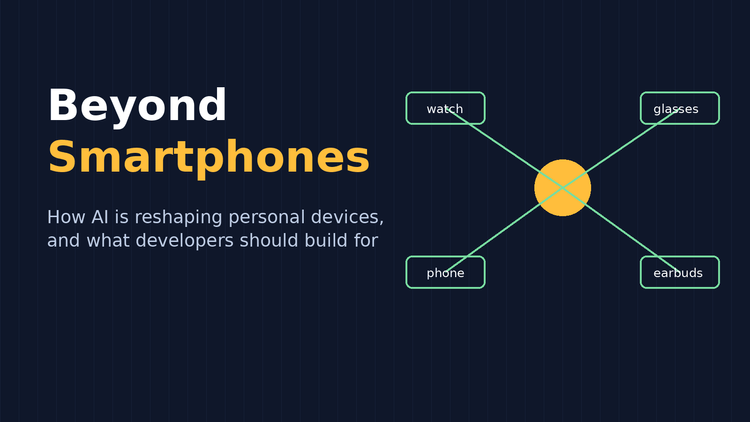
- Smartphones are not disappearing. They are likely to remain the connectivity and processing hub for a set of connected devices.
From Screen-Centered to Distributed Computing
The smartphone interaction model is screen-centered: open an app, navigate menus, enter a command. AI-powered devices combine machine learning, sensors and conversational interfaces to interpret a request with fewer manual steps.
Navigation is a simple example. On a phone, you check the map or listen to directions. A wearable could give timely audio instructions or a visual cue based on location and movement. That does not mean the phone goes away. Personal computing may instead spread across interconnected devices, with the phone continuing to supply connectivity and processing.
Contextual computing means a system uses relevant information about the environment, user activity or earlier interactions. A traditional app responds to explicit commands. An AI-assisted one can also interpret natural-language requests and combine several inputs. A personal assistant might use calendar and location data, with permission, to suggest when someone should leave for an appointment.
Multimodal AI, which McKinsey describes as AI that can handle several kinds of data at once, including text, images, audio and video, makes interactions feel more natural than touch controls alone.
Context only helps when the underlying information is reliable. Developers need to manage permissions, data accuracy and user expectations, or the feature will feel intrusive or wrong.
Wearables: Computing Without Reaching for the Phone
Smartwatches and fitness trackers already showed the value of getting information without pulling out a phone. AI extends this to other products, including smart eyewear, earbuds and connected accessories.
Smart glasses are one example of familiar accessories gaining intelligent features without a conventional screen. Depending on the model, they can support voice assistance, hands-free photography, audio playback and interaction with AI assistants. Several makers sell them, and guide pages such as ai glasses describes how the category is presented to buyers. Capabilities differ widely, so compare sensors, battery life, privacy controls and the software platform before building for or buying any one device.
For interaction design, the point is to deliver help while the user keeps doing something else. That changes what an app should show, say and ask.
On-Device AI, Cloud AI and Hybrid Designs
Many AI features rely on cloud infrastructure. The cloud offers large models and plenty of compute, but adds network delay and requires sending data off the device. On-device AI runs supported models on personal hardware. It can reduce latency, support some offline features and limit how much sensitive information is transmitted.
Local processing has costs. Small devices have limited memory, battery and thermal headroom, so teams balance model size, compute demand and response quality. Hybrid architectures split the work between local hardware and cloud services, and are a practical answer for many applications.
A Routing Helper You Can Run Today
A hybrid app needs a rule for where each request runs. The Python module below is a deliberately simple example. It takes the task (model size, whether the data is sensitive, the latency the user will tolerate) and the device state (free memory, battery, connectivity, measured round-trip time) and returns device, cloud, ask_user or unavailable.
"""Decide where an AI request should run: on the device or in the cloud."""from dataclasses import dataclass@dataclassclassTask:name: strmodel_mb: int # memory the on-device model needssensitive: bool # contains data the user would not want to leave the devicelatency_budget_ms: int # how long the user will wait@dataclassclassDevice:free_mb: intbattery_pct: intonline: boolrtt_ms: int # measured round trip to the serverdef route(task, dev, cloud_inference_ms=400):fits = task.model_mb<= dev.free_mbif not dev.online:return"device"if fits else"unavailable"if task.sensitive:return"device"if fits else"ask_user"if not fits:return"cloud"if dev.rtt_ms+ cloud_inference_ms > task.latency_budget_ms:return"device"return"cloud"if dev.battery_pct<15else"device"The tests cover the main cases: a live caption on glasses stays on the device when the network is too slow, a large model that does not fit goes to the cloud, sensitive data stays local or triggers a question to the user when the model will not fit, an offline device runs only what fits, and low battery pushes a heavy job to the cloud.
from route importTask,Device, routephone =Device(free_mb=2000, battery_pct=80, online=True, rtt_ms=60)glasses =Device(free_mb=300, battery_pct=80, online=True, rtt_ms=120)caption =Task("live caption", model_mb=150, sensitive=False, latency_budget_ms=300)summary =Task("summarize chat", model_mb=1500, sensitive=False, latency_budget_ms=5000)health =Task("health question", model_mb=1500, sensitive=True, latency_budget_ms=5000)assert route(caption, glasses)=="device" # network too slow for the budgetassert route(summary, glasses)=="cloud" # model does not fitassert route(summary, phone)=="device" # fits and network is fineassert route(health, glasses)=="ask_user" # sensitive, but cannot run locallyassert route(health, phone)=="device" # sensitive and fitsoffline =Device(free_mb=300, battery_pct=80, online=False, rtt_ms=0)assert route(summary, offline)=="unavailable"assert route(caption, offline)=="device"low =Device(free_mb=2000, battery_pct=10, online=True, rtt_ms=60)assert route(summary, low)=="cloud" # save batteryprint("all tests passed")Run it with python3 test_route-py.
Limits of This Helper
- The numbers are illustrative. Real memory, latency and battery data come from your own measurements on target hardware.
- Sending a request to the cloud also costs battery through the radio, so the low-battery rule is a simplification.
- It ignores quality. A small local model may answer worse than a large cloud one, so a real router may also weigh accuracy and cost.
- sensitive is a flag your product must set correctly. The helper cannot decide what counts as sensitive data.
Ambient Computing and Multi-Device Experiences
Ambient computing describes technology that blends into everyday environments instead of demanding continuous attention. Users may reach connected services through speakers, watches, glasses and other devices. Someone could start a task with a voice assistant, get a reminder on a watch and continue on a laptop without recreating the context.
That requires reliable synchronization, interoperable services and consistent identity across devices. AI can help interpret requests and coordinate interactions, but a seamless experience still depends on well-designed software architecture. Developers should decide how information moves between devices, what happens when connectivity fails and how users stay in control of automated actions.
What This Means for Developers
Apps built around large screens and touch navigation may not translate well to devices that rely on speech, audio feedback or compact visual displays. Google’s Android XR developer documentation describes building for several device types, including XR headsets, audio glasses and display glasses, and lists tools such as the Jetpack XR SDK, Unity, OpenXR and WebXR.
Whatever the platform, a few priorities recur:
- Context-aware interfaces: show information relevant to the immediate task without needless interruptions.
- Multimodal interaction: support suitable combinations of voice, visual information and physical controls.
- Privacy and security: collect only what you need and give users understandable permission controls.
- Accessibility: design for different physical abilities and environments.
- Efficient processing: optimize for devices with constrained power and compute.
Not every interaction benefits from AI. Predictable tasks may be better served by a conventional interface, so use intelligent features where they measurably improve usability.
Risks and Open Questions
- Always-listening or always-sensing hardware raises consent questions for the user and for people nearby.
- Cross-device identity and sync create new security surfaces.
- Assistants can be wrong with confidence, so important actions need confirmation.
- Platform support, device capabilities and policies change quickly, so avoid designing around one vendor’s roadmap.
Frequently Asked Questions
Will AI devices replace smartphones?
Probably not soon. Phones are likely to remain a hub for connectivity and processing, while wearables and ambient devices handle some everyday interactions.
What is on-device AI?
Running a machine learning model directly on personal hardware, so a task can run without sending each request to a remote server.
When the model is too large for the device, the data is not sensitive and the network is fast enough. Many apps use a hybrid, as in the routing helper above.
How is designing for glasses or earbuds different from designing for a phone?
Interaction relies more on voice and audio, displays are small or absent, and messages must be short and timely because the user is busy doing something else.
Conclusion
Personal computing is moving toward a connected, context-aware ecosystem of wearables, on-device processing and ambient interfaces. That transition needs careful attention to privacy, security, accessibility and usability. The products that last will be defined less by the hardware people carry and more by how naturally and responsibly technology supports what they are trying to do.
