


Close Menu
ToolTechBlogToolTechBlog

    Subscribe to Updates

    Get the latest creative news from FooBar about art, design and business.

    What's Hot

    OpenAI employee who secretly recorded meetings allegedly affiliated with the Saudi government

    November 24, 2026

    How to save your Google Nest app videos before the January shutdown

    November 24, 2026

    Claude can ship code for you now – how to try it (if you dare)

    November 24, 2026
    Facebook X (Twitter) Instagram
    ToolTechBlogToolTechBlog
    • Home
    • AI Tools
    • Web Hosting
    • Tech
    • Digital Marketing
    • Business Software
    • VPN & Cybersecurity
    ToolTechBlogToolTechBlog
    Home»Tech»Samsung One UI removed the all apps button, but you can easily get it back
    Tech

    Samsung One UI removed the all apps button, but you can easily get it back

    Tool Tech TeamBy Tool Tech TeamNovember 8, 2026No Comments3 Mins Read
    Facebook Twitter Pinterest Telegram LinkedIn Tumblr WhatsApp Email
    Samsung One UI removed the all apps button, but you can easily get it back
    Share
    Facebook Twitter LinkedIn Pinterest Telegram Email

    If you really don’t like swiping to bring up the app drawer, don’t worry. Samsung’s got your back.

    One of Android’s biggest learning curves is the way Google’s operating system organizes apps. Unlike the iPhone, which puts all your apps on the home screen by default, Android tucks them into a dedicated window called an app drawer. This lets you customize your home screen without hundreds of app icons cluttering it up.

    On modern versions of Android, including Samsung’s feature-packed One UI skin, you slide up on the home screen to bring up the app drawer, but that wasn’t always the case. For years, many Android versions had an “all apps” button on the home screen. That button is essentially now redundant, replaced by the aforementioned swiping motion, and Samsung has stopped showing it on the home screen by default in recent One UI updates.

    The only problem is that some users rely on the Apps button, either because they aren’t aware of the new swipe-up gesture or because they’re simply too used to having it around and don’t want to adapt. Thankfully, Samsung left the “all apps” button as an option for users who want it back. You’ll just need to dive into a settings menu to enable it.

    How to put the Apps shortcut back on your Samsung Galaxy home screen
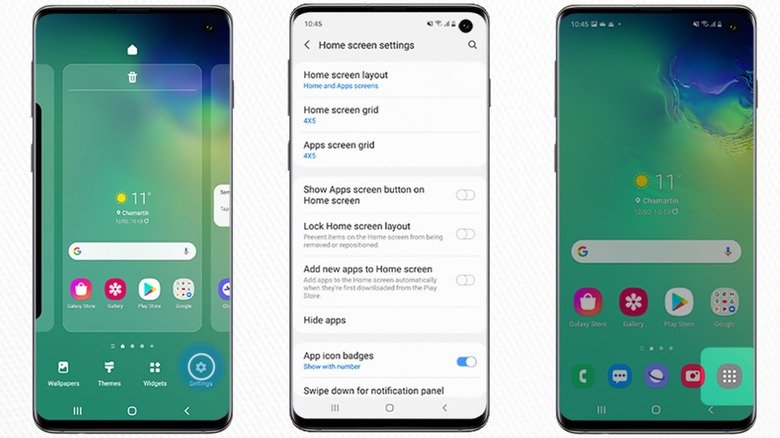
    Steps to add all apps button to One UI home screen shown in screenshots.

    To add the “all apps” button back to your Samsung Galaxy’s home screen in One UI 9, you’ll need to access the contextual options menu. Find a space on your home screen and long-press it or pinch as if zooming out on a photo. Either input will bring up several options. Tap the Settings button (the gear icon) in the bottom right of the screen, then scroll down to find and toggle on the option labeled Show Apps screen button on Home screen. 

    Return to your phone’s home screen, and you should now see the “all apps” button on the right side of the favorite apps dock at the bottom of the page. Note that the button takes up space you could use for an extra app in your favorites dock, so it’s only worth turning back on if you really don’t want to start swiping up to access the app drawer instead.

    Samsung is traditionally pretty good about retaining features that longtime users may have come to rely on, and offering the option to enable the “all apps” button is a good example. In some cases, though, the Korean giant might be too good. Samsung is the last major manufacturer still using Android 3.0 Honeycomb’s three-button on-screen navigation by default, even though stock Android introduced gesture-based navigation with Android 9.0 Pie in 2018. Users who prefer the latter can switch between the two in Settings, though.

    Apps button easily removed Samsung
    Share. Facebook Twitter Pinterest LinkedIn Tumblr Email
    Tool Tech Team
    • Website

    Related Posts

    OpenAI employee who secretly recorded meetings allegedly affiliated with the Saudi government

    November 24, 2026

    Your older, discontinued AirTags can still serve a purpose

    November 23, 2026

    Amazon resorts to package stickers in its fight against NYC’s proposed delivery law

    November 23, 2026

    Can you safely use a 140w charger on an iPhone?

    November 22, 2026

    Attention Pixel 9 and 10 owners: is it actually worth upgrading to the Pixel 11?

    November 22, 2026

    This built-in windows tool can tell if your DirectX has a problem

    November 21, 2026
    Leave A Reply Cancel Reply

    Top posts
    Tech

    OpenAI employee who secretly recorded meetings allegedly affiliated with the Saudi government

    By Tool Tech Team
    Business Software

    How to save your Google Nest app videos before the January shutdown

    By Tool Tech Team

    Claude can ship code for you now – how to try it (if you dare)

    By Tool Tech Team
    Editors Picks

    OpenAI employee who secretly recorded meetings allegedly affiliated with the Saudi government

    November 24, 2026

    How to save your Google Nest app videos before the January shutdown

    November 24, 2026

    Claude can ship code for you now – how to try it (if you dare)

    November 24, 2026

    Why the Agent Isn’t the Hard Part: Where Developers Go Wrong With Agentic Workflows

    November 24, 2026
    About Us

    Welcome to ToolTechBlog, your trusted source for the latest insights, reviews, and practical guides on AI tools, business software, cybersecurity, web hosting, and consumer technology.
    Our mission is simple: to help individuals, entrepreneurs, freelancers, students, and businesses discover the right digital tools to improve productivity, streamline workflows, and make informed technology decisions.

    Our Picks

    OpenAI employee who secretly recorded meetings allegedly affiliated with the Saudi government

    November 24, 2026

    How to save your Google Nest app videos before the January shutdown

    November 24, 2026

    Claude can ship code for you now – how to try it (if you dare)

    November 24, 2026
    Top Reviews

    The AI Hype Index: Unsexy AI

    July 29, 2026

    What it is and How to Fix it

    July 29, 2026

    LG to Ban Residential Proxies from Smart TV Apps

    July 29, 2026

    © 2026 tooltechblog.com. All rights reserved. Designed by DD.

    • About Us
    • Contact Us
    • Terms and Conditions
    • Privacy Policy
    • Disclaimer

    Type above and press Enter to search. Press Esc to cancel.